
Key Takeaways
- Fathom's free plan is the most generous in the category: unlimited recording and transcription, no minute caps. The catch is advanced summaries stop after 5 calls a month, and AI action items need Premium (Fathom's plan docs).
- The 2026 update is real: bot-free capture (Mac first, Windows "coming soon"), plus a public API and MCP for Claude and ChatGPT. Reviews still calling Fathom "the bot one with no API" are out of date.
- Paid pricing is Premium $20/mo ($16 annual), Team $19, Business $34, verified on the live page. Enterprise is sales-led.
- The real limit is the last mile. Fathom knows who owes what, then syncs tasks only to your own Asana with you as the assignee and no due date (per Fathom's Asana docs). You still re-key the rest by hand.
- Kai is the alternative for people whose problem is "the meeting ended and nothing moved": botless by default, action items routed with assignee and due date into tasks, calendar and email.
Most Fathom reviews stop where the summary appears. We build the opposite half for a living, an AI executive assistant that turns what was said in a meeting into work that actually lands on someone's list, so that is the question we brought to Fathom: after the summary is written, does a single action item move on its own? The answer, even after Fathom's strong 2026 update, is no. That gap is the review.
To be clear about the good news first, Fathom is one of the best AI notetakers you can run for free, and in April 2026 it fixed the flaw every older write-up still leads with. So this piece does two things: it gives Fathom real credit where it earns it, and it follows one action item the whole way from "spoken in a call" to "done," which is the part nobody else tests. For the head-to-head decisions, our Fathom vs Granola and Fathom vs Otter comparisons cover the forks; this is the standalone read on Fathom itself.
 Did you know?
Search "Fathom" and you'll hit at least three unrelated products: a 2021 whale documentary, a medical-coding company, and a text-analytics tool bought by QuestionPro. The one in this review is the AI meeting notetaker (YC W21, founded by Richard White), whose marketing site is fathom.ai and whose app and help centre live on fathom.video.
How we approached this review
We came at Fathom from two directions rather than borrowing quotes from G2 the way half the "hands-on" reviews ranking for this term do. We recorded real calls with it and pushed on the exact seam we care about (the test is a few sections down, and it's the sharpest thing in this review). We talked to people who use it every day. Then we checked every claim here against Fathom's own dated docs.
We push on that seam because it's the same problem we work on. When you build meeting-to-task extraction yourself, you learn the hard part isn't noticing a task exists. It's pulling the real commitments without burying someone in a task for every "we should maybe," attributing the right owner without guessing, and turning "by Thursday" into a real date. Fathom does the noticing well. It's the handoff after that we went looking at.
What Fathom is in 2026, and what changed
Fathom joins your Zoom, Google Meet or Microsoft Teams call, transcribes it, and produces an AI summary with action items. The quick summary lands fast; the richer templated "Enhanced Summary" (Fathom ships summary templates, including sales frameworks like MEDDPICC and SPICED) made us wait behind a "Hang tight, we're enhancing your summary" bar for a good while longer than the 30 seconds the marketing quotes. Speaker labels are automatic and, by most accounts including our own conversations with users, genuinely good. It's fast, the interface is clean, and the learning curve is close to zero. That combination, plus a free tier with no minute cap, is why it has a 5.0 on G2 across roughly 6,500 reviews (about 78% of them from small businesses, worth keeping in mind) and topped Product Hunt as #1 Product of the Day when Fathom 3.0 launched on 15 April 2026.
Two things changed in that April release that most of the reviews above this one miss. First, bot-free capture. Second, a public API with MCP. We'll come back to both, because "Fathom is the one with the visible bot and no API" was true a year ago and isn't now.
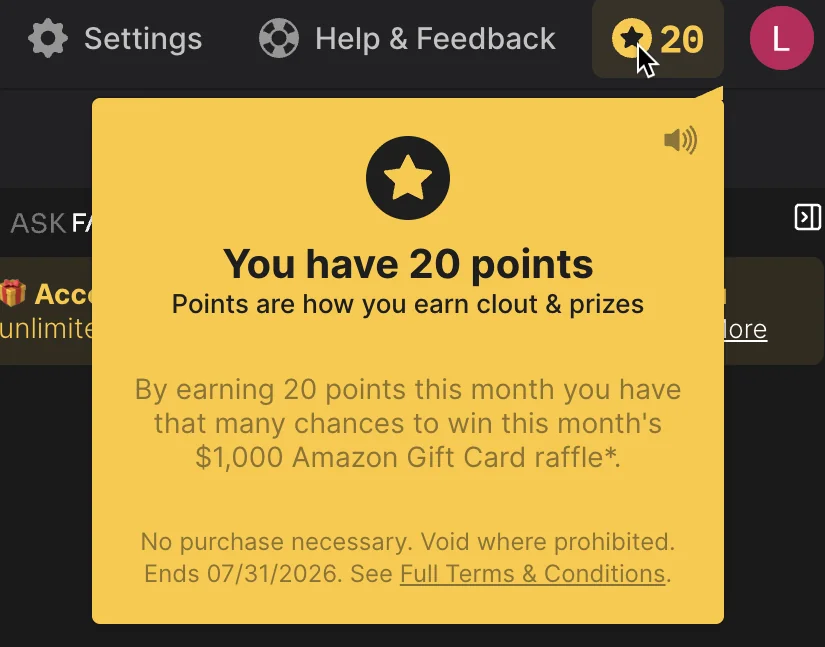
One thing the marketing doesn't prepare you for shows up the moment you open the app: Fathom gamifies it. You collect points ("Points are how you earn clout & prizes") that enter you into a monthly $1,000 Amazon Gift Card raffle. On a consumer app that's normal. On the tool sitting in your client calls, it reads a little like a trap, even though it plainly isn't one.
The free plan's real ceiling
Fathom's free plan is the most generous in the category, and also the most quietly misunderstood. The "unlimited" is real: you can record and transcribe as many meetings as you want, of any length, with no storage cap. What isn't unlimited is the AI.
On the free plan you get advanced AI summaries for your first 5 calls each month, and after that only the basic General or Enhanced template is available (Fathom's Free vs Premium doc). AI action items are not on the free plan at all: they're a Premium feature, alongside AI follow-up emails, custom summaries and the "Ask Fathom" chat. So the part of an AI notetaker that actually saves you time, the summary and the extracted to-dos, is the part that runs out on call six.
 Note
Note"Unlimited free recording" and "5 useful meetings a month" are both true at once. The recording is uncapped; the AI summary and action items are what's metered. New signups also get 30 days of Premium, so the wall is a day-31 experience, not day-1, which is why it catches people. One independent tester hit the summary cap by day nine of real use.
For a light user with a few calls a month, none of this bites and Fathom free is a genuinely great deal. For anyone in back-to-back meetings, the free plan is a trial, not a home.
Capture: the bot, the bot-free Mac beta, and who sees what
For most of Fathom's life it captured meetings the same way Otter and Fireflies do, by sending a visible "Fathom Notetaker" participant into the call. That bot is still the default, and for a lot of people it's the whole objection to Fathom.
The April 2026 update changed the story without finishing it. Fathom now lets you choose, per meeting, between four capture modes: bot with full video and audio, bot-free video (a limited beta, Zoom only), bot-free audio plus transcript, and bot-free transcript only (Fathom's What's New page). Bot-free capture keeps the same summaries and action items, and it even unlocked Slack Huddles, which have no bot-joinable link, as a capture surface. That last one is genuinely rare.
The catch is scope. Bot-free is tagged "Now live on Mac," and the full Windows experience sits under "Coming soon." So if you're on Windows, or you want full video outside the Zoom beta, you still get the visible bot. And bot-free is not silent recording: Fathom is explicit that there's no way to record a call invisibly, every mode carries some form of consent or visibility, which is the right call and worth knowing before you assume "bot-free" means "nobody knows." Recording consent is its own tradeoff across all these tools, one we dig into in our AI meetings and consent piece.
From summary to done: what happens to a Fathom action item
This is the section the whole first page of Google skips, so it's where we'll spend the most time.
We ran the simplest test we could think of. We recorded a call, opened Fathom's own "Ask Fathom" chat, and asked it to put a task into the meeting's action items. It replied: "I can't directly edit the meeting from here, but I can format it for you to add." Even Fathom's own assistant won't file the task where it belongs. It hands you formatted text to paste in yourself.
So we looked at where a Fathom output can actually go. Its "Send to" button offers Google Docs, Gmail, Notion, and Microsoft Word. Every destination is a document. Not one of them is a task with an owner and a date.
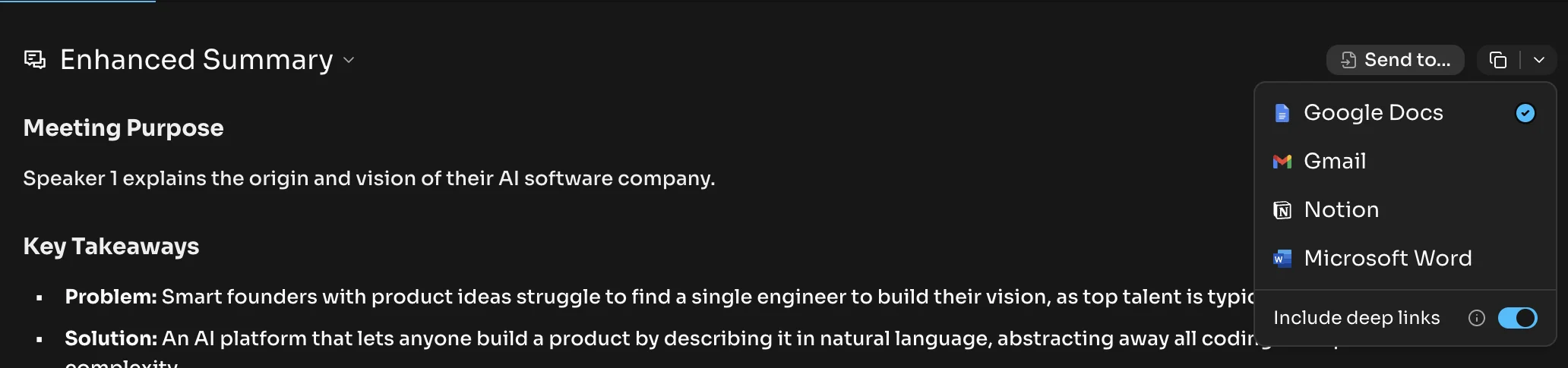
That is the shape of the whole problem, and it holds all the way down to the one integration that does reach a task manager.
Fathom extracts action items well, and it even works out who each one belongs to. Its docs say it detects action items "including who they are assigned to." Hold that thought, because ownership is understood at extraction time and then thrown away at the handoff.
Fathom's only native task-manager destination is Asana (other integrations are, per Fathom, still being built). We checked Fathom's own Asana integration doc, and the limitations are stated plainly there, not inferred by us (Fathom's Asana integration doc):
- Tasks sync only to your own Asana account, and you'll always be the assignee. The person Fathom just identified as the owner does not carry over.
- Only action items assigned to you sync, not every action item from the meeting.
- Only calls where you are the recording owner sync at all.
So Fathom hears "Priya sends the deck by Thursday," writes it correctly into the summary with Priya's name on it, and then either sends nothing to a task manager or drops it into your Asana, as your task. Someone still re-keys it for Priya, or Priya never hears about it. And the due date? It isn't in the list of fields that sync. What travels is the action item text, its completion state, and a "Fathom Link" back to the exact moment it was said, which is genuinely useful, but no date (Fathom's Asana docs). Fathom's own doc recommends Zapier as the workaround for the assignee limit, and says a fix to sync all action items was "expected later this year," in an article last touched in November 2025. Eight months on, it's still a promise.
In practice, the people who use Fathom daily don't lean on that sync at all. They run the copy-paste relay by hand, which is the exact friction we heard again and again in our own user interviews while building Kai. One consultant who records four back-to-back calls a day put it as a question: "some of them are tasks, and I'm too tired after four meetings. Where is that application to click?" A design consultant described his workaround plainly: "I'll copy the whole summary into a ClickUp meeting note. I just highlight a line of text and create that into a task." And a daily Fathom user we talked to said the automated tasks "are a bit crap and frequently they don't actually do what they're meant to do, they end up being quite useless," so she copies the action steps across herself. That verdict lines up with Fathom's own documented Asana limits (Fathom's Asana docs). What keeps her on it is the diarization, seeing who said what without having to remember every line. That split is Fathom in one sentence: excellent at capturing what happened, weak at making anything happen next.
Side noteThis isn't a knock unique to Fathom. Otter and Granola stop at the same line, extracted action items that sit in the tool. We cover it in the Otter AI review and the Granola review too. The category treats "extracted the task" as the finish line. It's the start of the actual work.
Integrations, and the public API question, settled
Beyond Asana, Fathom syncs to Slack and to CRMs (HubSpot, Salesforce, Close) on the free and Premium plans, capped at three users per email domain, with deeper CRM field sync and Deal View reserved for Business. Everything else, ClickUp, Notion, Todoist and the rest, goes through Zapier, which is "limited use" on the lower tiers.
The bigger correction is the API. Fathom shipped a public API and an MCP server, documented at developers.fathom.ai, with REST endpoints, webhooks that can include action items in the payload, official TypeScript and Python SDKs, and MCP connectors for both Claude and ChatGPT. It's available across all tiers, free included. Any review, including one of our own older comparisons that we're now fixing, that says "Fathom has no public API" is simply out of date. If you're a builder, this is a real point in Fathom's favor.
Worth a note on the other side of portability: unlike a CSV-style export, Fathom keeps your data reachable mainly through that API rather than a one-click download, though Fathom has said a CLI for local export is coming. If getting your notes out of a tool is a live concern for you, we walked through exactly that problem for a rival in how to export Granola notes.
Pricing
Pricing below is from the Fathom pricing page. Verified 2026-07-24. Note the plan names: Fathom renamed its tiers in August 2025, so anything you read calling the top plans "Team Edition Pro" is quoting a retired scheme.
| Plan | Monthly | Annual (per user/mo) | Min seats | What you get |
|---|---|---|---|---|
| Free | $0 | $0 | 1 | Unlimited recording + transcription, bot-free capture (Mac beta), 5 advanced summaries/mo |
| Premium | $20/user | $16/user | 1 | AI action items, AI follow-up emails, custom summaries, Ask Fathom, custom bot name |
| Team | $19/user | $15/user | 2 | Global search across calls, playlists, comments, folders |
| Business | $34/user | $25/user | 2 | CRM field sync, Deal View, AI scorecards, coaching metrics |
| Enterprise | Custom | Custom | n/a | SSO and SCIM, custom retention, priority support |
A quirk worth catching: Premium ($20) is pricier month-to-month than Team ($19), because Team has a two-seat floor. All paid plans carry a 90-day guarantee, and there are free-seat programs for nonprofits and VC-backed startups.
 Tip
TipIf you only want transcripts and don't need AI summaries on more than five calls a month, stay on Free. If you're one person who wants the AI features, Premium is the plan, not Team. Team and Business only pay off when you actually need shared search or CRM field sync across a group.
Features and honest limits
A few things that shape whether Fathom fits, drawn from its own docs:
- Accuracy: we're not going to print a number, because there's no credible independent benchmark for Fathom specifically. Every "95%" or "87%" you'll see traces back to a competitor's blog or a comparison of a comparison. For context, commercial speech-to-text lands around 4 to 8% error on clean audio and degrades with accents and crosstalk. Trust the shape, not a decimal.
- No file upload and no in-person capture: Fathom records live online meetings only. You can't drop in an existing recording, and there's no in-person mode yet, though Fathom says it's coming with the iOS app (Fathom FAQs).
- Mobile: the iOS app is listed as "coming soon" and there's no Android app (Fathom's What's New). If your phone is your main device, this is a real gap.
- Compliance: Fathom is HIPAA, SOC 2 Type II and GDPR compliant, which corrects some directories that claim otherwise. The nuance for regulated buyers: a signed BAA appears to be Enterprise-only, data is stored in the US, and Fathom does use de-identified customer data to improve its own models unless you opt out (Fathom's security FAQ). "We don't train on your data" is true of its AI subprocessors, not of Fathom itself.
Who Fathom is genuinely best for
Fathom is the right pick for two clear groups. If your budget is zero and you mostly want a searchable record of your calls, nothing else gives you unlimited recording and transcription for free the way Fathom does. And if you're a sales team living in Salesforce or HubSpot, Business at $25/user/mo annual bundles CRM field sync, Deal View and call scorecards that genuinely rival tools costing far more. Fathom actively courts Gong switchers for exactly this reason.
Where it stops is the handoff. If the job you actually need done is "the meeting ends and the right people get the right tasks, with dates, in the place we work," Fathom hands you a very good summary and leaves that last step to you. The transcription is excellent. The follow-through is just outside what any notetaker was built to do.
Kai: the meeting-to-workflow alternative
We build Kai, so treat this as the interested party's section, and hold us to the same last-mile test we just ran on Fathom.
Kai is an AI executive assistant, not a notetaker with sync bolted on. It captures meetings bot-free by default across Zoom, Google Meet, Teams, Webex and Slack Huddles, no Mac-only beta and no visible participant. Then it does the part Fathom stops before: it extracts action items with an assignee, a due date and a priority, splits them into "yours" and "other people's," and leaves them on the meeting, where you add each one to your central task list or delete it.
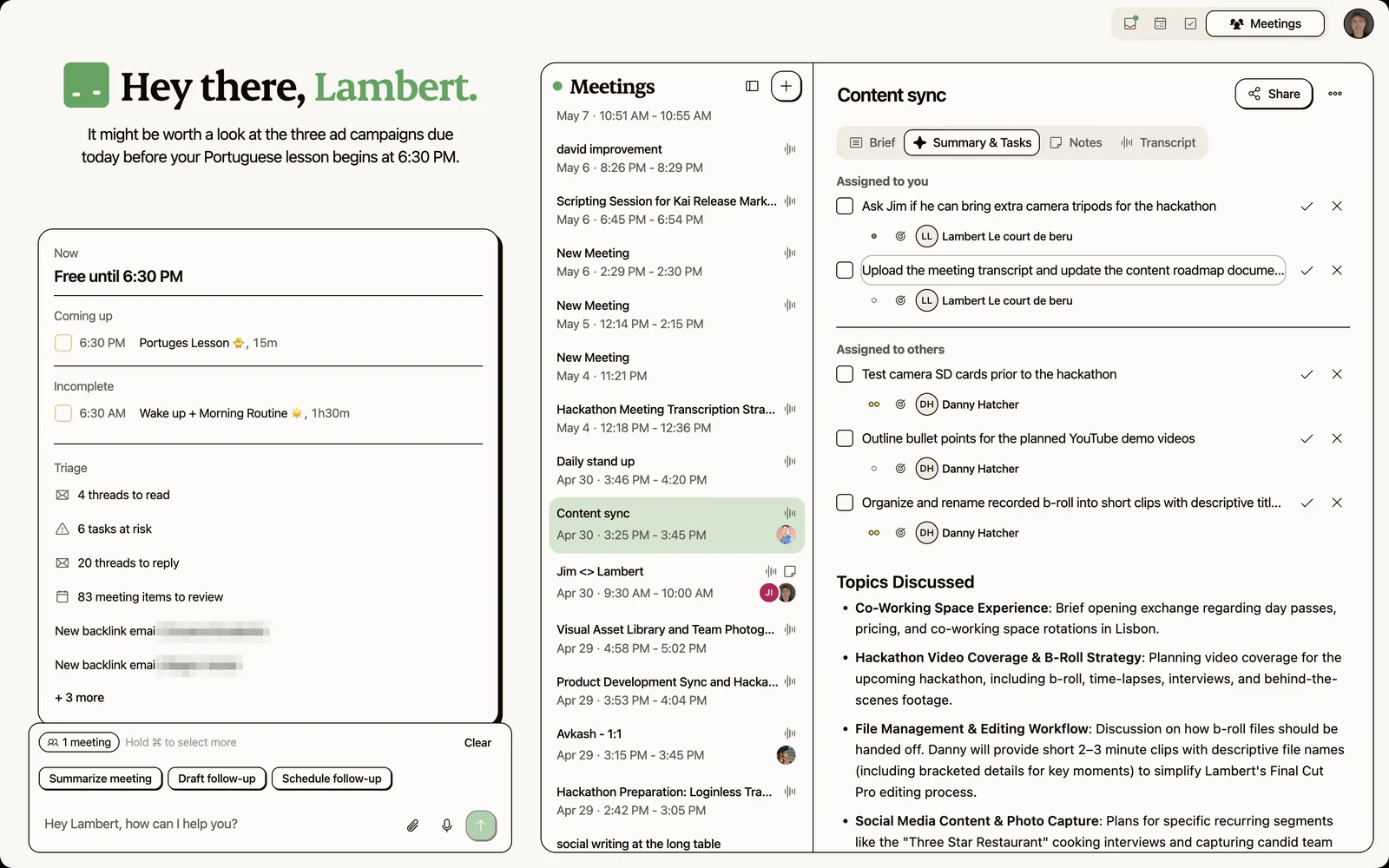
The difference shows up the moment a task lands. Where Fathom puts the item in your own Asana with you as the assignee and no date, Kai keeps the owner and the deadline attached and routes it to the person who actually owes it.
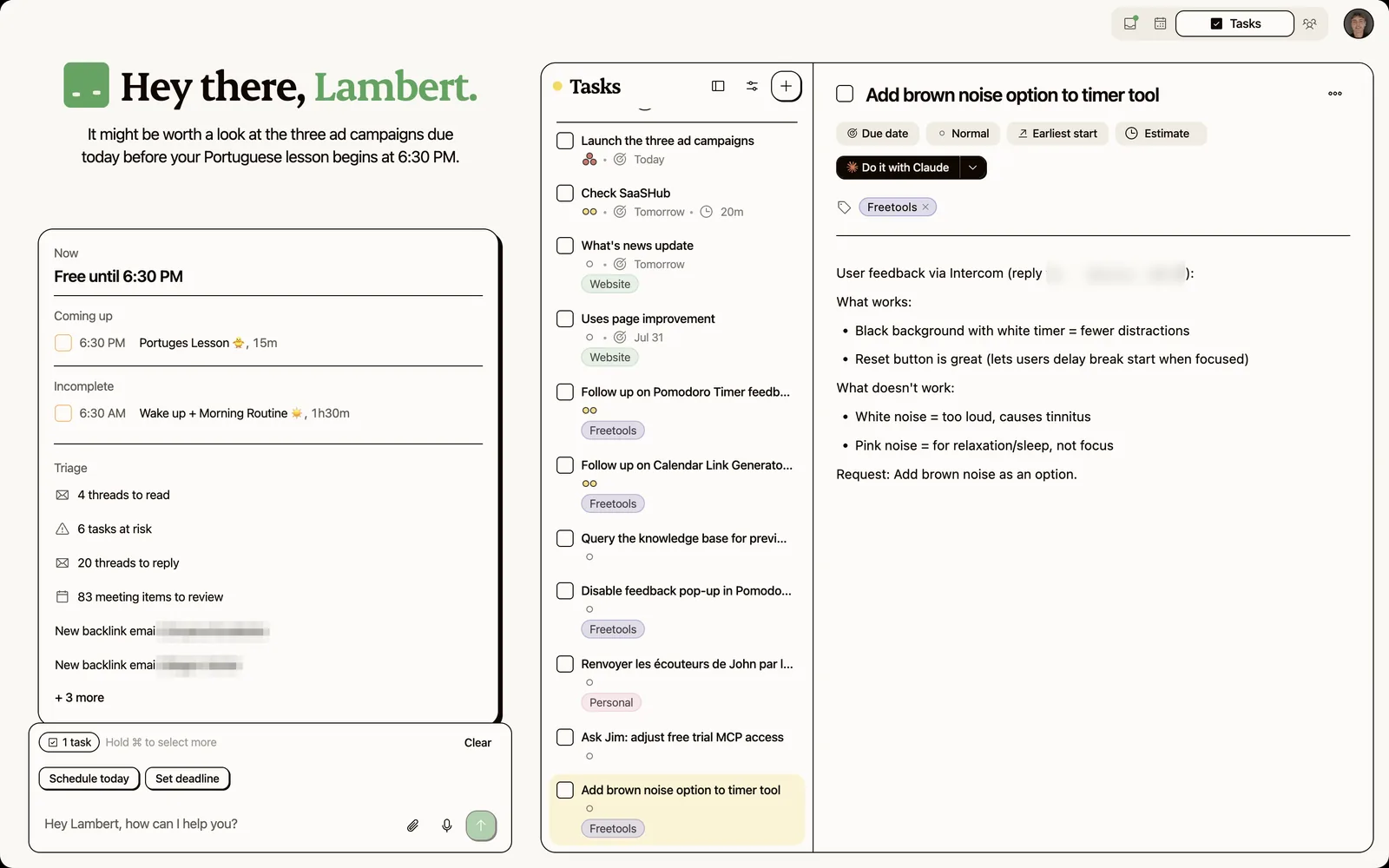
And because Kai also reads your email and your calendar and day, a commitment from a call sits next to the thread and the deadline it relates to, instead of in a meetings silo. It can draft the recap email to attendees in your own tone and send it from your mailbox. That whole chain, capture to tasks to follow-up, is the meeting action items workflow Fathom leaves you to run by hand.
The honest limitation. Kai has no free plan (a free trial, then $20/user/mo on Base or $50 on Pro), so if your budget is zero, Fathom's genuinely-free recording wins and it isn't close. Kai also has no sales-CRM depth (no Deal View, no AI scorecards, no CRM field sync) and no library of summary templates like Fathom's Enhanced Summary, so a Salesforce team or anyone who lives in a fixed summary format is better served by Fathom. And getting the routing right is hard-won, not free: in our own early use the extraction pulled too many tasks until we tuned how aggressively it fires, which is the exact trap a bolt-on task sync falls into. Kai is the pick when your problem isn't capturing the meeting, it's that nothing happens after it.

Fathom vs the alternatives
If Fathom isn't the fit, the decision usually forks along one of two lines. If you want bot-free capture and take notes during calls yourself, the Fathom vs Granola comparison is your fork. If you want mobile apps and the broadest integration list, Fathom vs Otter covers that one, and the Otter AI alternatives roundup widens the field. For the bot-free incumbent in depth, see the Granola review, and for the third big notetaker, the Read AI review. Whatever you pick, the meeting prep workflow and the basics of taking good meeting notes apply the same, and if you end up writing formal records, our guide to meeting minutes picks up from there.
Verdict: is Fathom AI worth it?
Yes, for the right person, and more so than a year ago. Fathom is the best free AI notetaker on the market, its 2026 update quietly answered its two loudest criticisms, and for solo users and Salesforce-native sales teams it's an easy recommendation. The transcription is fast, the speaker labels are reliable, and the free tier is genuinely generous as long as you understand the five-summary line.
What it still doesn't do is finish the job. It knows who owes what, then hands you a summary and lets the ownership, the dates and the follow-through fall back on you. For a lot of people that's fine, the summary is the win. For anyone whose real pain is the pile of things said in meetings that never became work, that gap is the whole point, and it's the reason we built Kai around the last mile instead of the recording.
FAQs
Does Fathom AI have a free plan, and what's the catch?
Yes, and it's the most generous in the category: unlimited recording and transcription with no minute or storage caps. The catch is the AI. Advanced summaries stop after your first 5 calls each month, and AI action items, follow-up emails and Ask Fathom are Premium features. New accounts get 30 days of Premium, so the limit tends to bite around week five.
Can Fathom record meetings without a bot?
Yes, as of the April 2026 update. You can pick bot-free capture per meeting (audio-plus-transcript, transcript-only, or bot-free video in a Zoom-only beta), and it keeps the summaries and action items. The important limits: it's live on Mac first with Windows still "coming soon," and it's not silent recording, every mode carries a consent or visibility step.
Does Fathom have a public API?
Yes. Fathom offers a public API and an MCP server (documented at developers.fathom.ai) with REST endpoints, webhooks, official TypeScript and Python SDKs, and connectors for Claude and ChatGPT, available on all tiers. Older reviews saying Fathom has no API are out of date.
What does Fathom do with action items after a call?
It extracts them, including who they're assigned to, then its handoff loses that ownership. Fathom's only native task manager is Asana, and per its own docs, tasks sync only to your own account with you as the assignee, only for items assigned to you, on calls you recorded, and no due date syncs. For anything else you use Zapier or copy items across by hand.
Can Fathom record in-person meetings or upload existing recordings?
No on both, today. Fathom captures live online meetings only. There's no file upload for an existing recording, and no in-person mode yet, though Fathom says in-person capture is coming with its iOS app, which is still listed as "coming soon."
Is Fathom worth it compared to Otter or Granola?
For unlimited free recording and sales features, Fathom is the strongest of the three. Granola wins if you take notes by hand during calls and want bot-free capture as the default; Otter wins on mobile apps and integration breadth. None of them route action items into your actual task system with owners and dates, which is the gap Kai is built to close. See our Fathom vs Granola and Fathom vs Otter comparisons for the details.

What to read next
Fathom vs Granola: Which AI Meeting Notes Tool Is Better? (2026)
Compare Fathom and Granola on pricing, bot vs botless capture, hybrid notes, integrations, and accuracy to pick the right AI meeting tool.
Fathom vs Otter: Which AI Meeting Assistant is Better? (2026)
Compare Fathom and Otter AI on pricing, features, accuracy, and integrations to pick the right AI meeting assistant in 2026.
Inside Our Product Hunt Launch
Issue #017 of How We Grow: David joins us two days after Kai's Product Hunt launch to talk about what a launch is for when you're already live, why finishing fifth was useful, and the Instagram trick that took our account from 300 to 700 followers.