

Key Takeaways
- Minutes are a one-page contract, not a transcript. Decisions, action items with owners, open questions. Everything else is notes.
- The 24-hour window is the rule. Minutes shipped the same day get acted on. Minutes polished for a week get skimmed and forgotten.
- Every action item needs an owner and a due date before you hit save. No name means no follow-through.
- Skip the blank page. The free Meeting Minutes Generator ships 8 templates: board, 1-on-1, project review, client call, brainstorm, standup, all-hands, other. Kai automates the whole loop once it launches.
Four meetings today, six tomorrow, and none of them with real minutes. That is a normal week for most people I talk to. Not because they do not know how to write meeting minutes. They learned it at some point. Writing them by hand, every time, across back-to-back calls, is the first habit that breaks when Tuesday gets hectic.
This guide is the 4-part workflow I actually use.
No Robert's Rules. No 2,000-word formal templates from 1995. Minutes got a bad reputation from the wrong era. The modern version is a one-page contract the room signs off on, shipped within 24 hours, with an owner on every action item. Anything longer is notes, and notes never ship.
Here is what the rest of this guide covers:
- What real meeting minutes look like in 2026 (and what they are not)
- The 4 ingredients every set of minutes needs
- The step-by-step workflow that survives a busy week
- The tools people try, and the gap none of them close
What meeting minutes actually are in 2026
Meeting minutes are a short, structured record of what the room decided, who owes what, and by when. Everything worth keeping fits into three buckets: decisions, action items, and open questions. That is the whole job.
Minutes are not a transcript. A transcript captures every word that was said; minutes are the 5% the room needs to remember and act on.
They are not notes either. Notes are private, written by and for the note-taker. Minutes are shared, written for the attendees plus anyone who missed the call.
And they are not a recap email. Recaps say discussed, reviewed, explored. Minutes say decided, agreed, committed to, due by. Those are two different jobs.
The shorthand I use: if a stranger reads your document 48 hours later and knows exactly what to do, you wrote minutes. If they don't, you wrote notes.
The 4 things real meeting minutes require
These are the criteria the rest of this guide maps against. Miss one and the document stops working, no matter how carefully it was written.
-
One page is the goal, always. Half a page for a 30-minute meeting, one page for a 60-minute one. A 1-hour meeting that generates 4 pages of minutes means the note-taker wrote everything down, and nobody will read it. Minutes are the 5% that matters. Cut the other 95%.
-
Shipped within 24 hours. The half-life of a meeting memory is brutal. Minutes shipped the same day get read and acted on. Minutes shipped 3 days later get skimmed once and archived. A rough version in 6 hours beats a polished one in 6 days.
-
An owner and a due date on every action item. "Follow up on the pricing page" is a wish. "Sarah sends updated pricing draft by Thursday EOD" is a commitment. The most common reason meetings generate no action is that the minutes list actions without owners. Fix that one thing and follow-through doubles.
-
A single home, not five scattered copies. Minutes die when they live in email and Slack and a Notion page and a Google Doc. Pick one home. The other places get a short message with a link. Two sources of truth is zero sources of truth.
Why most meeting minutes die in someone's inbox
The failure mode is always the same, and it has nothing to do with effort:
- Minute 0: the note-taker starts strong.
- Minute 20: they give up capturing everything and start typing a transcript.
- Minute 45: it is a wall of text with no structure and no action items.
- Post-meeting: 45 minutes of editing, no time left, and the minutes go out the next morning.
The next morning is already too late.
A product manager posted the exact pattern on r/ProductManagement: "I usually type everything that's being said during the meeting and then summarize it later. But I'm always rewriting the same stuff, and by the time I send it, half the actions are already forgotten." (source)
The same pattern shows up in every function. Ops on r/sysadmin. Consultants on r/consulting. Even lawyers on r/Lawyertalk describe it: capture everything, fail to structure, ship late.
The fix is less effort, not more. Capture 20% of what was said, not 100%. Capture it in the shape of the output (decisions, actions, open questions) while the meeting is still happening. Distribute before you close your laptop.
A real workflow, step by step
Here is the 4-step workflow that survives a busy week. The rule I keep for myself: any step that takes more than 30 seconds of cognitive effort gets skipped on a Tuesday afternoon. So every step is designed to either run automatically or take less time than refilling a coffee.
Step 1: Pick the right template before the meeting starts
Not every meeting needs the same minutes. A board meeting with motions and votes needs a very different structure from a 15-minute standup. Using a board template for a brainstorm is how you end up with 4 pages of nothing.
The 8 patterns worth having ready:
- Board meeting: call to order, attendance, reports, motions, votes, adjournment
- Team standup: updates, blockers, action items
- 1-on-1: check-in, priorities, feedback, growth, commitments
- Project review: status, demo, risks, decisions, actions
- Client call: context, discussion, agreements, next steps
- Brainstorm: framing, ideas, top picks, debate, next steps
- All-hands: milestones, updates, strategic theme, Q&A
- Other / custom: context, discussion, decisions, actions, open questions
For the full shape of a document that survives real meetings, decisions at the top and ceremony demoted to a footer, see our meeting minutes template.
Pick the template before the meeting, not during. 30 seconds of setup ahead of time saves 15 minutes of reshuffling afterwards. The free Meeting Minutes Generator ships all 8 as presets: pick one, fill the sections as the meeting happens, export.
Step 2: Capture decisions and actions, not a transcript
This is the habit that separates the two kinds of note-takers: the ones who ship minutes, and the ones who type frantically for an hour and give up.
During the meeting, listen for 3 signal words:
- "decided" (or "let's go with", "we agreed")
- "will" (someone committing to do something)
- "unclear" (an open question to park and revisit)
Decision words go to the Decisions section. Commitments go to Action Items, with the owner's name attached on the spot. Open questions land in a separate list, so the next meeting starts from a parked pile instead of from scratch.
That is roughly 20% of what gets said. The other 80% (small talk, the 4 different ways someone says the same thing) does not belong in minutes.
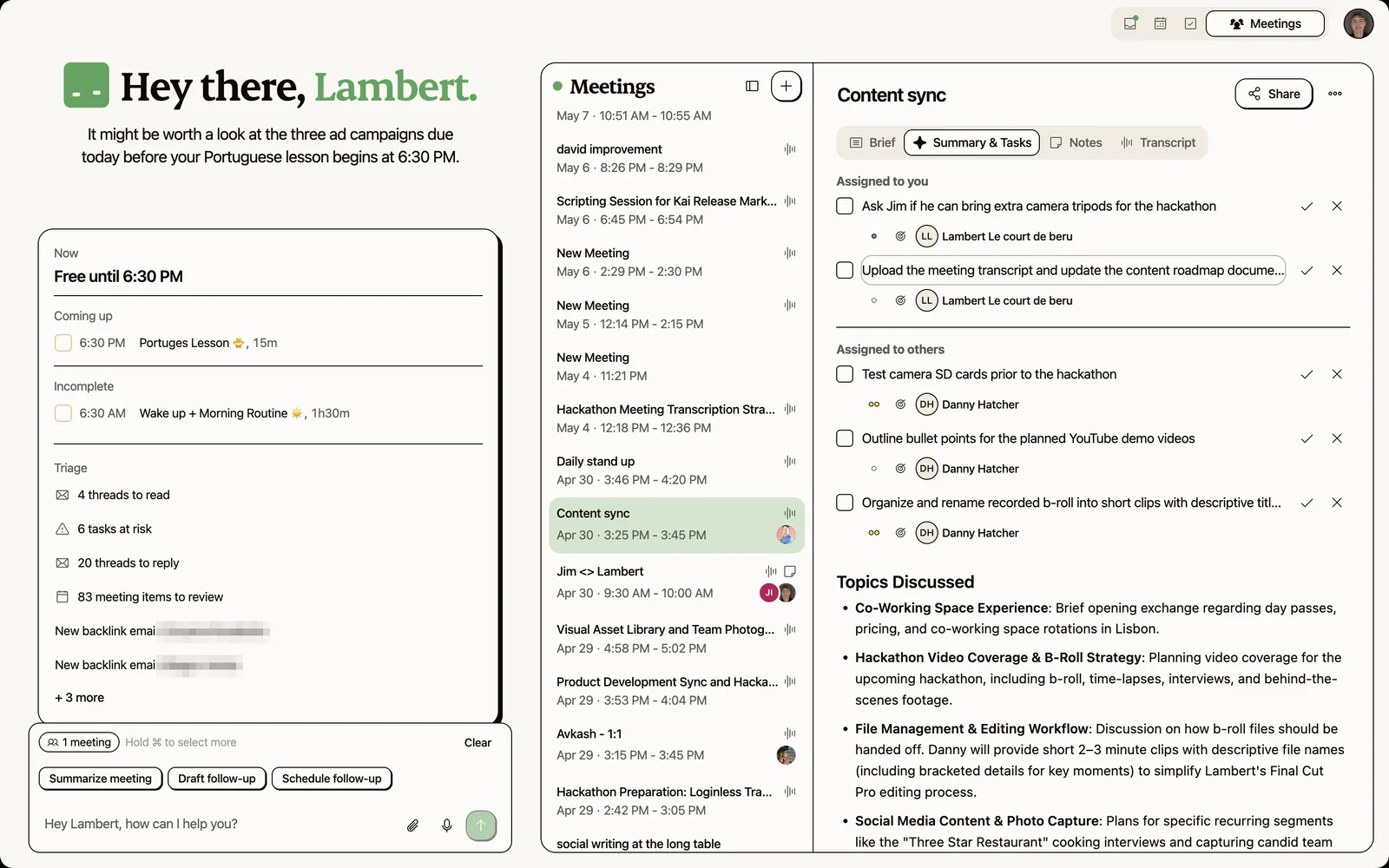
Quick note from experience: being the note-taker and a participant at once is how you end up doing neither well. Rotate the role, or let an AI handle the capture so you can talk.
Step 3: Assign owners and due dates before you save
This is the single highest-leverage 60 seconds of the whole workflow.
Before you hit save, scroll to the Action Items section and verify 3 things for every item:
- A name: not "someone", not "the team", not a blank
- A date: even a rough "by Friday" beats "soon"
- A specific verb: "send the v3 pricing draft" beats "follow up on pricing"
Miss any of the three and the action will not happen. Promise.
The free generator we shipped flags empty owners in grey, so you can fix them in one pass before export. If you write by hand, add a "no unnamed actions" checklist step before you hit send.
Step 4: Ship within the 24-hour window
Minutes that sit in your drafts folder for 2 days are minutes nobody acts on.
The clean workflow:
- Write (or finalize) during the meeting, so post-meeting work is zero
- Review in the 15 minutes after the call to fix typos and confirm owners
- Send as markdown into email and Slack thread and the project's home doc
- Link from anywhere else rather than copy-pasting
The free generator exports as clean Markdown, PDF, PNG or a shareable template link. Markdown pastes into Slack, Notion, Linear, or a plain email thread. PDF is for board-level records. PNG is for quick screenshots into chat.
One small gotcha: sending minutes is not the same as getting them read. Mention the action-owner by name in the send message ("Sarah, you own the pricing draft by Thursday"). That turns "FYI, minutes attached" into "you have been tagged in a commitment", and the read rate jumps.
Tools people try for this today
People usually reach for one of five categories, and none of them owns the full loop. Here is the honest scorecard against the 4 criteria above.
Google Docs and Word templates. The honest baseline. Free, familiar, every team has one. The drag I keep running into is the blank cursor problem: you open a blank doc at minute 0 and lose the first 5 minutes to formatting instead of listening.
Otter, Fathom, Granola, Read AI. Built for recording, not for minutes. They transcribe and summarize, which is closer to a recap than a structured artifact. Actions sometimes get extracted, sometimes with owners, but the output is transcript-plus-summary. You still distill the one-pager by hand. Full breakdowns: Otter review, Fathom vs Otter, Fathom vs Granola, Granola review, Read AI review, and Read AI meeting notes for the action-item angle specifically.
Notion or Confluence pages. A great home for minutes. A poor capture tool. Use them as the destination, not the workspace.
Dedicated minutes apps (MeetingKing, Beenote, Magic Minutes). Purpose-built, paid. Worth a look if your org runs 20+ formal board meetings a year. For everyone else, overkill.
Scheduling tools doubling as minute keepers (Calendly alternatives included). The booking layer is upstream of the meeting, not the minutes. Different job.
The free Meeting Minutes Generator. We shipped this for the times you just need a template and nothing else. 8 templates: board, standup, 1-on-1, project review, client call, brainstorm, all-hands, custom. 3-step wizard, exports to Markdown, PDF, PNG, or a shareable link. No login. No storage. Solves the blank-page problem in 30 seconds.
The pattern: every tool above owns one slice (capture, home, or template). None of them owns capture and structure and action-item tracking in one loop. That is the gap.
How Kai handles meeting minutes automatically
Kai is an AI executive assistant, not a note-taker.
That distinction matters here. Kai sits on top of your calendar, email triage, tasks, and daily planning, and it captures the meeting silently. The output is a structured artifact, not a transcript dump. Kai already knows who was on the call, what got committed, and where each action item belongs afterwards.
3 pieces map directly to the 4 criteria above:
- Botless meeting capture. Kai captures Zoom, Google Meet, Teams, Webex, and Slack Huddles calls straight from your device. No visible bot. No "is someone recording this?" moment. You get a full transcript plus a structured summary without changing how the meeting runs. That covers Step 2 without you typing.
- Structured summary, not a transcript dump. The post-meeting output splits into decisions, action items (owner, due date, priority), and open questions. The 20% that matters, extracted from the 100% of what was said. See the Kai meetings overview for the capture flow end to end.
- Action items triaged into your task system. Every action item waits on the meeting as a suggested task, and you add each one to your task list or delete it. The full loop sits on the meeting action items page. That is how Step 3 (owners + due dates) goes from a 60-second manual pass to zero.
Honest limitation. Kai is newer than the incumbent note-takers, with fewer integrations. It is built for people running 10+ external meetings a week who feel the minutes gap acutely enough to try it. Need a battle-tested transcript tool for tomorrow's board call? Fathom or Granola get you there faster. Need a structured template in 30 seconds? The free generator above does it without any of this.
When this workflow is overkill
Be honest: not every meeting earns a set of minutes.
Daily standups you already run in Slack? No minutes. The Slack thread is the record.
1-on-1s with a direct report where trust matters more than paper trail? A shared Notion doc with 3 bullets of "what we agreed" is enough. Lawyers-style minutes in a 1-on-1 can kill psychological safety.
Early-phase brainstorms? Capture ideas, not decisions. Running formal minutes on a brainstorm kills the divergent phase too early.
The break-even is roughly "any meeting with 3+ people where a decision or a commitment is expected". Below that bar, a shared note is fine. Above it, the 4-step workflow pays for itself in the first week.
FAQs
What is the difference between meeting minutes and meeting notes?
Minutes are the structured, shareable record of what a meeting decided and who owes what by when. Notes are the note-taker's private raw capture. The easy test: if a stranger reads the document 48 hours later, do they know what to do? Yes means minutes, no means notes.
Are AI-generated transcripts the same as meeting minutes?
No. A transcript is every word that was said. Minutes are the 5% that matters: decisions, action items, open questions. Tools like Otter, Fathom, Granola and Read AI generate transcripts and summaries, but you still have to distill the output into a structured one-page artifact. For side-by-sides, see the Fathom vs Otter and Fathom vs Granola breakdowns, or the broader Otter AI alternatives roundup.
How long should meeting minutes be?
Short. Half a page for 30 minutes, one page for 60, two for a formal board meeting with multiple motions. Longer than that for a regular working meeting means you are writing notes.
Do I have to share minutes with everyone who attended?
Yes, plus anyone who was invited but could not attend. That second group is the point. Minutes are how an absent attendee catches up without a 60-minute replay.
Are meeting minutes legally required?
Only for certain meeting types. Board meetings at registered companies, non-profit boards, HOAs, public-body committees and some regulated industries have legal minute-keeping requirements. For internal team meetings and client calls, there is no legal requirement, though the discipline is still useful.
Should minutes be approved at the next meeting?
For formal governance meetings (boards, committees, HOAs), yes. For everyday working meetings, skip the ritual. Ship the minutes the same day and let people flag corrections by reply. Week-long approval cycles are why people stop writing minutes at all.
Who should take the minutes?
In governance settings, a named secretary. In working meetings, rotate the role or let an AI do it. If you are the facilitator, you should not also be the minute-taker: doing both means doing both poorly. See the AI meeting prep guide for the full before-during-after loop.
What is the best format for board meeting minutes?
A structured template: call to order, attendance, prior minutes approval, reports, motions with outcomes, votes, action items with owners, adjournment, next meeting date. The free Meeting Minutes Generator ships this as the "Board Meeting" preset. Pair it with the time blocking workflow so the follow-up tasks actually land in your week.

What to read next
Meeting Minutes Template: The Structure That Survives Real Use
Six copy-paste meeting minutes templates, decisions-first, from the team whose AI writes minutes daily. Plus when the formal format is required.
Inside Our Product Hunt Launch
Issue #017 of How We Grow: David joins us two days after Kai's Product Hunt launch to talk about what a launch is for when you're already live, why finishing fifth was useful, and the Instagram trick that took our account from 300 to 700 followers.
One Year of Building With AI
Issue #016 of How We Grow: Jim's first year at Morgen, told through the models we built with, what each new one changed, and how the growth job looks when one person can ship a project in a day.