
Key Takeaways
- Most "how to run a meeting" advice teaches the 1970s playbook (Robert's Rules, ice-breakers, agendas mailed 24h ahead). In 2026 the leverage is upstream of the call.
- Microsoft's June 2025 telemetry shows knowledge workers spend 15.4 hours a week in meetings and get interrupted every 2 minutes (source). The first job is filtering, not facilitating.
- The winning shape is a 30-minute decision sprint with one owner, one outcome, and a silent pre-read. Atlassian's data shows page-led meetings hit their goal 85% of the time vs 69% for control meetings (source).
- Every action item leaves with an owner and a due date. No name means no follow-through. Kai handles the pre-read, the capture, and the action routing so the human can focus on the discipline.
This week I have 2 meetings on my calendar, plus the daily 15-minute team standup.
It used to be 3 weekly syncs with a teammate. We killed one once Kai's MCP shipped a shared knowledge base. The "let me explain what I did" half of those meetings became a doc and a Linear query. We kept the ones where we actually land strategic decisions.
That is the lever for 2026: what gets scheduled, not what gets chaired.
Most "how to run a meeting" advice still teaches the 1970s playbook. Chair the discussion. Send the agenda 24 hours ahead. Run Robert's Rules for the formal calls. Useful in 1976. Built for a world before Slack, before async-first work, before the average knowledge worker sat in 15.4 hours of meetings a week.
That is the wrong problem.
The 2026 problem is volume. Microsoft's June 2025 Work Trend Index, built on telemetry from real Microsoft 365 users, shows that 50% of all meetings cluster between 9 to 11 am and 1 to 3 pm, that 57% of meetings are ad hoc calls with no calendar invite, and that meetings after 8 pm are up 16% year over year (source). The average knowledge worker is interrupted 275 times a day. Every two minutes.
You cannot facilitate your way out of that. You have to design upstream of it.
This guide is the 6-step workflow I actually run, the tools that handle the surrounding plumbing, and where the whole approach is overkill.
What "running a meeting" actually means in 2026
Running a meeting in 2026 means owning the outcome. The discussion is the easy part.
A 2026 meeting is a 30-minute decision sprint with one named owner, one outcome the room signs off on, and a written pre-read that ships before the call. The discussion is the 20% nobody could resolve async. Everything else (status, FYI, awareness, alignment-without-decisions) should not be a meeting in the first place. It should be a doc, a Loom, or a Slack post.
That definition is what separates this guide from every "5 Ps of facilitation" listicle in the SERP. The leverage is not in the room. It is in deciding whether the room should exist.
The 4 things a real effective meeting requires
These are the criteria the rest of this guide maps against. Miss one and the meeting is theater, no matter how cleanly it was chaired.
-
One named owner, accountable for the outcome. Not a "facilitator" who keeps time. An owner who is on the hook for the decision the room produced (or did not produce). HBR's Steven Rogelberg identified three primary meeting failure modes, and "limited engagement, where nobody actively grapples with ideas" sits next to "dominance issues" near the top (source). An owner solves both. Without one, you get a discussion. With one, you get a decision.
-
A written pre-read everyone reads silently at the start. Atlassian's Team Anywhere Lab compared page-led meetings (silent pre-read, then discussion of a shared document) against control meetings. Page-led meetings hit their stated goal 85% of the time vs 69% for control. Attendees were 29 percentage points more likely to feel energized and 23 points less likely to feel frustrated (source). Amazon ran the same play earlier, on different intuition. Jeff Bezos told CNBC: "you can hide a lot of sloppy thinking behind bullet points in PowerPoint, but when you have to write in complete sentences with narrative structure, it's hard to hide sloppy thinking" (source).
-
A clock, defaulting to 30 minutes. 60 minutes is what calendars default to. 30 forces real preparation. Most meetings worth having are decision meetings, and decision meetings either close within 30 minutes or escalate to a different conversation (more data needed, wrong attendees, not actually a decision yet). Change the calendar default and watch what happens. It is the cheapest culture change you can ship.
-
Action items with owner + due date, captured during the call. Not after. During. Asana's Anatomy of Work Global Index, surveying 9,615 knowledge workers, found leaders lose 3.6 hours a week to unnecessary meetings (source). Most of those hours are the recap meetings that exist because the prior meeting did not produce written commitments. Close that loop in the room and the second meeting evaporates.
Why generic approaches fall short
The 5 Ps, Robert's Rules, the 10-step checklist: they all assume the meeting itself is a fixed input. It usually should not be.
Microsoft's June 2025 telemetry shows 12.1 hours of uninterrupted focus a week, against 15.4 hours of meetings. 76% feel drained on meeting-heavy days, and 44% openly dread meetings (source).
The variable that moves the dial is whether the meeting happens. Not how well it is run.
The second failure mode is the recap loop. Most meetings end without owners, due dates, or a written decision artifact. So the work spawns a second meeting to figure out what the first one decided. Asana's Anatomy of Work survey of 9,615 knowledge workers: leaders lose 3.6 hours a week to unnecessary meetings because of this gap (source).
Page-led structure + action items in the room cuts that loop in half.
The leverage moves upstream: what gets scheduled, what gets pre-read, what leaves with an owner. That is the layer the SERP keeps writing around.
A real workflow, step by step
Here is the 6-step workflow I run for every meeting I own. Every step is designed to either run automatically or take less than 60 seconds of cognitive effort, because if it costs more than that, I will skip it on a Tuesday afternoon.
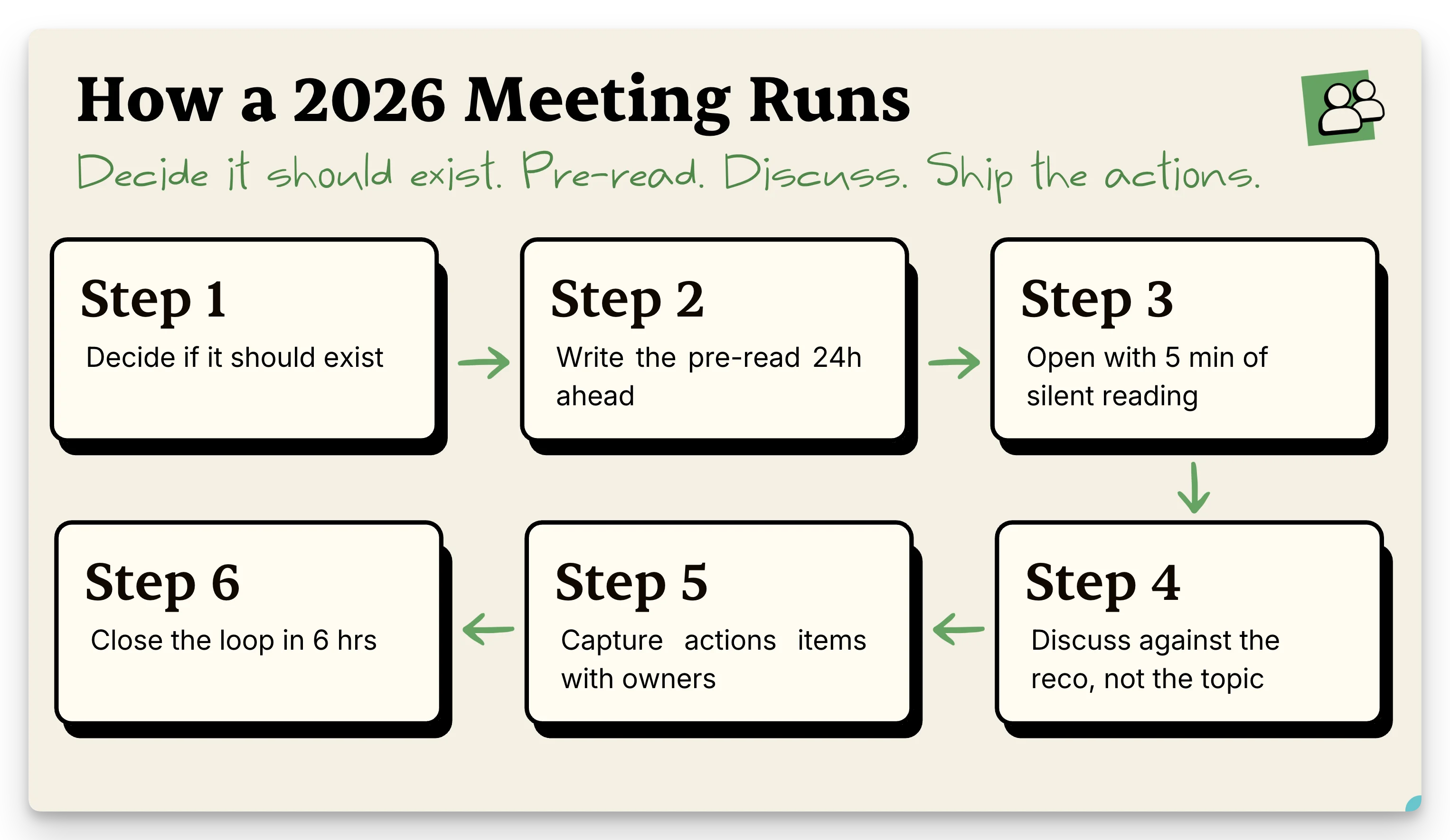
Step 1: Before you schedule it, decide if a doc would work
The cheapest meeting is the one you do not have.
Before opening the calendar, write the question you would ask in 3 sentences. If a teammate could answer it in writing within 30 minutes, send the doc. If the question is genuinely "we need to decide X, and the decision needs Y people in a room together to argue Z", schedule it.
Two anchors that help. Microsoft's 2025 telemetry: 48% of workers said their most recent meeting was unnecessary, and 12.1 hours is what is left for actual focus work in an average week (source). That math kills most "let's sync" requests by itself.
The most recent meeting we cut is the one from the intro: the third weekly sync, replaced by a doc plus a Linear query once Kai's MCP shipped a shared knowledge base. We dropped to 2 weekly. The ones we kept are strategic decisions, not status updates.
My personal rule: if I have written the question and I do not feel like writing the doc, the question is not sharp enough yet. Sharpen it before scheduling anything.
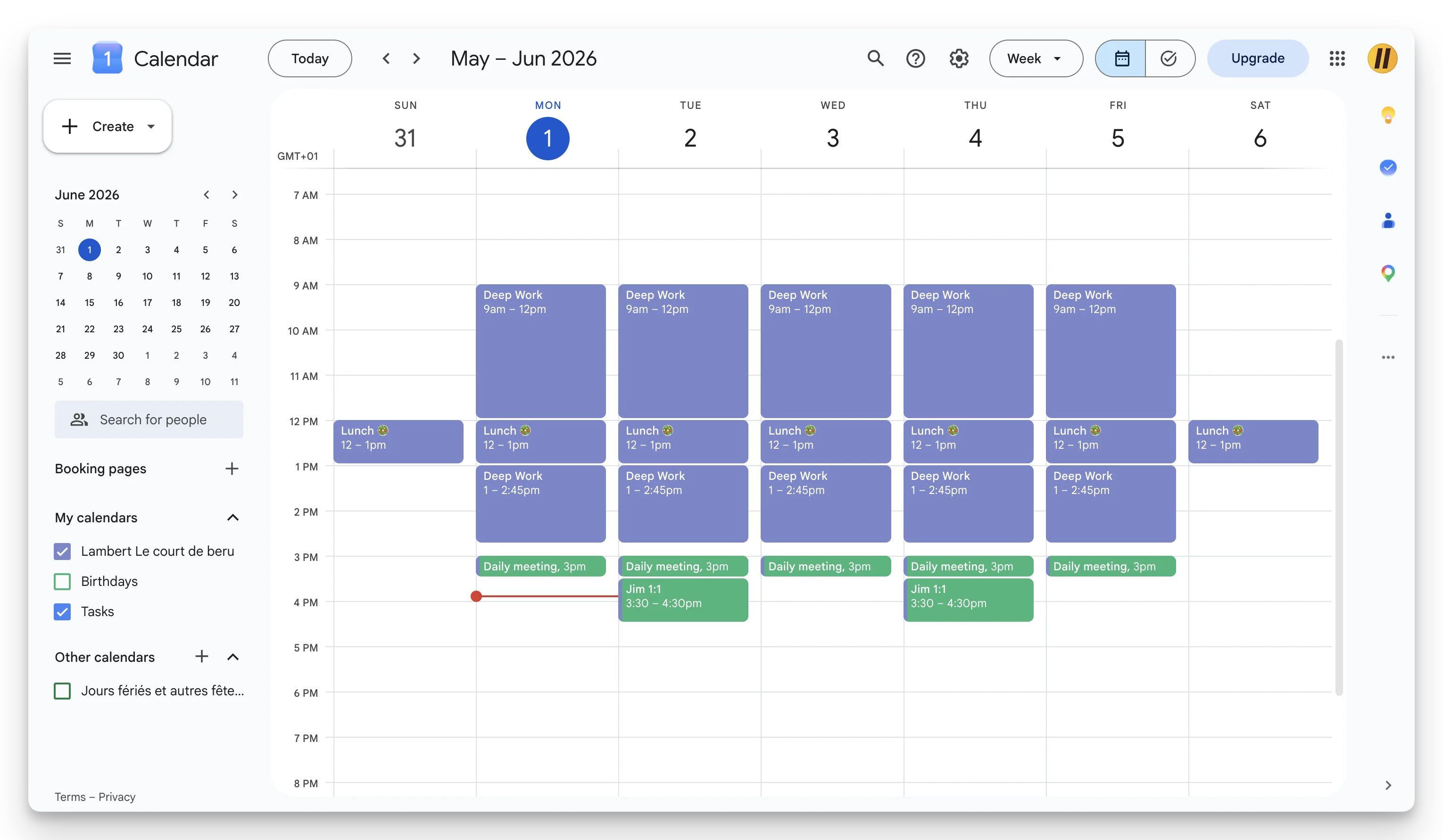
Cluster the meetings you DO keep. Look at my calendar this week. Deep work blocks every morning (9 to 12) plus early afternoon (1 to 2:45). All meetings stacked into one late-afternoon window: the 3pm daily standup, then a 3:30 1:1 on Tuesday and Thursday. The clustering is not aesthetic. It is the whole reason mornings stay protected.
For coordination meetings (kickoffs, calibrations) the right tool is often async + a short scheduled checkpoint. Our calendly-alternatives breakdown covers the scheduling-tool side of that tradeoff.
Step 2: Write the pre-read, ship it 24 hours before
The pre-read is 1 to 2 pages. Purpose, expected outcome, the data behind the decision, the 2 or 3 options on the table, and the recommendation. Not bullet points. Sentences and paragraphs, narratively structured, the way Amazon's 6-page memo works. Bezos called this out specifically because bullet points let sloppy thinking pass (source).
Ship it 24 hours before the meeting. The clock matters because of how meetings actually get prepped (or not). Microsoft's data: 57% of meetings are ad hoc calls with no calendar invite, which means most participants are walking in cold (source). A pre-read that lands 24 hours out is the only realistic way to get even half the room prepared.
What this looks like for me in practice: when I present a business case at Morgen, I prep the full written note before the meeting. The same note ships as the pre-read AND as my live presenter notes. I walk through the same doc the room read silently 5 minutes earlier, in the same order. The doc is both the input and the spine of the discussion. It cuts prep time in half and forces clearer thinking on my side, because the writing has to stand on its own before anyone reads it.
For the pre-read brief itself, Kai pulls the recent email thread, the last meeting's transcript, and the relevant tasks into a pre-meeting brief I get on the home screen. I still write the recommendation by hand. Kai handles the context plumbing.
Step 3: Open the meeting with 5 minutes of silent reading
This is the move most people will not do.
It is also the highest-ROI step on the list. The Atlassian Team Anywhere Lab measured the difference: page-led meetings closed 85% of their goals vs 69% for control meetings, and attendees walked out 29% more energized (source).
The math is brutal: 5 minutes of silent reading at the start, or 25 minutes of verbally re-explaining the context to the 3 people who did not read. Pick one.
The owner reads with everyone. No "while you read, I'll just queue up some context." That is what people do when they are nervous about silence. Sit with it.
The first time you run this with a team that has never done it, it is awkward for 90 seconds, then obvious.
Step 4: Run the discussion against the recommendation, not the topic
Most discussions wander because the question is too broad ("what should we do about X?"). A pre-read with a recommendation flips it. The question becomes "do we agree with the recommendation, and if not, which alternative do we pick?" That is a closeable question.
Matt Abrahams at Stanford GSB covers the facilitation side in his 5 Ps framework (Pattern, Purpose, Psychological Safety, Presence, Paraphrasing) (source). Paraphrasing is the move I lean on most. When someone goes off on a tangent, paraphrase what they said, restate the open question, and move back. It feels rude the first 2 times. It becomes muscle memory by call 10.
Step 5: Capture decisions + action items in the room, with owners
The rule: no action item leaves the room without a named owner and a due date.
"We'll follow up on the pricing page" is a wish. "Sarah ships updated pricing draft by Thursday EOD" is a commitment.
For the writing-up side, our how to write meeting minutes guide covers the 4-part output format. Short version: decisions, action items with owners, open questions. Anything else is notes.
I let Kai capture the call without a bot in the room. The action items land in a triage workspace where I accept, reject, or edit each one before it flows into my action items inbox. Botless capture matters most for client calls where a visible bot changes the conversation. More on the tradeoff in our Read AI meeting notes breakdown.
Step 6: Close the loop within 6 hours
Within 6 hours of the call: a 1-page summary lands in one shared location (not 3), every action item has an owner + due date, and the next checkpoint is on the calendar. 6 hours, not 24, because the half-life of a meeting memory is brutal. Late minutes get skimmed and archived. Same-day minutes get acted on.
If you ship one a week, send a 2-line digest of decisions to the broader team. The point of the meeting was the decision. Make the decision findable, or expect to re-litigate it in 8 weeks.
Tools that handle this today
No single tool owns the whole workflow. Most handle one layer. Pick honestly.
- Page-led docs (Confluence, Notion, Google Docs). Solid for the pre-read and the live doc people read silently. Weak at action-item routing once the meeting ends: you paste items into a task tool by hand.
- Notetakers with a visible bot in the call (Otter, Fathom, Granola, Read AI). Decent transcripts and summaries. The visible bot is a real social cost in external meetings, and action items live in a separate app from your tasks. Our Otter AI alternatives breakdown and Granola review cover this category.
- Calendar tools (Google Calendar, Cal.com, Reclaim). Handle scheduling + focus-block hygiene. Pair them with a deep-work practice: our time blocking guide is the foundation.
- Meeting cost calculators. Pre-bake whether the meeting should happen. Our meeting cost calculator takes 30 seconds. Best filter I know for "should this be a doc?"
The honest gap is the gluing layer. Pre-read pulls from emails + prior meetings. Capture lands without a visible bot. Action items flow into a task system the owner actually uses. Almost nobody handles all 3.
The combo I actually run: Claude wired into my full knowledge base on one side, Kai's MCP on the other. The MCP pulls the meeting context (email thread, last transcript, open action items) and prepares the brief. I run the meeting. Kai captures it silently. On the way out, the transcript + summary flow back to Claude for sprint prep, or straight to Linear as new tickets. Pre-read, capture, route: 3 layers stitched into one loop.
How Kai handles the meeting layer
Kai is the AI executive assistant we build at Morgen.
It runs the surrounding 80% of this workflow so the human can focus on Step 3 and Step 4 (silent read + the discussion).
Three pieces that map directly to the criteria above:
Pre-meeting brief. Kai assembles a brief on the home screen for every upcoming meeting: the last email thread with that person, the previous transcript if you met before, and the open action items still owed in either direction. This is the AI meeting prep piece.
Botless capture during the call. Kai captures Zoom, Google Meet, Teams, Webex, and Slack Huddles calls straight from your device. No visible participant. No bot in the room changing how people talk. Matters most in external calls where a visible recorder makes the other side hedge.
Action items with owner + due date, routed before they reach a task list. The post-meeting summary breaks the call into decisions, open questions, and action items. Every action carries a proposed owner + due date. Items land in a triage workspace for action items where I accept, reject, or edit each one. Accepted ones flow into the task system. The rest do not survive the triage.
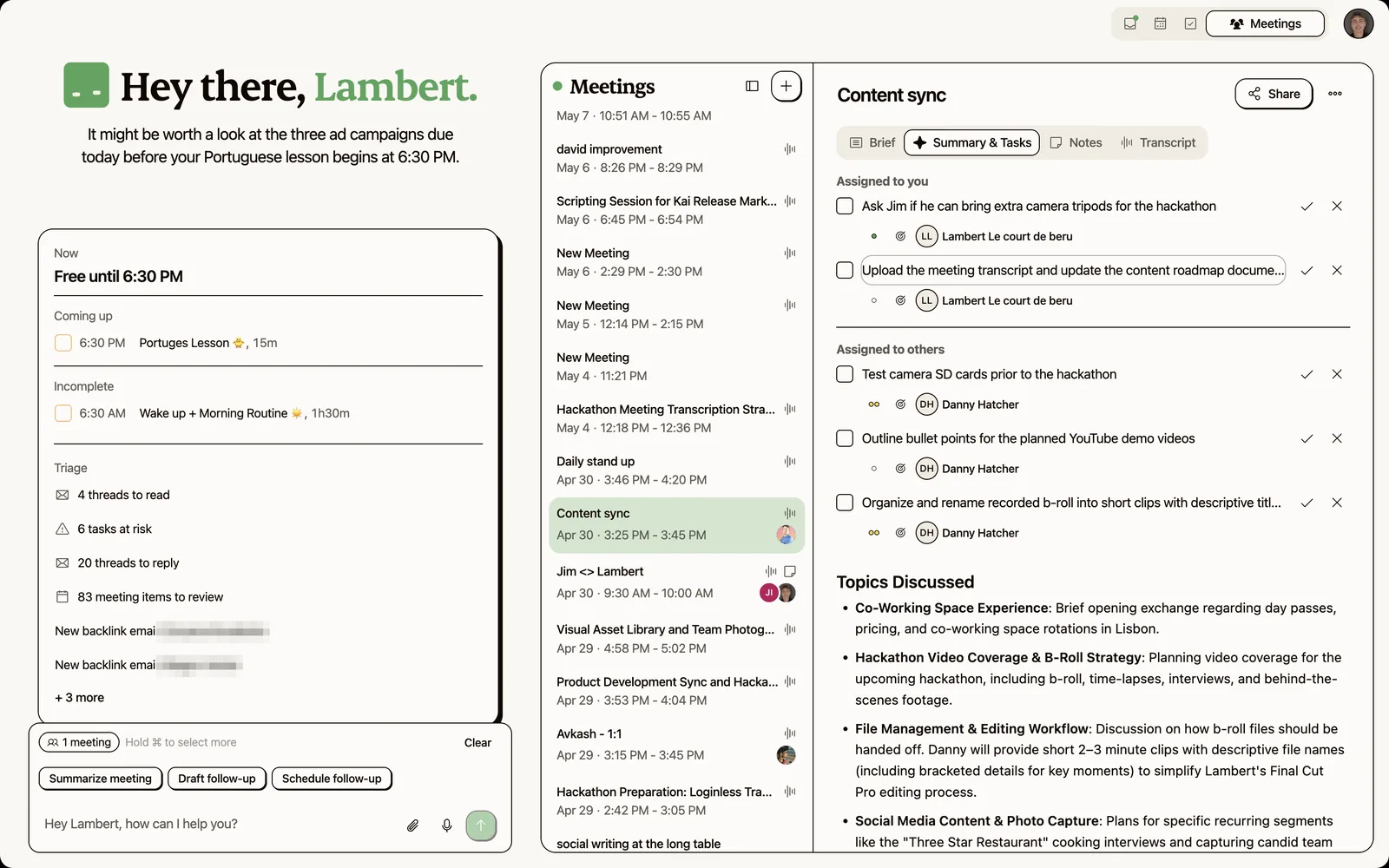
A recent example: when we recorded a "How We Grow at Kai" episode, the capture started before the call, so even the pre-show planning was in the transcript. Walking out, the summary held the full next-steps picture (publish timeline, who owed what, the open question for the next episode), each item one click from becoming a ticket; that handoff between "we talked about it" and "it's on the board" is the part that usually gets lost.
Honest limitations. The pre-meeting brief is only as good as the connected context, so a brand-new contact gets a thinner brief than a recurring stakeholder. The botless capture supports the major conferencing tools but the integration list is shorter than the visible-bot incumbents. If your team lives in a niche conferencing platform, check the Kai meetings page before assuming coverage.
The bet is that a meeting tool should reduce the surface area you have to manage, not add another tab. Kai sits inside the same surface as your calendar, email triage, and daily planning, which is the layer the SERP keeps writing around.
When this approach is overkill
Page-led meetings, 30-minute defaults, written pre-reads: none of it is right for every conversation.
Skip the structure for:
- 1-on-1s where the point is the relationship, not a decision.
- Brainstorms where the goal is divergent thinking and a pre-read would anchor you to the first idea.
- Status syncs in a brand-new team where people do not yet know how each other think. Run those raw for 2 to 4 weeks, then convert to async.
- Crisis calls where you need everyone in a room in 10 minutes. Pre-reads are a luxury you do not have.
The honest filter: if the meeting is mostly about how people work together, not about producing a decision artifact, the discipline is overhead. Use it on decision meetings, kickoffs, calibrations, reviews. Drop it for the human ones.
FAQ
How long should a meeting be in 2026?
30 minutes is the right default for decision meetings. 60 minutes is what the calendar gives you, not what the meeting needs. If the work consistently spills past 30 minutes, it is usually a sign the pre-read is missing or the meeting is trying to do 2 jobs (a decision + a brainstorm). Split it.
Who should run the meeting, the most senior person?
The owner of the outcome, not the most senior person. Seniority gates decisions, not facilitation. The two roles can split. A senior person can be the decider while a less-senior person owns the meeting (pre-read, agenda, action items, follow-up). That separation is why Stanford GSB's Matt Abrahams treats facilitation as a learnable skill independent of authority (source).
What is the right number of attendees?
Smaller than you think. Microsoft's data shows the average meeting has 7 attendees, and meetings with 9+ correlate with lower goal completion (source). My personal rule: if someone does not need to contribute to the decision, they do not need to be in the room. Send them the summary.
Do I really need a pre-read for a 30-minute meeting?
Yes. The pre-read is what makes the 30 minutes possible. Without it, the first 15 minutes are context-setting and the decision either gets rushed or punted. With a 1-page pre-read silently read at the start, you get into the actual disagreement within 8 minutes. That is the Atlassian page-led data in practice (source).
What if half the room did not read the pre-read?
Read it together. That is the point of opening with 5 minutes of silent reading. Bezos explicitly chose this format because "executives will bluff their way through the meeting as if they've read the memo because we're busy" (source). Reading in the room takes the bluff off the table. Awkward for 90 seconds, then it just works.
How do I handle people who dominate the discussion?
Paraphrase what they said, restate the open question, and call on someone else by name. Stanford GSB's facilitation framework names this as one of the 5 Ps (source). HBR's Rogelberg also flags dominance as one of the top 3 meeting failure modes (source). The fix is not avoiding the dominant person. It is actively pulling other voices in.
Should we have no-meeting days?
Yes, if your team is in 15+ hours of meetings a week. Microsoft's 2025 telemetry already shows knowledge workers only get 12.1 hours of uninterrupted focus a week, with 76% feeling drained on meeting-heavy days (source). A protected day or two gives that focus back. Start with one. See what breaks. Adjust.
How do I capture action items without writing them by hand?
Either someone takes notes during the meeting (good cost, fragile) or a tool captures the call and extracts action items. The 2026 stack is botless capture + structured summary + triage before items hit your task list. That is the layer covered in our how to write meeting minutes guide and what Kai automates end to end. You can try it free.

What to read next
AI Meeting Prep: How Briefs Work and Which Meetings Stay Yours
How AI meeting preparation works, from the brief we read before our own calls: what it pulls in, which tools gate it, and the meetings it can't prep.
Inside Our Product Hunt Launch
Issue #017 of How We Grow: David joins us two days after Kai's Product Hunt launch to talk about what a launch is for when you're already live, why finishing fifth was useful, and the Instagram trick that took our account from 300 to 700 followers.
One Year of Building With AI
Issue #016 of How We Grow: Jim's first year at Morgen, told through the models we built with, what each new one changed, and how the growth job looks when one person can ship a project in a day.