
Key Takeaways
- An AI executive assistant manages email, calendar, meetings, and follow-ups as one connected workflow. Not a chatbot. Not a single-purpose app.
- 5 capabilities define whether a tool is real: inbox triage, meeting capture + prep, scheduling, action item routing, and daily planning. Most tools nail 1-2 and miss the rest.
- Lindy, Martin, Saner, and others each own a slice. None of them connect all five today. The gap is integration, not intelligence.
- Kai is built around cross-tool awareness (calendar + email + meetings + tasks in one place). Fewer integrations than Lindy, but designed to close the loop where others hand you back to manual work.
Pricing in this article verified 2026-04-17 against official pricing pages: Lindy, Martin, Saner.
$21 billion market projected by 2030 (GeekWire). And right now, in April 2026, most of the tools chasing that number solve one problem and punt on the other four.
Lindy triages email. (Lindy pricing) Martin texts and calls. (Martin) Saner organizes notes. (Saner)
Each clever in isolation. Each owns one channel. The whole job of an executive assistant is sitting across all of them at the same time.
Here's the honest map. What "AI executive assistant" actually means in 2026, which tools deliver on which capabilities, and where the entire category still falls short.
What an "AI executive assistant" actually is in 2026
An AI executive assistant is software that manages your calendar, email, meetings, and follow-ups proactively: monitoring in the background, acting before you ask, and learning your preferences over time.
It is not:
- A chatbot (ChatGPT, Claude). Generic AI waits for you to paste context in. It doesn't know your inbox, your calendar, or your prior meetings. The brief it generates is capped by what you copy in by hand.
- A single-purpose AI app (Otter for transcription, Superhuman for email). These are excellent at one thing. An executive assistant coordinates across things.
- An AI agent (in the autonomous-reasoning sense). Most tools marketed as "AI agents" are workflow automations with an LLM in the loop. A real EA needs judgment, not just triggers.
The distinction matters because the SERP for "ai executive assistant" is full of tools that are really AI schedulers, AI note-takers, or AI inbox sorters wearing an executive assistant costume. The test is simple: does it work across your calendar, email, and meetings as one connected picture? Or does it solve one channel and leave you to manually bridge the rest?
The 5 things a real AI executive assistant must handle
These are the criteria the rest of this article maps against. If a tool doesn't cover at least 4, it's a point solution, not an executive assistant.
-
Inbox triage + draft responses. Sort email into actionable categories (needs reply, FYI, waiting on them, noise). Draft responses in your voice. Extract tasks from threads. A human EA does this in the first 30 minutes of the day. An AI EA needs to do it before you open your mailbox.
-
Meeting capture + pre-meeting prep. Record and summarize meetings without a visible bot. Generate a brief before the next meeting: who you're meeting, what you last discussed, what's open. Note-takers handle the first part. Almost nothing handles the second. See the full breakdown in our AI meeting prep guide.
-
Scheduling without the back-and-forth. Propose times, negotiate with attendees, defend focus blocks, handle timezone math. This is the most commoditized capability: Motion, Reclaim, and Cal.com's Martin all do versions of it. The bar is table stakes now.
-
Action item routing. When a meeting ends or an email arrives with a task buried in paragraph 3, the EA extracts it, assigns it, sets a due date, and puts it where you'll actually see it. Most tools stop at extraction. The gap is routing: getting the action item from "captured" to "scheduled in your day."
-
Daily planning and replanning. Propose a realistic agenda for the day. Protect deep work. When a meeting overruns or an urgent request lands, adjust the plan automatically. This is where generic tools completely fall off. Notion and Motion attempt aspects of it, but neither reads your inbox or your meetings.
 Side note
A human executive assistant costs $2,000-5,000/month and handles all five. Most AI EAs cost $8-100/month and handle 1-2. The question isn't "is AI cheaper?" It's "which slice does each tool actually cover?"
Where today's tools actually land: An honest scorecard
This is a capability matrix, not a listicle. Each tool is scored against the 5 criteria above, based on official features and user feedback. A checkmark means the tool handles it end-to-end. A tilde means partial. An X means it doesn't.
| Capability | Lindy | Martin | Saner | Otter/Read AI | Kai |
|---|---|---|---|---|---|
| Inbox triage + drafts | ✓ | ✓ | ~ | ✗ | ✓ |
| Meeting capture + prep | ~ | ✗ | ✗ | ✓ (capture only) | ✓ |
| Scheduling | ✓ | ✓ | ~ | ✗ | ✓ |
| Action item routing | ~ | ~ | ~ | ~ | ✓ |
| Daily planning | ✗ | ✗ | ✓ | ✗ | ✓ |
| Price | $50/mo (Plus) | $21/mo (annual) | From $8/mo | $17-40/mo | From $20/mo (free trial) |
Three things stand out in this matrix.
Lindy is the broadest. Plus starts at $49.99/month, Pro is $99.99/month, and Max is $199.99/month (Lindy pricing): usage is metered in credits, and overages bill at 2x (Lindy docs). It covers email, scheduling, meeting notes, draft replies, and hundreds of integrations. Where it stops: the pricing page feature list doesn't include daily planning or pre-meeting briefing, the two capabilities most distant from workflow automation. It's an automation platform wearing an EA costume. Clever, not unified.
Martin is the most personal. It manages your calendar, inbox, Slack, texts, WhatsApp, and phone calls (trymartin.com). $21/month on Basic billed annually, $35/month billed monthly, Pro at $30-49/month (Martin pricing). The "Jarvis" pitch is compelling. But it doesn't capture meetings, doesn't generate pre-meeting briefs, and doesn't do daily planning: its product page lists messaging, scheduling, and calls, not meeting capture or daily agenda planning. Product Hunt reviewers praise its tone-matching for follow-up texts (Product Hunt).
Saner is the most underestimated. At $8-16/month, it's positioned as a note-taking tool with AI. But its morning planning feature (reads your emails, todos, and notes, then proposes an optimal day) is closer to a real EA workflow than tools 3x its price. The limitation: it doesn't touch meeting capture, scheduling is basic, and the mobile experience is inconsistent (Product Hunt reviews). Its blog ranks #2 for "ai executive assistant" on Google, proof that focused product content beats big budgets in this space.
Otter and Read AI own meeting capture, not EA. Otter's real-time transcription and speaker labels are excellent. Read AI is building "Ada," an internal EA pilot that handles scheduling and email (GeekWire). But today, both are note-takers with aspirations, not working EAs. For the full picture, see our Otter AI review and the Otter AI alternatives roundup.
The "already in the room" test: Why connected beats clever
Here's the pattern nobody talks about in AI EA reviews.
The best AI model in the world can't help you prepare for a meeting if it doesn't have access to:
- your last email thread with that person
- your prior meeting notes with them
- the tasks you owe them (and they owe you)
- your calendar for the rest of the day
This is the "already in the room" test. Is the assistant connected to your actual work? Or does it need you to paste everything in first?
Most tools fail this test because they're built around one channel. Lindy reads your email and calendar but not your meeting transcripts (Lindy pricing page feature list). Otter reads your meetings but not your email (Otter features). Saner reads your notes but not your calendar (Saner pricing). Martin reads your messages but not your meetings (Martin).
One of our interview subjects, David (Director of Technology at Harvard Business School), built his own version of this with Claude + Obsidian: "Morning prompt reviews yesterday's incomplete high-priority tasks. Runs through GTD methodology checklist. Processes meeting notes and extracts tasks automatically." He wired together 4 tools manually because no single product connected them.
Another user, Islam (a Salesforce consultant doing 4+ meetings a day), described the same gap from the fatigue angle: "Every day after four meetings, back to back. I have some notes from all of them. And some of them are tasks, and some of them are meetings, some action items. And I'm too tired after four meetings."
The intelligence of the AI doesn't matter if it can't see your work. Connected beats clever, every time.
How Kai approaches the AI EA problem
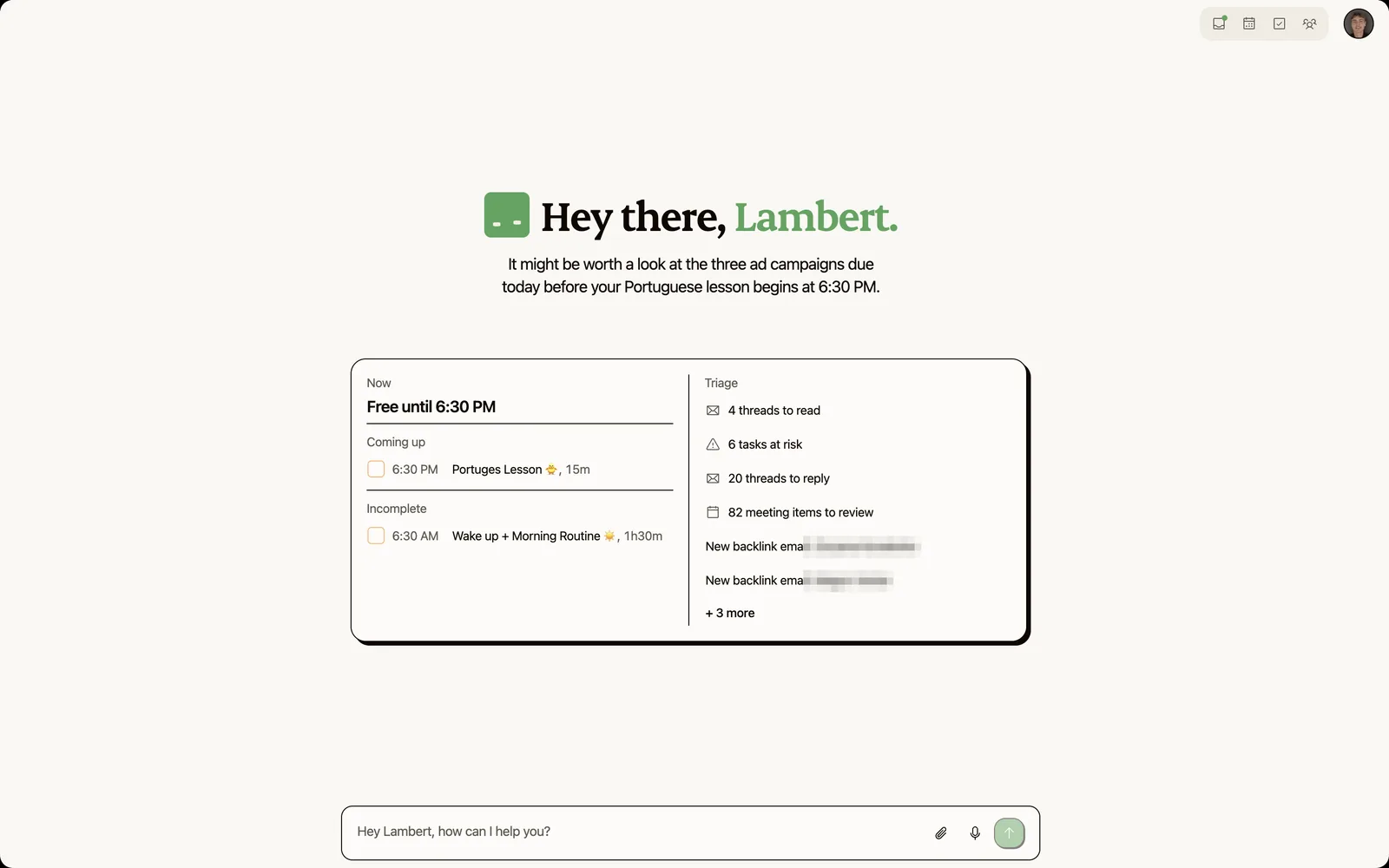
Kai is built on a different bet than the tools above. Instead of being excellent at one channel, it sits on top of all four: calendar, email, meetings, and tasks. The thesis is that an AI executive assistant only works when it can see the full picture.
Three capabilities map directly to the 5-criteria matrix:
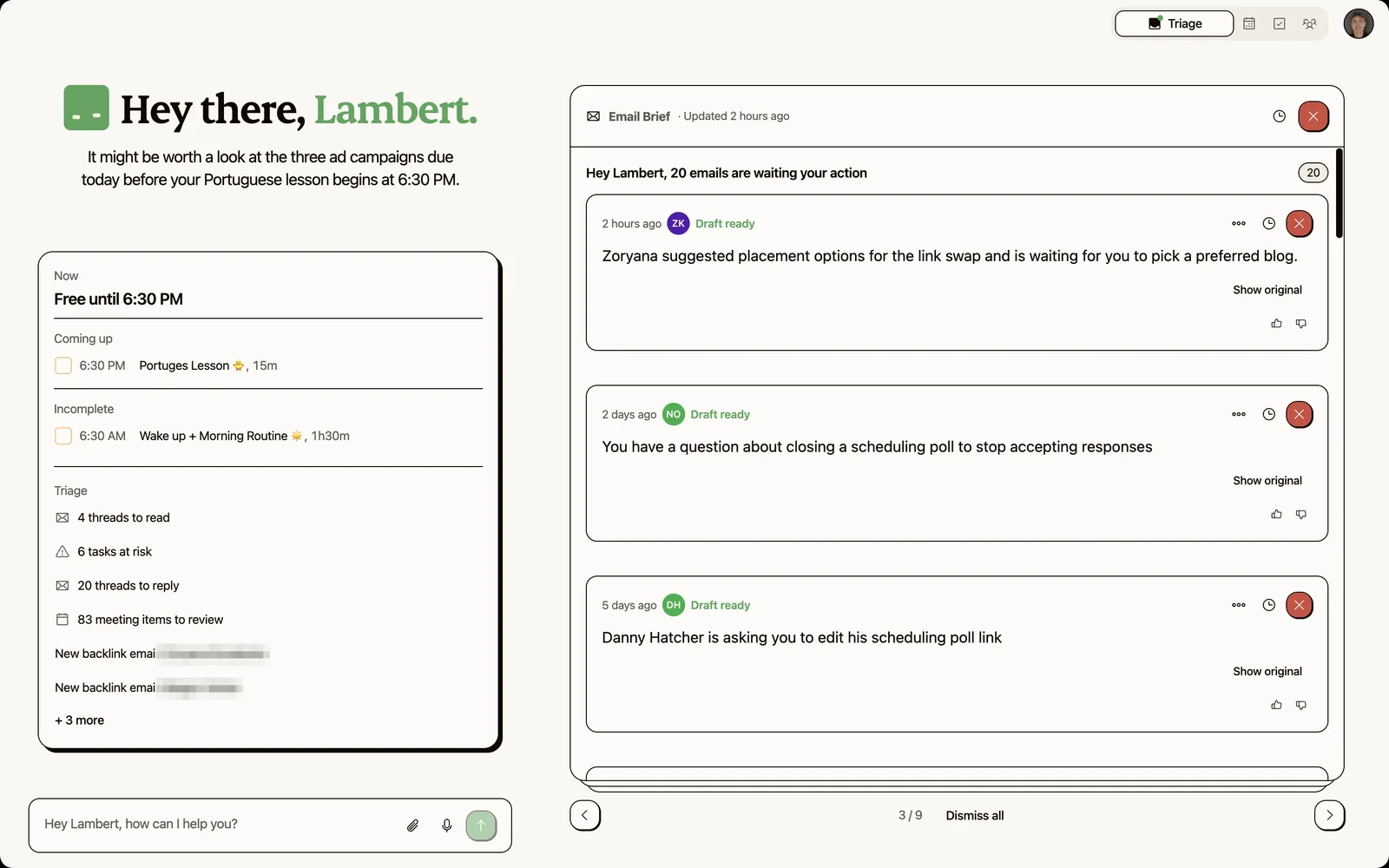
- Cross-tool triage. Kai sorts every email into five categories (Needs Reply, FYI, Waiting Reply, Other, Done), shows the three that need you as tabs, drafts responses, and extracts action items from email threads. Because it also holds your meeting history, drafts pick up relevant meeting context, so a reply to someone you just met reflects what you agreed. The Superhuman alternatives comparison shows where single-tool email triage hits its ceiling.
- Meeting capture + pre-meeting briefs. Botless capture across Zoom, Google Meet, Teams, Webex, and Slack Huddles (no visible bot in the room). Before important meetings, Kai assembles a brief from the last email thread, prior meeting summaries, and open tasks. See the meeting action items workflow for the triage loop.
- Action item routing. When a meeting ends, action items flow into a triage workspace where you accept, edit, or dismiss each one before it hits your task list and gets scheduled. The gap between "captured" and "scheduled" is the gap most tools leave open.
Honest limitation: Kai is newer than every tool in the scorecard above. It has fewer integrations than Lindy (no iMessage, no phone calls, no Zapier-style automation builder). If you need a battle-tested tool that works today, Lindy or Martin will get you further right now. Kai's bet is on the connected workflow, and whether that's worth trying free.
What an AI executive assistant still can't do
Honesty section. These are the things the entire category fails at, not just one tool.
Relationship judgment. A human EA knows that when your investor emails at 11pm on a Friday, the tone matters more than the content. AI triages by keyword patterns and priority rules. It doesn't read between the lines. The GeekWire piece puts it well: AI handles "high-volume, pattern-based work," while human EAs are still better at "relationship management, judgment calls, and anticipating needs in ambiguous situations."
Multi-stakeholder coordination. Scheduling a 3-person call across timezones? AI handles that. Navigating the politics of who should be in the room, who gets the agenda first, and when to loop in the CEO's office? Not yet. Howie (the Seattle scheduling startup) uses a hybrid model: AI drafts the scheduling proposal, human reviewers catch timezone errors and ambiguous requests before sending.
Anticipating what you haven't asked for. A great human EA prepares the board deck before you mention it because they know the quarterly cadence. AI assistants are reactive by default and proactive only within narrow triggers. "Proactive" in 2026 mostly means "we set up an automation that runs on a schedule." Ours included: the library of recurring Kai workflows runs every morning or every Friday on a schedule you set, and Kai never works out the quarterly cadence on its own.
When to hire a human instead. If you're a CEO with 30+ meetings a week, board obligations, and a team of 50, you need a human EA, augmented by AI tools. The AI handles the volume (email triage, scheduling, note capture). The human handles the judgment (stakeholder management, travel logistics, gift purchases, anticipating needs). At 15+ meetings/week with rotating external contacts and cross-timezone coordination, that's the realistic break-even where AI alone starts to crack.
When this category is overkill
If you run 3-5 meetings a week, mostly internal, with the same 5 people, you don't need an AI executive assistant. A calendar app and a decent task manager will do.
If your inbox gets 20 emails a day and you process them in 15 minutes, adding an AI triage layer creates more friction than it removes. You'll spend more time configuring the tool than it saves you.
The break-even, based on our user research and every Reddit thread we've read on this, is roughly 15+ external meetings per week with a rotating cast, plus 50+ emails/day requiring judgment. Below that, the ROI on setup time doesn't pay off. Above that, manual coordination silently degrades, and the people on the other side of the call start to notice.
FAQs
What's the difference between an AI executive assistant and an AI scheduling tool?
A scheduling tool handles one job: finding times, sending invites, defending focus blocks. An AI executive assistant coordinates across email, calendar, meetings, and tasks. Scheduling is one of the five capabilities, not the whole product. Tools like Motion and Reclaim are schedulers. Lindy and Kai aim to be EAs.
Can ChatGPT or Claude replace an executive assistant?
Not without heavy manual work. Generic AI doesn't have access to your inbox, calendar, meeting history, or task list. You'd paste context in for every request. Fine for a one-off email draft. Doesn't scale to 15+ meetings and 50+ emails a day. The gap is context access, not intelligence.
How much does an AI executive assistant cost in 2026?
$8-100/month depending on tier. Saner starts at $8/month, Martin at $21/month (Basic annual), Lindy at $49.99/month (Plus) with Pro at $99.99/month. A human EA costs $2,000-5,000/month. The AI tools cover 1-3 of the 5 core capabilities each, so direct price comparison understates the gap.
Is Lindy AI worth $50 a month?
At $49.99/month on Plus, yes for email triage, scheduling, and light automation if you're in the Google ecosystem. Plans are metered in credits and overages bill at 2x, and surprise overage charges are a recurring theme in its billing complaints. For full executive assistant functionality (meeting prep, daily planning, action item routing): no, Plus doesn't cover those and neither does Pro at $99.99. Read the Motion vs Notion comparison for a different angle on the "automation vs. planning" trade-off.
Do AI executive assistants work with Outlook and Gmail?
Most support both. Lindy, Martin, and Kai work with Gmail and Outlook. Saner integrates with Gmail and Google Calendar. Otter and Read AI are platform-agnostic for meeting capture. Check each tool's official integrations page: support levels vary (some offer full email access, others only calendar sync).
Will AI replace human executive assistants?
Not in 2026. AI handles the high-volume pattern work: email triage, scheduling, note capture, follow-up tracking. Human EAs handle relationship judgment, multi-stakeholder politics, travel logistics, and anticipating needs before you ask. The realistic model is AI + human, not AI instead of human. See the Fathom vs Otter breakdown for how this plays out in just the meetings category.
What's the best AI executive assistant for founders?
Depends on your bottleneck. Email-heavy: Lindy (Plus $49.99/mo) or Superhuman ($30/mo). Meeting-heavy: Otter + a scheduling tool. Need everything in one place: Kai (newer, fewer integrations). Want a cheap starting point: Saner ($8/mo) for morning planning + note organization. No single tool is best across the board. See the Cluely alternatives roundup for more options.
How do AI executive assistants handle sensitive data?
Varies widely. Most tools require access to your email and calendar, which means they process sensitive business data. Check each tool's SOC 2 status, data retention policy, and whether they train models on your data. Kai captures meetings without a visible bot (no third-party recording service in the room), but the trade-off is that any AI accessing your inbox and calendar requires trust in the provider's security posture.

What to read next
AI for Customer Success: Which Tools Remember What You Promised
AI tools for customer success, scored on the question listicles skip: when you promise a customer something in March, does anything tell you in September?
AI Tools for Executive Assistants: What EAs Actually Use in 2026
Compare the AI tools executive assistants actually use in 2026, tested on the point vendors skip: whether they work in your exec's inbox and calendar.
The 6 Best AI Executive Assistants in 2026, Compared
Compare the best AI executive assistants of 2026 against a published five-capability rubric, with our own product scored by the same rules.