

Key Takeaways
- An AI meeting prep brief is written before the call: who's on it, where you left things, and what's still owed in both directions.
- At least nine tools write one on their own in 2026, and each gates it: a paid plan (Granola, Fellow), recurring meetings only (Read AI), a Copilot seat (Microsoft), AI credits (Fireflies), or an existing account or deal (Gong, Oliv).
- A brief covers the recurring and low-stakes call. For the meeting that matters, an assistant can draft the material, but the decisions stay yours.
- Kai writes its brief a day ahead from past meetings, email and action items, internal calls included, as long as the meeting has a calendar invite.
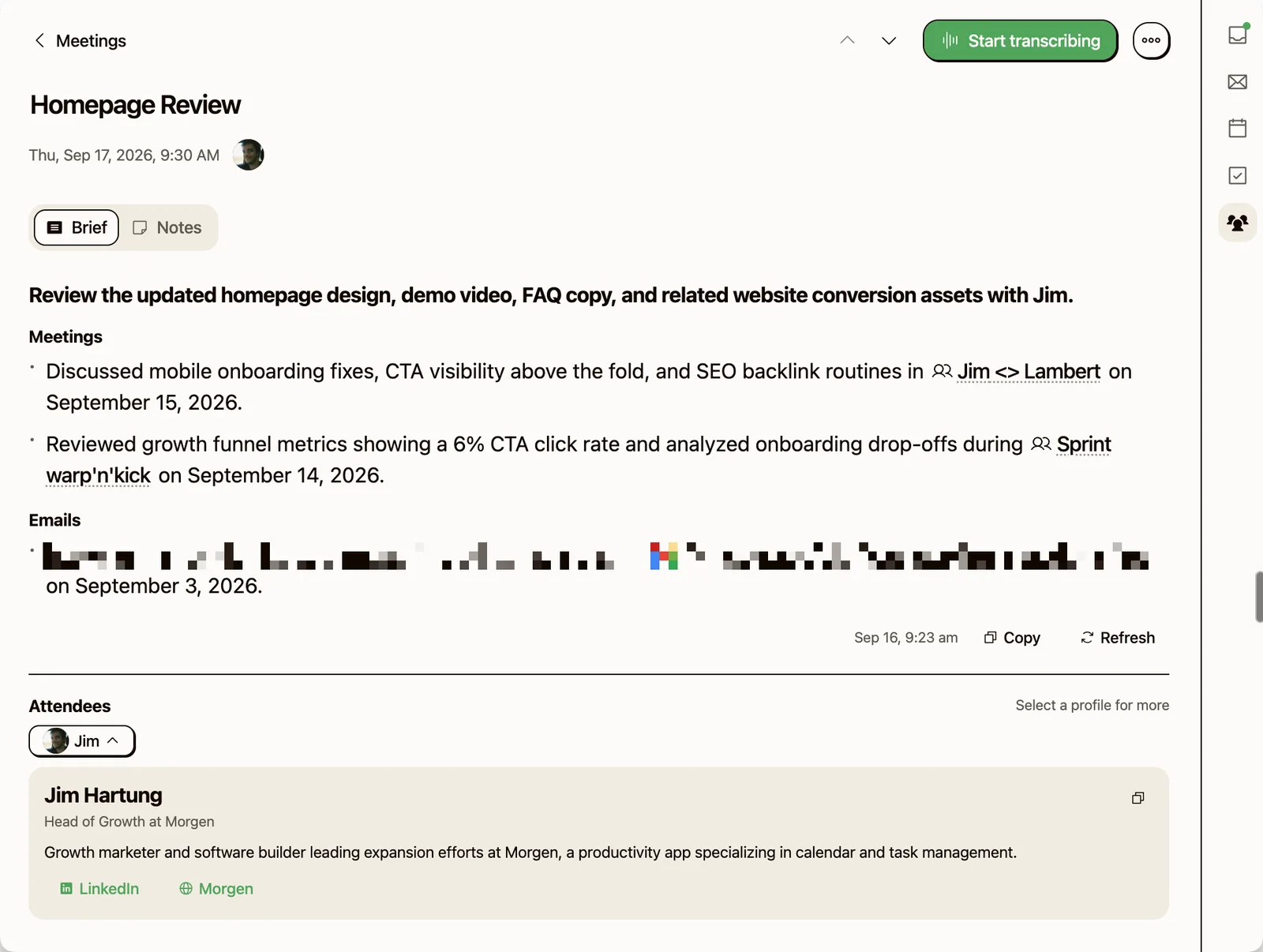
AI meeting prep does its best work on the meetings that need it least. Kai wrote the brief below on its own, the morning before a homepage review with Jim: a one-line purpose, two earlier calls cited by name and date, and an email thread. Before our twice-weekly 1:1, we read a brief like that to pick up where the last one ended, and for a recurring call that's most of the preparation.
Before a first call with someone new, we want something else: their site, two or three things worth knowing, and whatever email history exists. Before a How We Grow recording, no brief is enough. Which of those meetings a tool can prepare for matters more than its feature list, and every tool in this guide gates its brief somewhere.
What AI meeting prep actually means in 2026
AI meeting prep is using AI to assemble the context, history and open commitments for an upcoming meeting before it starts, rather than summarizing it afterwards.
That makes it the inverse of a note-taker. Notes are a record of what happened. A brief is a forecast of the next thirty minutes: who's on the call, what you last discussed, what's still open, what you owe them.
Most people skip it because the context is scattered across the calendar, the mailbox, the CRM, the last transcript and a thread someone started in Slack. Assembling it by hand costs more than the meeting saves, so it gets dropped exactly when the week is busiest. One commenter in r/ProductManagement put the gap between intent and habit plainly:
“I always intend to review background materials or notes to understand the context and why we are meeting. (That doesn't happen most of the time, though.)”
u/bo-peep-206, r/ProductManagement, 6 November 2025The four things a real pre-meeting brief requires
These are the criteria the rest of this guide judges against.
-
Attendee context, not attendee names. Who is this person, when did you last speak, what did you promise. A name and a job title is a business card.
-
Open threads stitched across conversations. If this is meeting four in a sequence, you need what was decided in one, two and three, and what quietly got dropped. Most tools archive each meeting in isolation.
-
Commitments in both directions. The fastest way to lose credibility is to arrive without the thing you said you'd send. The brief needs an explicit line for what you owe them and what they owe you.
-
Delivery before you open the call. A brief you have to request is a brief you skip on a busy Tuesday. It has to be written and waiting when you open the meeting.
We used to end this list differently. An earlier version of this article told you to block ten minutes on the calendar before every important call, because a brief with no time to read it is useless. That made sense when assembling the brief was the work. It doesn't survive a brief that's already written when you open the meeting, so we retired it.
No tool yet? A brief you write yourself needs five lines:
- Who they are: role, company, and when you last spoke
- Where you left off: the decisions and open questions from the last meeting
- What's owed: what you promised them, and what they promised you
- The thread that matters: the one email or message that changed things since
- The outcome you want: one sentence, and the one line no tool writes for you
Every AI meeting prep tool gates its brief somewhere
Search results for AI meeting prep mostly sort tools by CRM depth and describe prep as company research: firmographics, funding news, LinkedIn. That half is purchasable, and it's the same whichever vendor sells it. The more useful half is what happened between you and this person, which only exists in your own mailbox and past calls.
A growing list of tools now write that second kind of brief on their own, and each one decides who gets it:
| Tool | What the brief draws on | Who gets it |
|---|---|---|
| Granola | Earlier Granola notes with the same people or company, your calendar, the web and Gmail if connected | Business ($14/user/month) and Enterprise ($35) plans, Google Calendar only, external meetings only |
| Read AI | A recap of the last meeting, with "your action items and open questions" | Recurring meetings only, once you enable pre-reads |
| Microsoft 365 Copilot | Emails, chats and documents already shared between the attendees | Copilot users, once an admin enables Meeting Insights |
| Wispr Notetaker | "your Gmail, Slack, and past notes, plus research from the web" | Free and Pro plans, weekly limits on Free |
| Fireflies | Past discussions with the same people or topics, once your calendar is connected | Charged per request in AI credits |
| Fellow | Details from the last meeting and information about attendees | Business and Enterprise plans only |
| Gong | Objectives, key topics, past discussion highlights, suggested questions | Customer meetings; the summary needs prior activity on the account |
| Oliv | Deal stage, close date, next steps and stakeholders | Meetings linked to an active opportunity in your CRM |
| Jump | Client goals, household, past concerns, recent meetings, life events | Financial advisors, plus insurance and accounting teams |
Pricing verified 2026-09-16 against granola.ai/pricing.
 Side note
Granola says it's "exploring support for Microsoft Calendar in future". Until that ships, a team on Outlook gets no Granola brief at any price.
Two patterns sit under the table. Relationship prep mostly sits on a paid tier or inside a sales stack. And every tool here starts from the calendar: Oliv runs when "the meeting is on your calendar", Fireflies once "something is on the schedule", and Jump checks "the invitees' email addresses on the event in your calendar". A call that starts as a Slack message gives none of them anything to fire on.
We tested Wispr's version in our Wispr Flow Notetaker review, where its briefing card recalls your last conversation with each attendee. Our take on Granola is in the Granola review and the Fathom vs Granola breakdown, and on Read AI in the Read AI review.
 Did you know?
Read AI's pre-read doesn't only go to you. Its settings describe a recap of the previous meeting, "reminding you and other meeting participants" about action items and open questions, about an hour before the next one.
The meetings a brief won't prepare for you
A brief covers the recurring call and the meeting where nothing big rides on the outcome: what happened since last time, who these people are, which commitments are still open. That describes most of a calendar, and having it handled is a real gain.
The meeting that matters is a different job, and How We Grow is our standing example. Before episode #012, we built a runsheet with Claude from our own repo: a timed rundown, the numbers with their sources and the date they were frozen, suggested questions for every segment, and three candidate hooks for the cold open. An assistant drafted all of it, because we asked, with the repo open. The runsheet still ended on a block titled "On-mic decisions (settle with Jim before recording)": whether to publish a rate card, which names could be said on air, which exchange rate was safe to quote. Those calls were ours, and so was the choice of hook.
Some tools reach further than a recap. Gong's prep page lists "Suggested questions to ask" and offers Dry run, a rehearsal "with an AI participant generated from your meeting context" (Gong help). Neither one decides what you want to walk out of the meeting with.
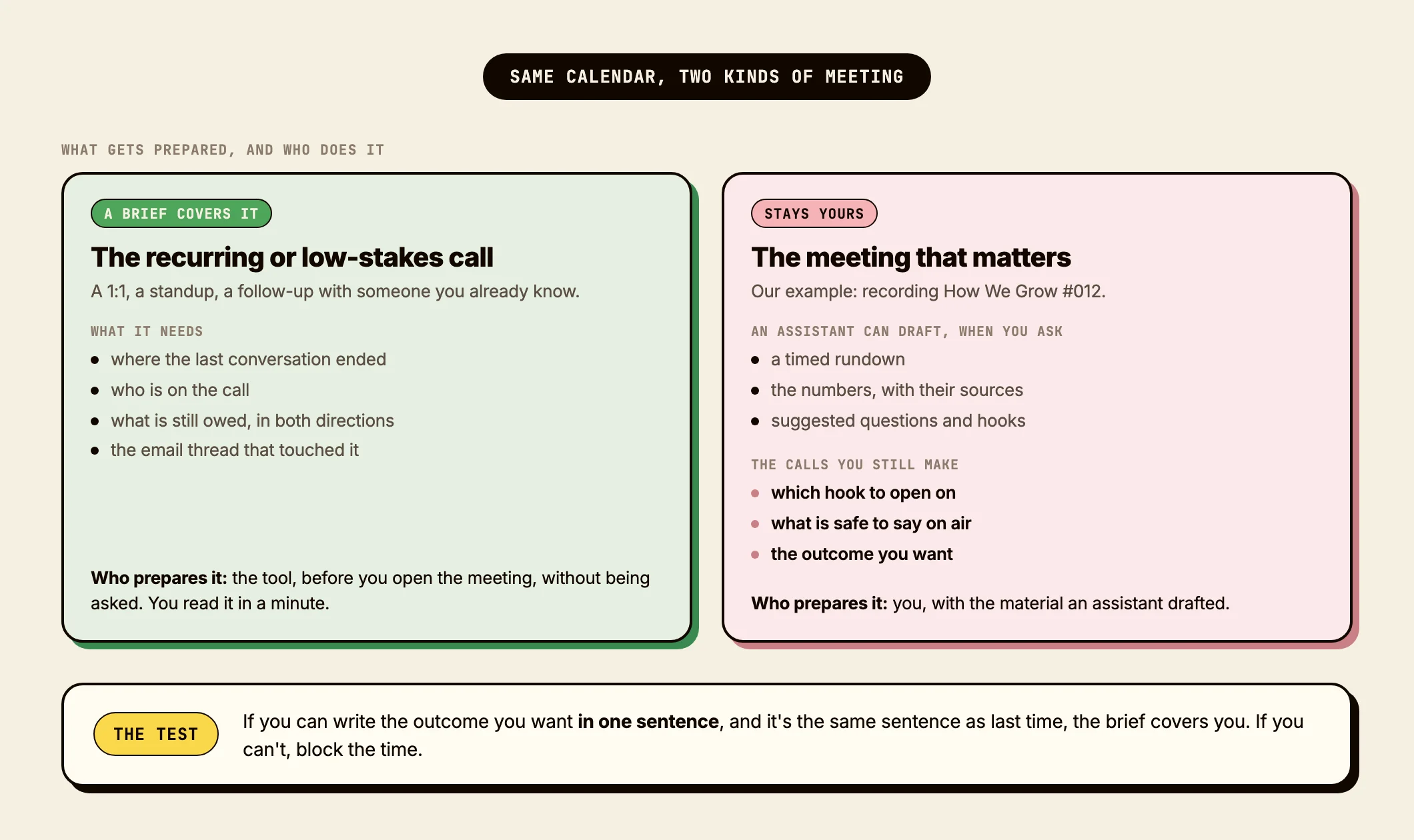
A rough sort holds up in practice: if you can describe the outcome you want in one sentence, and it's the same sentence as last time, the brief covers you. If you'd struggle to write that sentence, block real time and do the thinking yourself.
A workflow that survives a busy week
Assume any step taking more than thirty seconds of manual effort gets skipped on a Tuesday afternoon. Each step below either runs on its own or takes less time than refilling a coffee.
Step 1: decide which meetings earn a brief
Not every meeting needs one. A standing sync with someone you speak to daily doesn't. A first call with a prospect does.
Pick a rule and keep it. A reasonable default: any external meeting with someone you've talked to fewer than five times, any meeting longer than 45 minutes, anything with money or a decision on the line. Everything else gets a sixty-second glance at the invite.
In practice this ends up informal rather than systematic. We read the brief when we're short on context or want the history with that person, and skip it when we already know what the call is about. That's the honest version, and it works better than a rule nobody follows.
“If I didn't schedule the meeting (and it's an audience I've never met before), I absolutely expect to be briefed on who is who and what problems they need to solve. It doesn't happen all the time, and that's okay.”
u/v-irtual, r/ProductManagement, 6 November 2025One useful side effect: if an internal weekly sync genuinely needs a brief to be intelligible, the meeting probably shouldn't exist in that form. Our guide on how to run a meeting covers what to do about that.
Step 2: pull the context automatically or not at all
For each meeting that earns a brief, you want the last email thread with the attendee, the most recent meeting summary, any tasks where they're the owner or the source, and anything they sent recently.
By hand that's five to ten minutes per meeting, which is why it's the most-skipped step in real life. There are two honest options: glue it together with a workflow tool, or use an assistant that already holds your calendar, mail and tasks in one place. Doing it reliably by hand isn't a third one.
Whatever produces it, a brief should be short and structured. You're reading it in ninety seconds, not nine minutes.
Step 3: capture during the meeting so the next brief is half-written
This is the step that makes step 2 cheap. During the call, capture the decisions, the action items and the open questions, and land them somewhere your prep can read later.
This is where note-takers earn their place. Otter, Fathom, Granola and Read AI are all good at it. Make sure the output lands somewhere queryable rather than in a transcript graveyard. Our guide on taking meeting notes covers what to capture, and if meetings arrive without structure in the first place, the free meeting agenda generator handles the other end.
Where the popular note-takers actually land
Otter writes no brief. Its feature page lists 26 named features, and none is a brief, a prep document or an attendee dossier (Otter). Its CRM sync pushes notes out after a call; nothing comes back before the next one. Details in our Otter AI review, its pricing breakdown, and the Otter alternatives roundup.
Fathom is retrospective by design. Its Ask Fathom documentation sits under "Using Fathom After a Call", and one prompt in the documented set looks forward, "help me create an agenda for my next call", which is something you type rather than something you receive (Fathom help).
Granola, Read AI and Wispr all write briefs now, with the gates in the table above. More on the second in our piece on Read AI meeting notes.
That split between asking and receiving runs through the whole category. The context is usually retrievable, and somebody has to remember to retrieve it, at the moment they're least likely to.
How Kai handles pre-meeting prep
Kai is an AI executive assistant rather than a note-taker. It sits on your calendar, your mailbox and your tasks at once, so its brief draws on more than a transcript archive.
The brief at the top of this page is a typical one. Kai generated it at 9:23 the morning before a 9:30 meeting, and nobody asked for it. That's the design: Kai writes each brief about a day ahead and refreshes it an hour or two before the start, as long as Kai is open on your computer or in a browser tab. If it wasn't, the brief catches up within seconds of opening Kai.
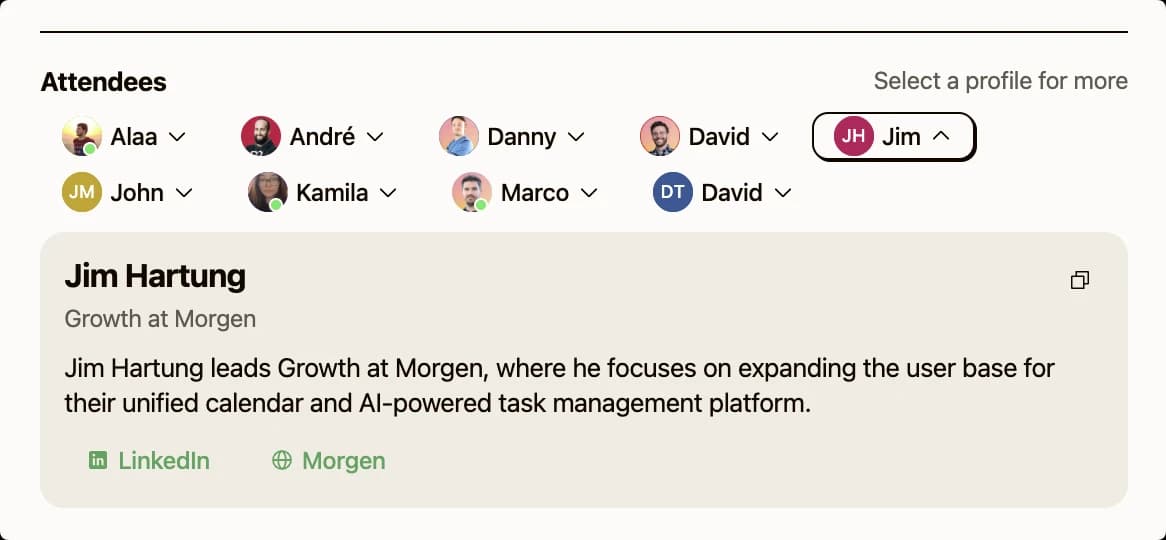
It reads past meetings that share an attendee, email with the attendees from the last 30 days, and the action items those meetings produced. Internal meetings get a brief too, the case Granola skips. With no email history, the Emails section says "No open email threads found" instead of padding. Under the brief, each attendee gets a short profile: role and company, a line or two of background, links to LinkedIn and their company's site, and a marker when you've never met them or haven't in over a month.
If you'd rather the prep came to you, meeting prep dossiers is one of the workflows Kai can run on a schedule before your external meetings, sent the evening before or the morning of, whichever you ask for. Ask Kai is the manual path when you want something the brief left out, and the action items workflow is how a commitment from one call reaches the next brief. The meetings overview covers the rest.
NoteNo invite, no brief. Kai's brief starts from a calendar event with at least one other person on it, the same trigger as every tool in the table above. An unscheduled call still gets a Brief tab with a button to generate one, but with no attendee list there's little for it to work from.
Kai starts with a free trial, then costs $20 per user per month on Base or $50 on Pro, which has 5x the usage (Kai pricing). Briefs come with every plan and draw on the same monthly usage allowance as the rest of Kai.
When this is overkill
Three to five meetings a week, mostly internal, mostly people you know well? You don't need any of this. A glance at the invite is enough, and a system on top creates more friction than it removes.
Mostly recurring one-to-ones with the same five people? Same answer. The context lives in your head.
“My mouse to click "Join meeting". Anything beyond that I don't have the time, desire, nor ROI to bother.”
u/___Art_Vandelay___, r/ProductManagement, 6 November 2025The break-even sits somewhere around ten to fifteen external meetings a week with a rotating cast. That figure comes from practitioner threads and conversations with users rather than our own calendar, which is mostly internal, so treat it as a starting point.
FAQs
What is AI meeting preparation?
Using AI to assemble the context for an upcoming meeting before it starts: who's on the call, what you last discussed, which commitments are open in each direction, and what a good outcome looks like. It's the inverse of an AI note-taker, which records what already happened.
What's the difference between AI meeting prep and AI meeting notes?
Notes are a record made after a meeting ends. Prep is the brief you read before it starts. Most popular tools began as notes tools; several now do both, but the prep half is usually gated behind a higher plan or restricted to certain meeting types.
Which AI tools actually generate a pre-meeting brief?
Granola, Read AI, Microsoft 365 Copilot, Wispr Notetaker, Fireflies, Fellow, Gong, Oliv and Jump all write one on their own. Each restricts it: Granola to Business and Enterprise plans on Google Calendar, Read AI to recurring meetings, Copilot to Copilot users, Fellow to its Business and Enterprise plans, Fireflies to AI credits, and Gong, Oliv and Jump to sales and advisory teams. Check the restriction before the feature list.
Can ChatGPT do meeting prep?
Yes, as far as its context reaches. OpenAI's models can read Gmail, Google Calendar and Outlook through its connectors, and Claude connects to Gmail and Google Calendar too, though it "only accesses your data when you explicitly ask" (Anthropic). A chatbot preps the meeting you remember to ask about. Nothing arrives before the one you forget.
How long should a pre-meeting brief be?
Sixty to ninety seconds of reading. Who they are, when you last spoke, what's open, what you owe them, one line on the desired outcome. Half a page at most. Longer than that and you'll skim it and miss the part that mattered.
Does a prep tool need access to my email?
For the relationship half, yes. Most of the value is knowing where you left things, and that history lives in your mailbox. A calendar-only tool can tell you who's on the call but not what you last promised them. Several tools ingest the mailbox for other features without feeding it into the brief, so it's worth checking what the brief itself draws on.
Is this different from a CRM like HubSpot or Salesforce?
A CRM stores what happened. A prep tool surfaces what to do next, in the right format, at the right moment. They complement each other, and several prep tools read the CRM as a source. The gap a CRM leaves is the person-level history that never got logged, which is most of it.
Should I prep for every meeting?
No, and trying to is the fastest way to abandon the habit. Brief the external meetings with people you barely know, anything over 45 minutes, and anything with a real decision attached. Everything else gets a glance. And for the handful that genuinely matter, block real time and do the thinking yourself.

What to read next
How to Run a Meeting in 2026: The Workflow That Actually Works
Learn how to run a meeting in 2026. Decide it should happen, ship a pre-read, run a 30-minute decision sprint, leave with action items owned.
One Year of Building With AI
Issue #016 of How We Grow: Jim's first year at Morgen, told through the models we built with, what each new one changed, and how the growth job looks when one person can ship a project in a day.
How We Built Onboarding Emails With Claude
Issue #015 of How We Grow: the 6 onboarding emails Lambert built for Kai, where their content came from, how Claude built them in Intercom without anyone clicking through it, and what the first numbers say.