


Key Takeaways
- David picked the topics from usage data. He spent a week in Amplitude on what new users ask Kai and where they drop off, and Lambert turned that into 6 emails.
- The one personalized email does most of the work. It tells you how many emails need you, 2 hours after you connect your inbox. By mid-September it had 14 people clicking. The other five together had 11.
- Nobody on the team works in Intercom. Claude writes the emails as HTML, then drives Intercom through Chrome to build the sequence and send the tests, and it writes down every mistake so it doesn't make it twice.
- Now anyone can ship an email. David asked for a warning at 90% of the trial and got one. A "you haven't connected your inbox" email got 2 of its first 22 people to connect.
- The emails show up after people have already activated. Most new users do their first real thing in Kai within minutes, so the emails are really about the days after, and the last two aren't pulling their weight yet.
Introduction
This is How We Grow, where we write up what we're doing to grow Kai. We're two weeks out from Product Hunt, and this week was Lambert's topic: the onboarding emails he built, and the fact that he built them without really touching Intercom.
A bit of background first. Back in issue #010 I rebuilt the onboarding inside the app, the screens you go through on day zero. That gets people connected and gives them a first look around. But we kept seeing users who never found a feature, or found it and didn't get it. And the app can only teach you something if you open it. Email is how you reach the people who don't.
Prefer to watch or listen? Here's the full episode
Where the emails came from
It started with a How We Grow episode
Lambert says the whole thing goes back to #010. After we recorded it, he and David got talking and realised we'd been ignoring a channel. Email's one of the only ways we reach people outside the app, and we weren't really using it.
Around the same time he was trying out Wispr Flow and Lindy, so their onboarding emails were landing in his inbox. Lindy's are basically plain text with an image. Wispr Flow's are properly designed, and they kind of start the product experience right there in your inbox. Lambert's reaction was "I want to go back and try this." So that became the bar. People get loads of these emails, and ours had to be worth opening instead of going straight to the bin.
David's week in Amplitude
What goes in the emails came from David. He spent a week in Amplitude looking at two things: what people ask Kai in their first 3 days, and the moment people stop using it. He came back with the topics worth teaching, things like meetings, workflows and the morning brief.
Mapping it out with Claude
Lambert took David's analysis into Claude, together with our knowledge base, and worked through the rest with it: what order the emails go in, how long the journey should run, what each one says. He's pretty upfront that he'd never built an email journey before, and he got some of the mapping and wording wrong at first.
The first idea was actually a fully personalized journey. Say you already draft emails in Kai. Then you don't need the email about labels and drafts. You'd get the one about meeting notes instead, because you've never recorded a meeting. We parked that. You need a branch for every feature and a lot more iterating, and we wanted to get data from a simple version first.
One personalized email, then five that tell a story
Email 1 counts what needs you
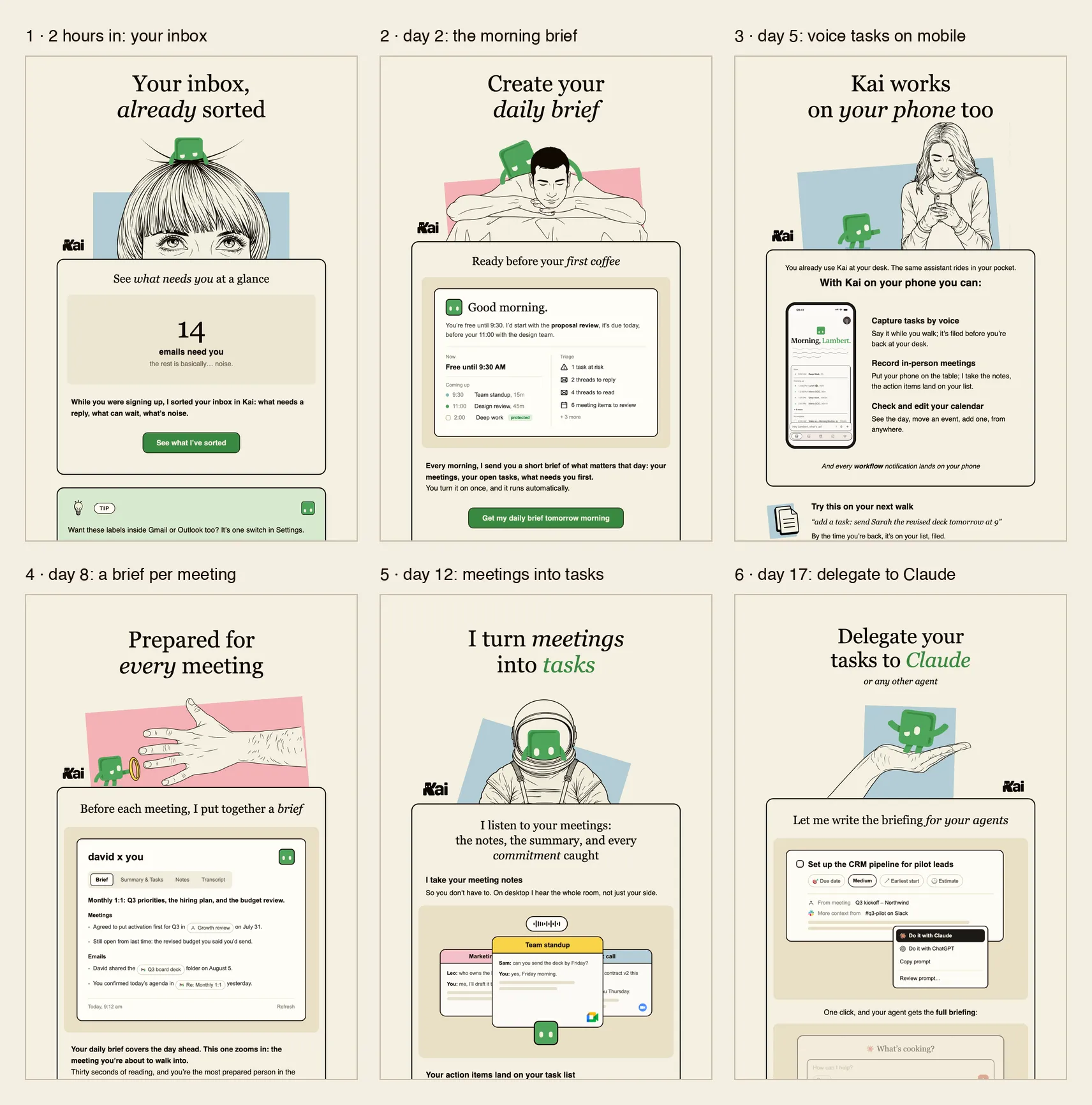
The first email is the only personalized one. When someone connects their inbox, Kai sorts it, and 2 hours later the email tells them how many of their emails need a reply. That one needed a bit of engineering, because the number comes from each person's actual inbox.
Email 1. The number is the user's own. If we don't have it, it falls back to "A few emails need you".

It works because you see "14" and you immediately want to know which 14. It's our best email by every measure we have.
The other five follow a day with Kai
Everyone gets the same five after that, and together they tell a little story about a day with Kai. Here's how the sequence runs today:
- 2 hours in: your inbox. How many emails need you.
- Day 2: the morning brief. A short rundown of your day, every morning.
- Day 5: Kai on your phone. Add tasks by voice while you're out on a walk.
- Day 8: a brief before every meeting. What you agreed last time and what's still open.
- Day 12: meetings into tasks. Notes, a summary, and the action items on your task list.
- Day 17: hand tasks to Claude. Kai writes the briefing and your agent does the task.
All six onboarding emails. The top of each one, in the order they send. Click to open it full size.
Lambert calls this a first shot, and it's already changed once: on 15 September we slowed the whole thing down by a day, which is where the timings above come from.
How Claude built them without anyone opening Intercom
Our emails send from Intercom, and if you've ever tried building a designed email in there by hand, you know it's slow and pretty painful. Claude does have an Intercom connector, but it can only read. It can't create an email or a sequence. So Lambert gave it a browser instead.
He started by letting Claude loose in our Intercom workspace with Claude in Chrome. It went through every setting, tried out what each feature does, and wrote the whole lot up in our knowledge base. From there it told him how to build the onboarding: a Series, which is Intercom's word for a sequence where something triggers the first email and each next one waits a set amount of time.
The design started in Canva. Lambert sketched a few ideas there and gave Claude the onboarding emails from Wispr Flow, Lindy, Fyxer and a few other productivity apps to look at. They landed on 2 or 3 patterns, and Claude turned those into HTML emails using our design system.
Then Claude went back into Chrome, pasted the HTML into Intercom, built the Series and sent test emails, and Lambert checked them in his inbox. Whenever he spotted a mistake, Claude wrote it down in the knowledge base so it wouldn't happen again. So the process gets a bit better every time someone uses it.
From the first round of feedback to a finished version took 1 or 2 weeks. Most of what the team came back with was wording and small details.
Now anyone on the team can ship one
Because all of that is written down, the next email doesn't need Lambert at all, and two have gone out since the journey.
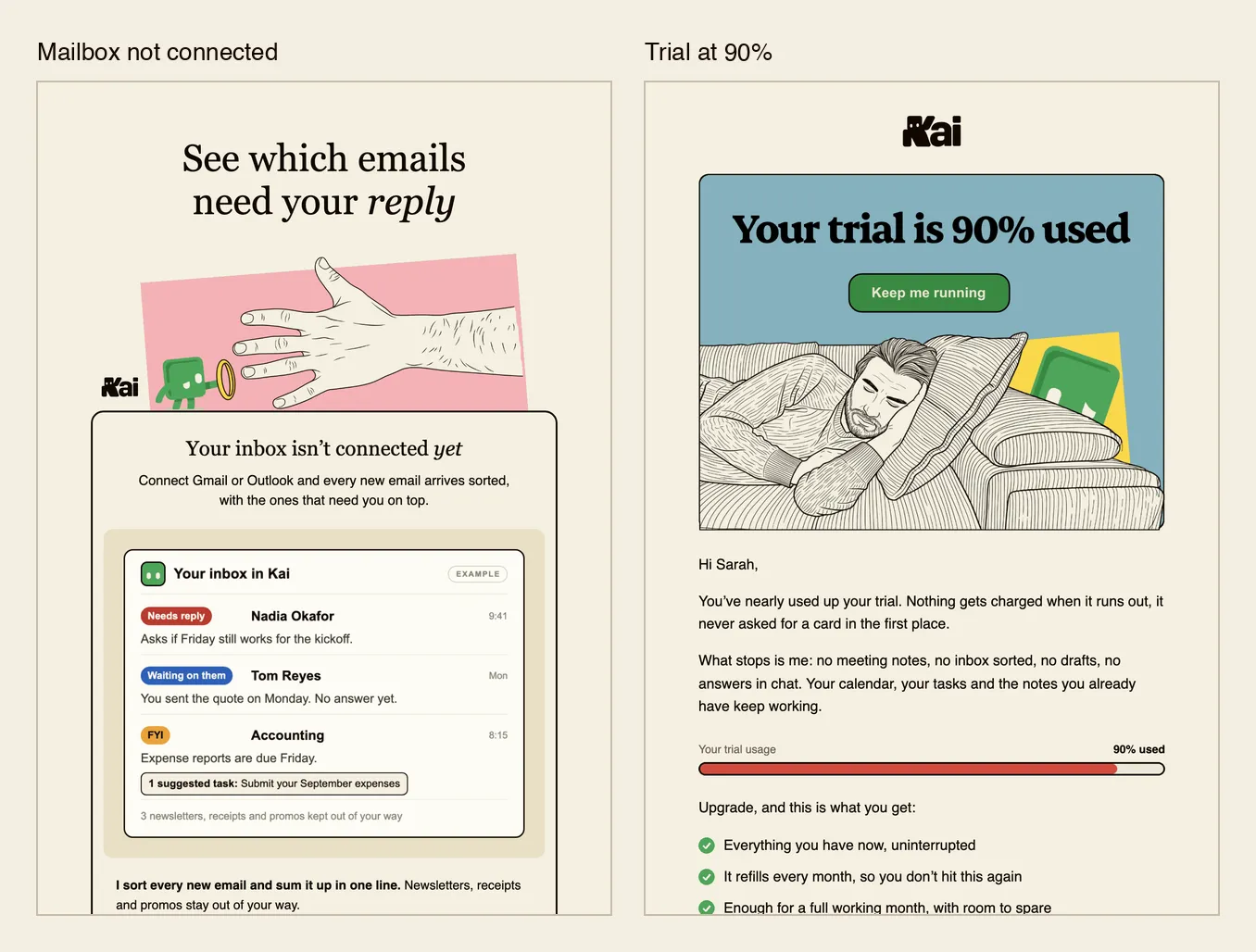
Trial at 90%. David noticed loads of users hitting 90% of their free trial credits without realising, and asked for an email warning them so they could upgrade before Kai stops working for them. Lambert took the notes from that meeting in Kai, handed them to Claude, and the email's now live for anyone who crosses 90%.
Mailbox not connected. David also flagged people who sign up and then never connect their inbox. Without an inbox Kai has nothing to work with, so this email shows them what it would do if they connected one. It went live on 16 September, and Lambert pulled up the numbers while we were recording: of the first 22 people who got it, 2 went on to connect their inbox and calendar.
The two emails outside the journey. Each one fires on its own trigger.
How we tell if they're working
What we really want to move is activation. The idea is to compare before the emails with after. But we ship changes to the app and the website every week, so if activation goes up, we can't just say it was the emails. That's why every email also gets looked at on its own: who opened it, who clicked, and whether they hit the goal we set in Intercom. For most emails the goal is just coming back into the app. For "mailbox not connected" it's connecting the inbox.
Lambert had a good point on feedback, too. Asking the team only gets you so far, because we all use Kai every day and each of us would squeeze our own favourite feature into the onboarding. Danny might use something constantly that most new users will never need. So he sent the drafts round, then had to separate what actually needed fixing from what was just personal taste. These days the data does that job for him.
What the numbers say. Here's how the journey looked up to 15 September, with our own team and test accounts taken out. Email 1 went to 89 people and 14 of them clicked, mostly through to the inbox it had just counted for them. Emails 2, 3 and 4 went to about 80 people each and had 4, 4 and 3 people clicking. Emails 5 and 6 got no clicks at all, from 36 and 27 people, and the sixth picked up an unsubscribe.
When an email gets nothing, Lambert takes it back to the team with the numbers and asks what's wrong with it. Is it the wrong feature, the wrong information, or is it just a bad email?
The honest caveats
- Most people activate before the first email even arrives. Of the new users who did something real in Kai in their first week, 26 out of 28 did it before email 1 got to them, typically about 3 minutes after they first opened the app. So the emails can't take credit for activation. Their job is the days after that.
- We can't see a lift yet. People who clicked email 1 were more active afterwards, but its button takes you straight into your inbox, and using the inbox already counts as activity. We don't have a clean read yet on whether the emails change what people do.
- The end of the journey isn't earning its place. People open emails 5 and 6 and don't click. Maybe they come too late, maybe it's the wrong features, maybe it's just too many emails.
- The numbers are small. 89 people got email 1 in our read, and 22 had got the "mailbox not connected" email when Lambert checked. 2 out of 22 is a nice start, but it's not a rate yet.
What's next
Right after we finished recording, the team sat down for another onboarding meeting. It never really stands still. Whenever we spot a problem now, an email is one way to fix it, next to changing the app or the website.
On the emails themselves, emails 5 and 6 are first in line for a rework. The personalized journey comes back once the simple version has taught us which branches are worth building.
And Product Hunt is in two weeks. Lambert's been heads down on the launch and its video, so that's his topic for an upcoming episode.
If you want to follow along, the whole series lives at How We Grow, and the changelog shows what we ship week to week. Sign up and each issue lands in your inbox, along with early access to what we're building.

What to read next
8 Rules We Learned for Day-Zero Onboarding
Issue #010 of How We Grow: Jim rebuilt Kai's onboarding in four days, made connecting an email compulsory, and explains why he'd ignore the before-and-after numbers it produced.
How We Built a Rival Ad Board With Claude
Issue #014 of How We Grow: why we pay for traffic, how Jim runs Kai's Google and Meta ads by talking to Claude, and the board of 324 competitor ads Claude collected to feed our next creatives.
How We Film Our Product With Claude
Issue #013 of How We Grow: the homepage wasn't converting, so Lambert built a Claude skill that films Kai from our own codebase. The two options he ruled out, how the skill works, and what the first homepage test said.