


Key Takeaways
- Superhuman is a keyboard-first email client you move into. Fastest way to process mail yourself: 100+ shortcuts, split inbox, Ask AI. No meeting notes, $30-40/user/mo.
- Fyxer is an AI layer over your existing Gmail or Outlook. It pre-sorts mail into labels, pre-writes drafts in your tone, and includes a meeting notetaker. $30-50/user/mo.
- The real fork: Superhuman makes every decision faster, Fyxer removes some decisions but you review its output. Pick by which half of email you want to keep.
- Kai handles the third case: email, meetings, and tasks as one job. Triage lands before you open the inbox, drafts wait in your voice, commitments become tasks. Free trial, then $20-50/user/mo.
Verified 2026-07-07 against the official pricing pages.
Fyxer and Superhuman get compared constantly because both promise to fix email. They fix opposite halves of it. Superhuman sells a faster cockpit: a keyboard-first email client you move into and pilot yourself, one keystroke at a time. Fyxer sells a copilot: an AI layer that stays inside the Gmail or Outlook you already use and does the first pass before you show up.
Choosing between them is choosing which half of email you keep doing by hand. Three of us have used both tools, we ran a fresh Fyxer trial this week, and we build an AI executive assistant in this same category. This is the comparison we wanted to read before anyone paid for either.
Fyxer vs Superhuman: a brief overview
 Fyxer Fyxer |  Superhuman Superhuman | |
|---|---|---|
| What it is | AI layer inside your existing Gmail/Outlook | Standalone email client on top of Gmail/Outlook |
| Core promise | Fewer emails to touch: pre-sorted, pre-drafted | Process everything yourself, twice as fast |
| AI drafts | Trained on your last 300 emails, land in your drafts folder | Write with AI, Auto Drafts on Business tier |
| Triage | 8 fixed categories as Gmail/Outlook labels | True split inbox + auto labels |
| Meeting notes | Yes: bot joins Zoom, Meet, Teams | None |
| Mobile | No dedicated app | Native iOS + Android |
| Starting price | $30/user/mo ($22.50 annual) | $30/user/mo ($25 annual) |
| Free plan | None (7-day trial, card required) | None (mandatory onboarding call) |
| Data training | Never trains AI models on your data | Trains Grammarly's models unless you opt out |
Fyxer, Superhuman, or neither? Pick in 30 seconds
Four questions. Weighted scoring. Honest routing: we recommend Kai when the real problem is the work around email, and a competitor when it isn't.
Question 1 of 4What do you actually want to change about email?
This is the cockpit-vs-copilot fork. It matters more than any feature.
Who is Fyxer best for?
Fyxer is built on one bet: you don't want a new email app, you want your current inbox to require less of you. It connects to Gmail or Outlook, sorts incoming mail into categories like To Respond, FYI, and Marketing, and drops pre-written replies into your drafts folder in your own tone.
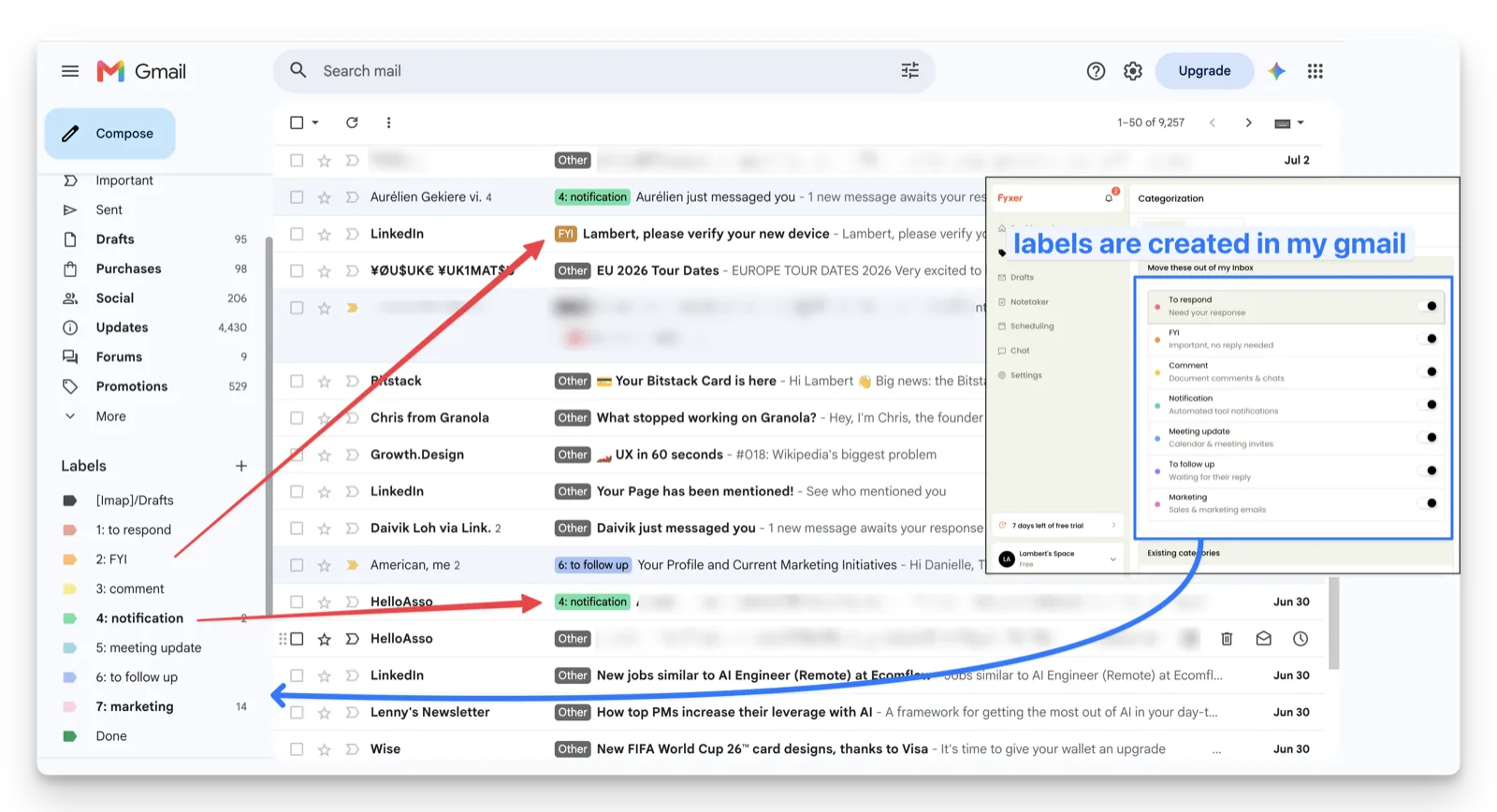
We connected a test Gmail account this week. The seven labels appeared in the sidebar within minutes and mail started arriving pre-categorized, which matches what one of our teammates found in his own two-week trial: the labeling is genuinely good.
- High-volume inboxes with repetitive replies. Consultants, founders, and account managers who answer similar emails daily get the most from tone-trained drafts.
- People who live in a lot of meetings. The notetaker joins Zoom, Google Meet, and Microsoft Teams and drafts the follow-up email for you. Superhuman has nothing comparable.
- Anyone allergic to new tools. There is almost no learning curve because nothing about your inbox UI changes.
Not for: anyone who dislikes bots in their calls. That same teammate liked the labeling but stopped using Fyxer in meetings because of the bot. Also not for mobile-first users: there is no dedicated Fyxer app, so you manage everything through your existing mail apps, as noted in this independent review.
Who is Superhuman best for?
Superhuman is a different philosophy: you keep doing all of email yourself, and the product makes each action nearly instant. Every action is a keystroke, threads auto-summarize, and the split inbox separates VIPs from noise. Since the Grammarly acquisition (announced July 2025, terms undisclosed), the email client lives inside the broader Superhuman Suite.
- Keyboard-first power users. If you enjoyed learning Vim or Raycast, Superhuman's 100+ shortcuts will feel like home.
- People who process 100+ emails a day themselves. The company's whole pitch is speed of manual processing, and users genuinely hit daily inbox zero. One of our teammates did, every day of his trial.
- Mobile-heavy professionals. Native iOS and Android apps, which Fyxer simply does not have.
Not for: anyone unwilling to learn a new tool. Our teammate's experience captures the tradeoff: daily inbox zero and commands he liked, but some important emails landed somewhere hard to find. And in our onboarding calls for Kai, a former Superhuman user (an AI consultant) told us it was expensive for what he ultimately used it as: a clever combination of shortcuts.
Price
Fyxer
| Plan | Monthly | Annual (per user/mo) | Key gating |
|---|---|---|---|
| Starter | $30 | $22.50 | 1 inbox + 1 calendar, drafts, notetaker |
| Professional | $50 | $37.50 | Multiple inboxes, Fyxer Chat, HubSpot, file training |
| Enterprise | Bespoke | Bespoke | 50-seat minimum, SSO |
Source: fyxer.com/pricing, verified 2026-07-07.
The 7-day trial requires a card up front, and Fyxer's Trustpilot profile shows a cluster of one-star reviews about trial-to-billing surprises, so set a calendar reminder before day seven.
Superhuman
Pricing is genuinely confusing post-acquisition because email is sold two ways: standalone Superhuman Mail, or the Superhuman Suite (Grammarly + Coda + Mail).
| Plan | Monthly | Annual (per user/mo) | Includes Mail? |
|---|---|---|---|
| Suite Pro | $30 | $12 | No, writing and docs only |
| Suite Business | $40 | $33 | Yes, full Mail + CRM integrations |
| Mail Starter (standalone) | $30 | $25 | Core Mail, most AI features |
| Mail Business (standalone) | $40 | $33 | Auto Drafts, Ask AI, custom labels |
Source: superhuman.com/plans and the official pricing help page, verified 2026-07-07.
Two catches worth knowing before you commit: there is a mandatory onboarding call before you can start, and annual plans are non-refundable except where the law requires it.
Verdict: Fyxer wins on entry price, Superhuman punishes hesitation. Fyxer's $22.50 annual Starter undercuts everything Superhuman sells, and you can test it in an afternoon. Superhuman asks for a call, then $300+ per year, non-refundable. Neither has a free plan.
AI drafts in your voice
Fyxer
Drafting is Fyxer's flagship. It trains on your 300 most recent emails and writes replies that land as normal drafts in Gmail or Outlook, ready to review. Professional users can upload style guides to steer it further.
The catch is the gap between promise and week one. Another teammate ran Fyxer for a full month, and his one real complaint was the lack of context and poor simulation of his tone. That matches the pattern on Fyxer's Trustpilot profile, where the recurring negative alongside billing is drafts that miss the mark. Users who stick past the 2-to-3-week learning window report much better results.
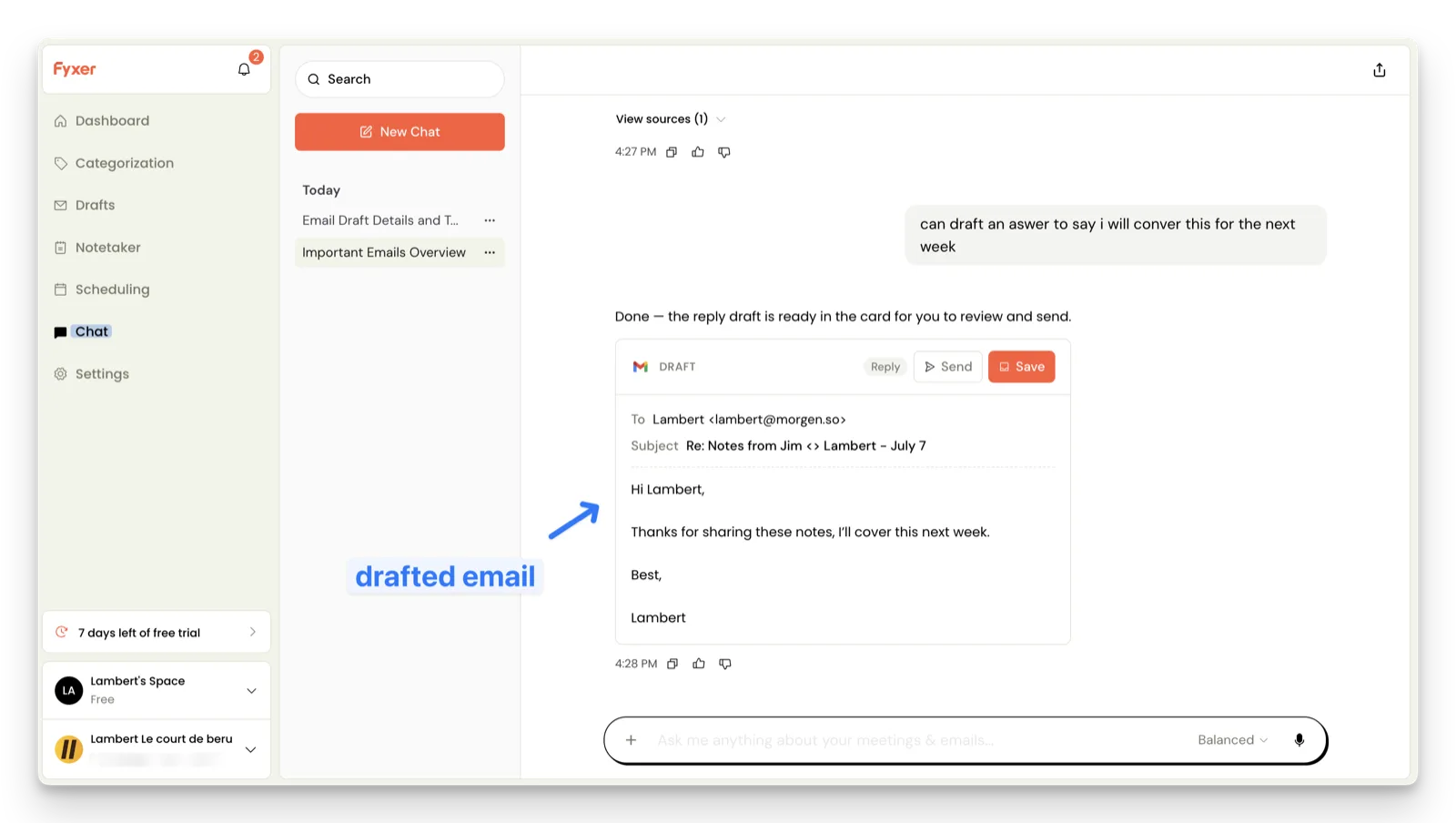
In our own trial the draft workflow held up: we asked Fyxer in chat to draft a reply saying we would cover the topic next week, and the finished draft appeared as a card, addressed, subject-lined, ready to send or save. Other parts of the same chat did not hold up. It placed us in the wrong timezone (insisting it was morning in New York while its own message timestamps read 4:00 PM), it could not see an email that had arrived minutes earlier, and it could not open a Gmail link pasted into its own chat window.
Superhuman
Superhuman's Write with AI generates text in your voice, Instant Reply offers one-click short answers, and the Business tier adds Auto Drafts, which pre-writes full replies. Auto Summarize condenses long threads.
The difference is where the work starts. Superhuman's AI is a tool you reach for while processing mail yourself. Fyxer's drafting happens before you arrive.
Verdict: Fyxer wins if you want drafts waiting, Superhuman wins if you want help while you type. Both need weeks to sound like you, and neither sends anything without your approval.
Inbox triage: labels vs a true split inbox
Fyxer
Fyxer sorts mail into roughly eight fixed categories (To Respond, FYI, Comment, Notification, Meeting Update, To Follow Up, Marketing, Done). You cannot create your own categories, though you can pin senders to a category with custom rules. Everything happens through native Gmail/Outlook labels, so your existing clients and filters keep working.
Since April 2026 Fyxer also auto-archives threads after you reply, closing an old gap. Worth knowing: Superhuman's own comparison marketing still lists that as missing from Fyxer. Vendor tables go stale, on both sides.
Superhuman
Superhuman's split inbox is a real split, purpose-built UI rather than labels, with auto labels and custom auto labels on Business. Combined with shortcuts, this is the strongest triage cockpit on the market. It is also where the mis-filing problem lives: auto-filed mail is only as good as the filing, and a mis-filed important email is worse than an unsorted one.
Verdict: Superhuman wins on triage UI, Fyxer wins on staying out of your way. If you want to drive the sort yourself with the best controls available, Superhuman. If you want the sorting done for you inside the inbox you already have, Fyxer.
Meeting notes
This one is short. Fyxer bundles an AI notetaker that joins Zoom, Google Meet, and Microsoft Teams, produces summaries and action items, and drafts the follow-up email. Reviewers consistently rate it Fyxer's strongest feature. Superhuman has no meeting transcription at all, as we noted in our Superhuman pricing breakdown on morgen.so. If you want meeting notes with Superhuman, you are buying a second tool, and probably reading our Fathom vs Otter comparison next.
One honest caveat from our own team: the notetaker is a visible bot in the participant list. The teammate who liked Fyxer's labeling still would not use it in meetings, because he did not want a bot joining his calls. If that is you, see how botless capture works instead.
Verdict: Fyxer wins by forfeit. It is the only one of the two that does meetings. Whether you want its bot in the room is a separate question.
Integrations, platforms, and support
Fyxer
Gmail and Outlook only. No IMAP, no Apple Mail, no dedicated mobile app, and one CRM integration (HubSpot, Professional tier). Support is AI-first, which frustrated users on Trustpilot report as hard to escalate. If your stack is Outlook-centric, our guide to AI for Outlook email maps this landscape more broadly.
Superhuman
Gmail and Microsoft 365 only (no Yahoo, iCloud, or IMAP), but within that: native iOS and Android apps, HubSpot, Salesforce, and Pipedrive on Business, plus the Grammarly and Coda surface via the Suite. Onboarding is white-glove by design.
Verdict: Superhuman wins on platform breadth and support depth. Fyxer's narrowness is partly the point (it lives inside tools you already have), but mobile-heavy or CRM-heavy teams will feel the walls.
Privacy and data training
The clearest factual difference in this comparison, and the one buyers skip most often.
 Note
NoteFyxer states your data is never used to train AI models, full stop, and that it never sends email on your behalf. SOC 2 Type II, ISO 27001, GDPR.
Superhuman, now under Grammarly's privacy policy, does use your content to train its own models unless you opt out in account settings. It restricts third-party LLM providers from training on your content. SOC 2 Type 2, GDPR.
Neither company sells your data, and both are far more certified than the average AI startup. But if "my email trains someone's model" is a dealbreaker, the defaults differ: Fyxer's answer is never, Superhuman's is unless you opt out.
Verdict: Fyxer wins on defaults. Superhuman users should spend the two minutes to find the Product Improvement and Training toggle.
What users actually say
Superhuman rates around 4.6 out of 5 on G2 across 14,000+ reviews, with praise concentrated on speed and design. The sharpest recent criticism clusters on its small Trustpilot profile, where reviews describe the AI getting slower after the acquisition:
“The AI is very very slow, it takes me a couple of minutes just to open the mail. Terrible.”
Trustpilot review, July 2025“Cannot cancel subscription by myself. Huge redflag.”
Trustpilot review, February 2026Fyxer averages around 4.1 out of 5 on Trustpilot across 650+ reviews, and the distribution is unusually polarized: five-star reviewers describe an hour saved daily and inboxes cleared for the first time in years, one-star reviewers describe billing surprises and mislabeled mail.
“With an inbox that sometimes reaches 150 emails a day, Fyxer truly makes a difference. All messages are neatly categorized, and draft replies are prepared and ready for review.”
Trustpilot review of FyxerThe most interesting datapoint we found: one Trustpilot reviewer left Fyxer after six months and found instant relief in Superhuman. The two products attract refugees from each other, which supports the core point: they solve different problems.
How to choose an AI email assistant
1. Decide who does the work: you, faster, or the tool, first
Superhuman assumes you want to stay the operator. Fyxer assumes you want to review instead of write. Neither is wrong, but be honest about which describes you: buying Superhuman when you hate processing email means paying to do a chore faster. If what you actually want is the chore done before you show up, that is a different product category, closer to an AI executive assistant than an email client.
2. Count the tools you are replacing, not the price tags
Fyxer at $37.50 bundles a meeting notetaker that would cost $15-20 on its own (compare the Otter alternatives landscape). Superhuman at $33 bundles Grammarly and Coda via the Suite. And if your real cost is meetings plus email plus the tasks they generate, tools that treat those as one job (like Kai, with meeting prep and action items built in) replace more line items than either.
3. Test the failure modes, not the demo
Every AI email tool demos beautifully. The differences show up in week two: a mislabeled investor email, a draft that sounds nothing like you, a chat that thinks you live in New York. Run a real trial on a real inbox before an annual commitment, especially with non-refundable plans.
Kai: when email should be handled, not just faster
Fyxer made the same architecture bet we did: stay inside Gmail and Outlook rather than build another client. Where we differ is scope. Fyxer treats email and meetings as the job. We think the job is everything your emails and meetings create: the replies owed, the commitments made, the tasks that land on your calendar. That is what Kai is built around.
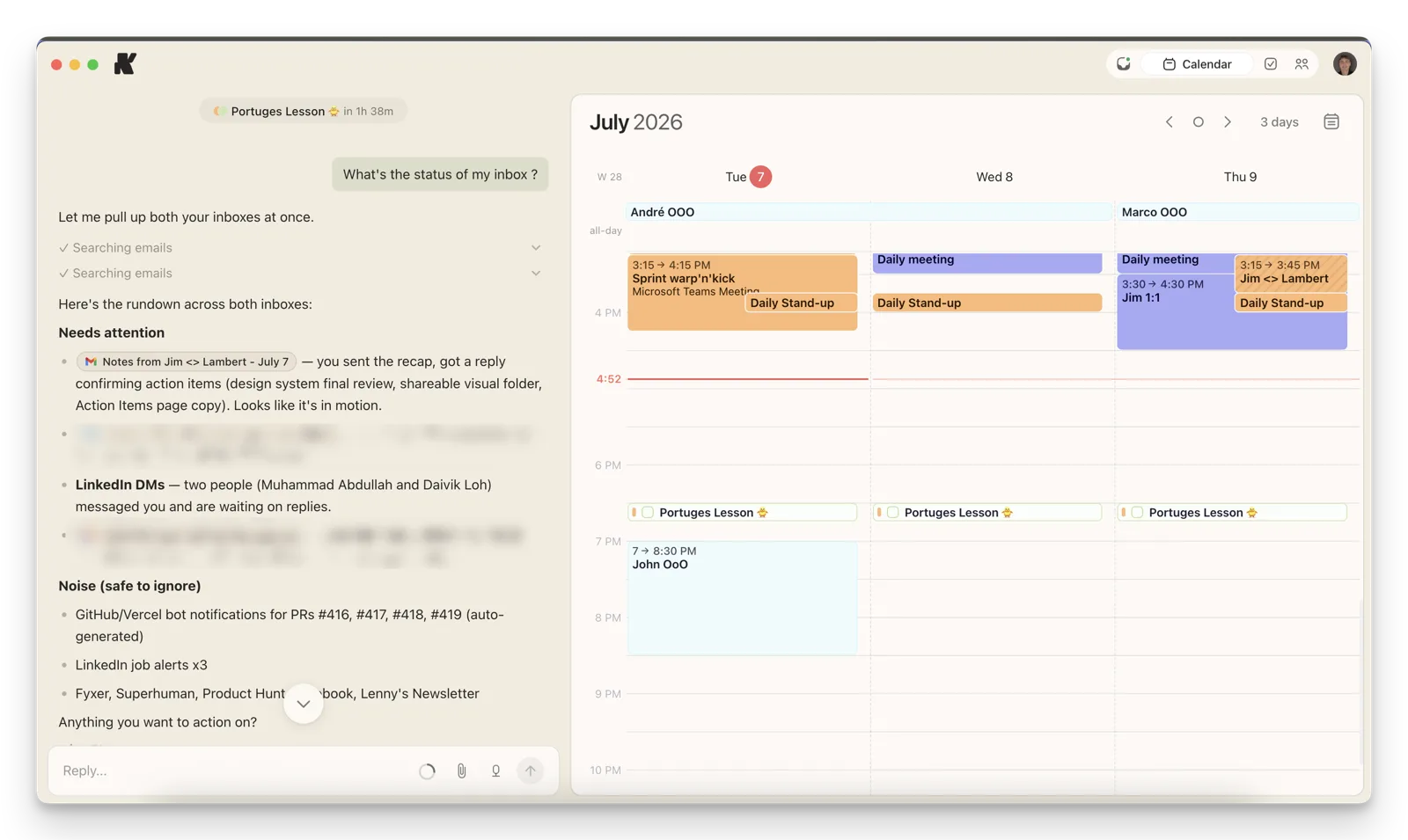
This is our own morning routine, not a mockup. You ask Kai what needs you, and it has already been through both inboxes: what needs a reply, what is noise (it files Fyxer's and Superhuman's marketing emails under "safe to ignore", which we find funny), and what should become a task.
Three things Kai does that neither Fyxer nor Superhuman does:
- Triage before you open the inbox. Kai's email triage categorizes what needs you and briefs you on it, so the first touch of the day is a summary, not a scroll.
- Email commitments become tasks. "Can you send the proposal by Friday" becomes a task with a due date, connected to your calendar and meeting follow-ups. Fyxer drafts the reply; Kai also tracks what you promised in it, and a scheduled promise tracker brings back the ones you haven't delivered, before the deadline you named.
- Meetings without a visible bot. Kai captures meetings without joining the participant list, the exact objection that kept part of our team from using Fyxer's notetaker.
Honest limitations: Kai works with Gmail and Outlook only, and doesn't file your mail on its own: nothing gets sent, moved or deleted unless you say so. If you want auto-filing, Fyxer does that and Kai deliberately does not. And tone takes real input: in our own early use, drafts missed our voice until we filled out Kai's memory, and we had to do part of that by hand before the current memory system existed.

Which one should you choose?
- Choose Superhuman if you want to stay the operator of your inbox and become fast enough that email stops hurting. Best keyboard-driven client there is, no meeting notes, opt out of model training.
- Choose Fyxer if you want your existing inbox pre-sorted and pre-drafted, and a meeting notetaker in the same subscription. Budget 2-3 weeks for the tone to land, and mind the trial billing.
- Choose Kai if email is only one piece of the coordination you want off your plate, and you want triage, drafts, meetings, and tasks handled as one job. You will be early: it's a young product, and it is opinionated about never touching your mailbox. It starts with a free trial and no card, then costs $20 per user per month on Base (below both entry plans, even billed annually) or $50 on Pro, which has 5x the usage.
All three are honest products for different users. If you are still mapping the space, our Superhuman alternatives roundup covers the wider field, and the Kai vs Fyxer comparison goes deeper on that pair.
FAQs
Does Fyxer send emails without your approval?
No. Fyxer states it never sends email on your behalf. It writes drafts into your Gmail or Outlook drafts folder, and every send requires you to review and click send yourself.
What happened to Superhuman after the Grammarly acquisition?
Grammarly announced the acquisition in July 2025 (terms undisclosed), then rebranded the parent company to Superhuman in October 2025. The email client is now "Superhuman Mail" inside the Superhuman Suite alongside Grammarly and Coda. New Suite users need the Business tier to get email.
Can you run Fyxer and Superhuman at the same time?
Technically yes: Fyxer works at the mailbox level, so its labels and drafts appear in any client, including Superhuman. In practice you would pay $55+ per month for two tools drafting replies to the same emails. Pick the philosophy you believe in first.
Does Fyxer have a mobile app?
No dedicated app. Fyxer's categories and drafts live in your mailbox, so you see them in the normal Gmail or Outlook mobile apps, but the Fyxer dashboard and chat are desktop-web only, per independent reviews.
Do Fyxer or Superhuman work with Yahoo, iCloud, or IMAP accounts?
No. Both support Gmail and Microsoft 365 only. That is also true of Kai. If your email lives on IMAP, none of the three tools in this comparison will connect to it today.
How long does Fyxer take to sound like you?
Fyxer trains on your 300 most recent emails at connect, and reviewers consistently describe a 2-to-3-week window before drafts reliably match their tone. Judging it on day two, as part of our team once did, undersells it.
Is there a free version of Fyxer or Superhuman?
No free plan on either. Fyxer offers a 7-day trial that requires a card. Superhuman requires an onboarding call and paid signup, with non-refundable annual billing. Kai doesn't have one either: it starts with a free trial, no card needed. After it, Kai is $20 per user per month on Base or $50 on Pro.

What to read next
7 Best Superhuman Alternatives & Competitors (Reviewed for 2026)
Compare the 7 best Superhuman alternatives in 2026: pricing, features, user reviews, and which email client best suits your workflow.
How We Built Onboarding Emails With Claude
Issue #015 of How We Grow: the 6 onboarding emails Lambert built for Kai, where their content came from, how Claude built them in Intercom without anyone clicking through it, and what the first numbers say.
How We Built a Rival Ad Board With Claude
Issue #014 of How We Grow: why we pay for traffic, how Jim runs Kai's Google and Meta ads by talking to Claude, and the board of 324 competitor ads Claude collected to feed our next creatives.