

Key Takeaways
- Score every AI tool on one question: does its output land in Jira, Linear, Notion, your calendar or your inbox without you retyping it? Feature lists do not predict this. Vendor documentation does.
- The gap between marketing and docs is where the answer lives. Granola markets "Turn meeting action items into Jira issues" and files Jira under "via Zapier", with no action-item field in the payload it sends.
- Only 4.1% of product teams use AI-assisted scoring when they prioritize (Product-Led Alliance / ProductPlan, fielded Q4 2025). Plenty of AI output, almost none of it reaching the decision.
- We build Kai, an AI executive assistant. Its route into your stack is an MCP connector, and its wall is that Kai tasks do not sync to Jira or Linear.
Your AI stack produces more than it ever has. Transcripts, summaries, PRD drafts, tagged feedback, working prototypes. And somewhere between all that output and the work actually changing, there is a person doing copy and paste. That person is you.
So this page scores the AI tools for product managers on one dimension the rest of this search result ignores: does the output land in a system where the work already happens, or does it stop inside the tool that made it? Not features, not pricing tiers, not a rubric we invented. We read the official docs and help centers rather than the marketing pages, because that gap turned out to be the story.
We build an AI executive assistant, which is how we ended up caring about this. Routing is the part we work on, and it is the part every listicle waves at.
PMs already judge tools this way
Before the tools, the criterion, because product managers state it themselves and in their own words. From an r/ProductManagement thread on AI tooling:
“the "all in one ai PM tool" demos great, then dies the second your context is split across jira, slack, docs and random calls. the stuff that actually sticks is embarrassingly narrow, like turning messy notes into decisions and next actions. anything broader usually becomes another tab nobody opens.”
u/escalicha, r/ProductManagement, May 2026A commenter in the same thread turns it into a purchase rule: "if a technology speeds up my usual processes without the need to perform anything in another place, then I will keep it. If I need to go somewhere else to generate what I could generate otherwise, then I probably won't adopt it even if its output looks perfect" (u/luodaint). A third: "if I have to 'adopt' it, it dies in a week" (u/ThespecialistHare).
Dennis Yang, a generative-AI PM at Chime, compresses it to six words: "The PRD-to-Jira copy-paste is pure tax."
The failure mode has a shape, and it is not that the AI is bad at its job. It is that nobody reopens what it produced.
“honestly most ai notetakers solve the wrong problem. transcription is a solved commodity now. the real issue is that the action items they pull out just die immediately after the call because no one actually executes them.”
u/alexandre-boudot, r/ProductManagement, July 2026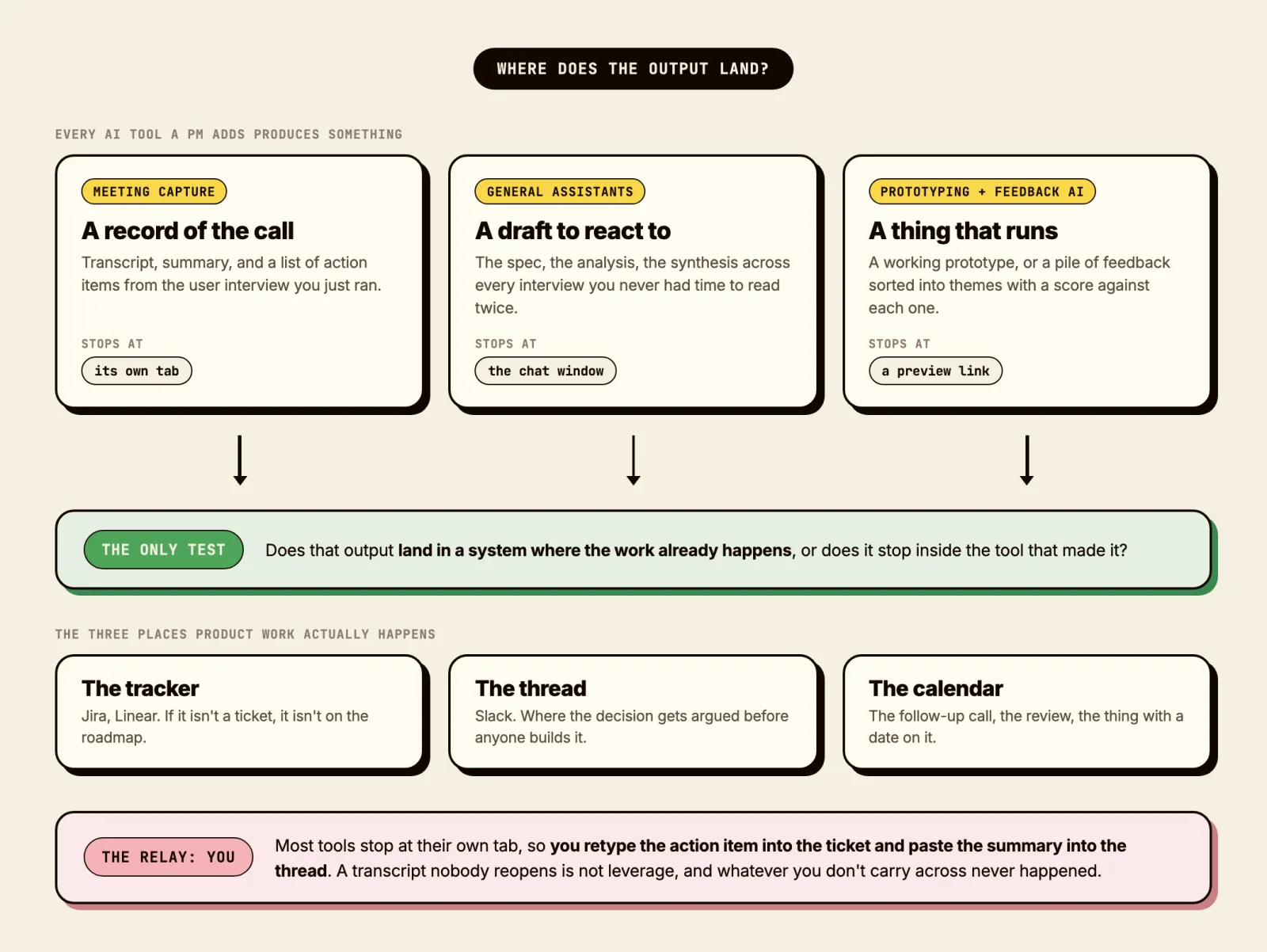
One number puts a floor under it. In Product-Led Alliance and ProductPlan's survey of roughly 250 product professionals, fielded Q4 2025, 4.1% use AI-generated or AI-assisted scoring when they prioritize. Every other AI adoption figure for PMs is vendor-run or drawn from a newsletter audience, and they contradict each other hard: Productboard's enterprise panel reports 100% of product teams using AI tools, the same quarter that ProductPlan found 36.9% using it for limited workflows only. We are quoting the 4.1% because it measures the thing this article is about, and we are telling you who ran it and when.
Meeting capture, where the gap is widest
This is the category with the most tools and the widest spread between what the marketing says and what the docs say.
| Tool | Jira | Linear | Notion | The honest read |
|---|---|---|---|---|
| Fireflies | Native, one-way | Native, one-way | Native, automatic | Real issues in three trackers, each with a link back to the recording |
| Otter | Native, richest payload | Does not exist | Native, manual by default | The best ticket payload here, behind an account manager |
| Fathom | Absent | Absent | Via Zapier or Make | Best raw materials, one native tracker (Asana), you build the rest |
| Granola | Via Zapier | Via Zapier | Native, one click | Notes land, tickets do not |
| Dovetail | "Send to Jira", mechanic undocumented | Native issue creation | Link previews only | The only research repo that writes real Linear issues with the evidence attached |
Fireflies is the one whose documentation describes what a PM actually wants. Its Jira article says it "automatically uses the participant who was assigned the action item in the meeting as the owner for the Jira issue", and carries the mention time plus a link back to the recording. Its Linear integration creates real issues with the action item as the title. One caveat its own docs make: the owner is carried through on Jira, and the Linear article documents no assignee mapping at all.
Granola is the clearest example of the gap, and to its credit it labels the mechanism honestly even while the headline oversells it. Its integrations page files Jira and Linear under "via Zapier", beneath the line "Turn meeting action items into Jira issues". The payload Granola publishes for Zapier carries Title, Creator, Attendees, Calendar event, My Notes, Summary, Transcript and Link. There is no action-item field. That marketed sentence is only as true as a Zap you write to parse summary markdown, and the route needs a paid plan and the desktop app. Our full Granola review covers the rest of the product, which is genuinely good at the part it is good at.
Otter runs the gap in both directions. Its Jira help article describes the richest payload in the category, then ends with "Connect your Otter account manager to get started". Notion export is manual unless an account manager switches on automatic exports. The documented self-serve way to move action items anywhere is a button called "Copy all action items". If capture is the whole job for you, our Otter alternatives roundup compares that category properly.
Dovetail deserves its own line, because research repositories have their own version of this disease. A senior UX researcher titled a thread "Research repository is where Insights go to die", and a commenter supplied the mechanism: "The core issue isn't storage, it's retrieval context. Most importantly: integrate insights into existing product docs so people encounter research where decisions are made." Dovetail is the only tool here that answers that structurally, creating Linear issues with attachment links and rich previews of the source evidence inside the issue.
Worth noticing what the whole category shares: none of these is bad at transcription. Transcription stopped being the hard part. If you want the workflow view rather than the tool view, we wrote how to take meeting notes without typing through the call and how to write meeting minutes worth reading.
The general assistants, and the trap of running four
Most PM AI use is here, and it is the layer where the landing test is easiest to pass, because both major trackers now run their own MCP servers. Linear's is read-write at mcp.linear.app/mcp with tools for finding, creating and updating issues, projects and comments. Atlassian's Rovo MCP can create and update work items from natural language, and its own documentation uses "Create five Jira work items from these meeting notes" as the worked example.
Which assistant to pair with which tracker is decided by that documentation, not by model quality. Linear ships setup instructions for Claude, Claude Code, Codex, Cursor, VS Code, v0, Windsurf and Zed, and as of this writing there is no ChatGPT section. Atlassian documents ChatGPT, Claude, Gemini and GitHub Copilot CLI. So: Jira shop, either works. Linear shop, Claude is the better-documented pairing.
The mistake to avoid is the one Nielsen Norman Group's Laura Klein describes: splitting work across ChatGPT for brainstorming, Claude for analysis and Perplexity for research means "each tool is working with a fraction of the relevant context", and you are the one carrying context between them. That is the ferrying problem again, one level up. One assistant learned deeply beats four learned shallowly.
| Assistant | Jira | Linear | Notion | The honest read |
|---|---|---|---|---|
| Claude | Real writes, via Rovo | Real writes, native MCP | Real writes | Cannot touch Google Calendar or Gmail at all, by its own docs |
| ChatGPT | Real writes, via Rovo | Read solid, write hedged | Contested: docs disagree with each other | Full write MCP is still beta |
| Gemini | Read only from the assistant; a real write exists only in a labelled-Beta Workspace Studio flow | Nothing documented | Nothing documented | Its own help page: integrations "currently only support read actions" |
| Microsoft 365 Copilot | Two different things: Microsoft's connector reads, Atlassian's separate Teams plugin writes | Read-only federated connector | Read-only federated connector | Every PM-tool connector is read-only by design |
Claude and ChatGPT are the two that reach a tracker for real. Claude's gap is Google: "Claude cannot create, modify, or delete calendar events" and "Claude cannot create, send, or modify emails", stated twice in its own docs. ChatGPT's Jira write is real; whether it can read from Company Knowledge and still write is contested between Atlassian's docs and OpenAI's. Gemini and Copilot are read-first by design, not by an oversight you might catch on a future release: Google's help centre states plainly that integrations "currently only support read actions", and Microsoft's federated connectors are "read-only; they can search and fetch content but can't write data back".
 Did you know?
Inside ChatGPT, writing back to a connected service is per-app rather than default. OpenAI's own wording: "Some apps may be able to take actions, such as creating or updating information in a connected service. Availability depends on the app and how it is configured." Read access is not write access.
Feedback and roadmap platforms
These platforms already sit next to the tracker, so you would expect them to win this test outright. Two of them do, one in a way worth copying.
ProdPad has the best structural answer of anything we looked at: its CoPilot writes directly into the Idea description, User Story or initiative, which are the same records that already sync to Jira and Linear. The AI does not produce a document that someone then moves. It writes into the object that travels. Jira gets initiatives as epics and ideas as stories carrying description, notes, specs and acceptance criteria, with status flowing back.
Productboard splits. Its roadmap objects push into Jira as real epics and stories with two-way field sync, on all plans. Its AI output, Spark, does not. The overview page says Spark "exports delivery-ready specs directly to connected trackers"; the support document describing the mechanic says you "link the spec document URL from your issues". Those are different things, and only one of them is a ticket. Productboard's Pulse, which the search results still list as a buying option, is marked "Legacy tool to be retired" in Productboard's own docs.
| Tool | Jira | Linear | Notion | The honest read |
|---|---|---|---|---|
| ProdPad | Native, two modes, needs a paid Ideas tier | Native since mid-2026 | No integration at all | The AI writes into the record that already becomes the ticket |
| Productboard | Native for roadmap objects, all plans. Spark's AI output does not sync | No admin-configured sync; a conversational MCP connector only | Read and search only | Two different products under one name: the roadmap syncs, the AI output does not |
| Airtable | Native automation actions, gated to Business and Enterprise | None | None | The only one here whose AI output can become a ticket, an event and an email unattended, once you build the schema |
| ChatPRD | Absent | Named on the Teams plan, mechanic undocumented | Export only, on the Pro plan | Every write lands back inside ChatPRD's own document store |
ChatPRD is worth naming for what it is not: a PRD writer whose own MCP page lists document tools and names no Jira, Linear or Confluence destination. It writes a document about the work, not the work. If Notion is where your specs live, our Notion review covers Notion AI, and the same test applies: its output lands where you already were, which is genuinely the point of it.
Prototyping, where landing is literal
Replit, Lovable, v0 and Figma Make all turn a spec into something that runs, and "where does the output land" has an unusually clean answer here: a URL your engineers can open.
What we do in practice has drifted away from the dedicated tools. A customer request becomes a branch, built with Claude against the repo, then demoed to the engineers who review it properly. Marketing does this, not only engineering. It is the shortest path we have found from "a user said this" to "someone technical is looking at a real thing", and it needs no new tool because the repo is already the system of record.
| Tool | Where it lands | The honest read |
|---|---|---|
| Claude Code | A branch and a pull request in your repo, plus comments on the issue that triggered it | The only tool here whose default destination is the work itself, not a document about it |
| Cursor (cloud agents) | The repo, via a pull request. Launchable from Slack or Linear with @cursor | Same landing as Claude Code, and the trigger can start where the team already talks |
| v0 by Vercel | A Vercel deployment, and real Linear, Jira or GitHub issues created from comments left on the preview | The one dedicated tool with a documented path from feedback to a populated ticket, and the landing runs through Vercel Comments, not v0 itself |
| Replit Agent | A hosted app and a public URL. Connectors to Linear, Jira and Notion exist, but only when the agent is asked, every time | Best at landing where PM work happens, and nothing lands automatically |
| Lovable | A deployed app and a two-way GitHub sync | Docs promise pushing back into Linear, Confluence and Notion and never define what that creates |
| Figma Make | A public URL and GitHub, one-way | A pure tab-adder: its own support staff confirms a pasted-in prototype does not stay linked to the source file |
Treat the four dedicated prototyping tools as worth surveying rather than automatically buying, and check the claim you are actually paying for. Lovable's docs promise pushing prototypes back into Linear, Confluence and Notion, and never define what that physically creates.
Where Kai fits
We build Kai, an AI executive assistant, and we run our own product loop through it: user calls and onboarding calls captured, action items pulled out, follow-through routed. Twenty-three of those onboarding calls sit in our own repo as transcripts, which is how we know the shape of the problem, and we have gotten the landing test wrong ourselves.
In April, our CTO Danny asked Kai to remind him about a fee payment coming due. Kai wrote itself a private note instead of creating a task, so nothing landed on his calendar. The reminder surfaced the same morning the payment was due, with no room left in his day to act on it.
“If I asked an EA to remind me and they did last minute without planning for it, I would fire them.”
Danny Hatcher, CTO, internal product SlackOur engineer Marco replied that he had not acted on the pattern because Danny's report was the only one he had seen. Our CEO David reframed it as an expectations problem: when Kai creates a private note for itself instead of a task, does anything even show the user that a decision was made. The fix (a task, or a visible notification, never a note only Kai can see) came out of that thread. We are the company that sells the fix to this exact problem, and we found it by living it.
The route a reader can actually switch on is the MCP connector. Kai runs a remote MCP server that any compatible client can add: Claude, Claude Code, ChatGPT. You approve once, and the assistant gets read access to your calendar, tasks, email threads, meeting sessions with their summaries and action items, and the notifications Kai files from your email, meetings and workflows, plus write access to create and reschedule events, create and complete tasks with due date, priority and tags, and create or send email drafts. Tasks it creates carry a source link back to where the item came from, which is the small thing that decides whether anyone can tell why a task exists three weeks later.
That is the same dimension we scored everyone else on, so here is where we fail it.
 Note
NoteKai's tasks are native. You cannot sync them into Jira, Linear, Todoist or ClickUp. If your team tracks work in Jira or Linear, Kai holds the follow-through and a person still opens the ticket. Our own team routes that last step by hand through Slack, and Slack is not something you can connect yourself today: it is de-listed from Kai's in-app integrations with no self-serve setup.
Here is that route, from a real call. Someone names the bug mid-meeting, the feedback lands in the team's channel without anyone stepping out to write it up, and a colleague turns it into a ticket without waiting for the call to end.
We would rather write that than let you find it in week two. For the surrounding jobs, what an AI executive assistant actually does covers the category, AI meeting prep covers the before, and how we would organize an overloaded day covers the after.
The tools we would skip
Not because they are bad, but because of what buying them actually gets you.
A second general chatbot. If you already pay for one, the second one adds a context split, not a capability. This is NNG's point and it is the most common wasted spend we see.
A dedicated PRD writer with no tracker path. In the r/ProductManagement thread about cancelling ChatPRD, the top-voted explanation is that it never built the link into the tracker where the work happens. A document generator that stops at the document is the archetype of the problem this whole page is about.
Anything whose integration page says "via Zapier" while its headline says otherwise. That is not a rule against Zapier, which is fine. It is a rule about buying a tool for a capability that is actually your homework.
A meeting tool chosen on transcription quality. They are all good enough now. Choose on what happens to the transcript afterward.
Find the AI tool your stack will actually keep
Four questions, weighted scoring, routed by where your work already lives. We recommend Kai when it fits and a competitor when it doesn't.
Question 1 of 4Where does your team actually track work?
This decides more than budget does. Native tracker support is the scarcest thing in this market.

Frequently asked questions
Will AI replace product managers?
There is no evidence of replacement and clear evidence of task-level substitution, and the honest caveat is that the data is thin either way. The ProductPlan survey fielded in Q4 2025 found 8.6% of respondents reporting fewer PM hires, 25% hiring PMs with AI expertise and 73.4% expecting the role to become more hybrid. That is people describing their own organizations in a vendor-run survey, not labor-market data, and we could not verify any independent series on PM job postings or headcount. What has shipped automates the ferrying, not the judgment. Atlassian's own worked example for its MCP server is "Create five Jira work items from these meeting notes."
What AI should a product manager learn first?
One general assistant, learned deeply, and then the write path into your tracker. The second thing is not a second chatbot. Linear and Atlassian both publish MCP setup instructions, and that connector is what turns your assistant from a place you draft things into a place work starts.
Do these tools work with Jira and Linear?
Some natively, several only through Zapier, and that difference is most of this article. Both trackers run their own MCP servers now, so an assistant can write to them directly. Among the notetakers, Fireflies documents native issue creation in both. Granola documents Zapier for both. Verify the specific claim on the vendor's help center rather than its integrations grid, because the grids group native and automated destinations together.
How do PMs use AI for user interviews and research synthesis?
Four separate jobs, and only the last one decides whether the work counts. Capture is close to solved. Moderation is not: NNG ran ten participants through two AI interviewers and found they "follow the script, not the insight", useful for screening and product feedback, wrong for messy problem spaces. Synthesis is where Dovetail and the general assistants both compete. Routing is the step nobody scores, and it is the difference between a transcript in your chat history and a Linear issue with the clip attached.
Is ChatGPT enough, or do I need dedicated tools?
ChatGPT covers more of the loop than it did a year ago, and its documented limits say exactly where a dedicated tool still earns its money. Record mode runs only in the macOS desktop app and only on paid plans, and its notes land as canvases in chat history. A dedicated tool is worth buying when it does something ChatGPT documents it cannot: capture on Windows or a phone, capture without a bot joining every call, or a corpus that stays queryable and pushes into the tracker with its evidence. A second general chatbot is the purchase to skip.

What to read next
Inside Our Product Hunt Launch
Issue #017 of How We Grow: David joins us two days after Kai's Product Hunt launch to talk about what a launch is for when you're already live, why finishing fifth was useful, and the Instagram trick that took our account from 300 to 700 followers.
One Year of Building With AI
Issue #016 of How We Grow: Jim's first year at Morgen, told through the models we built with, what each new one changed, and how the growth job looks when one person can ship a project in a day.
How We Built Onboarding Emails With Claude
Issue #015 of How We Grow: the 6 onboarding emails Lambert built for Kai, where their content came from, how Claude built them in Intercom without anyone clicking through it, and what the first numbers say.