
Key Takeaways
- Organizing your day is three jobs: see what matters, know the work, place it on time. They live in three different tools, and you're the messenger between them. That relay is where days fall apart.
- Plan the evening before, not the morning of. You start the day executing instead of reconstructing.
- A task with a time and a place on a real calendar is dramatically more likely to happen than the same task on a list. The research on this is unusually strong.
- AI can honestly take over the collation and the suggestions. The seeing-what-matters judgment and the placement decisions still work best as yours.
I plan days for a living, in a strange way. I work on Kai, an AI executive assistant, and a big part of that job is watching where people's daily planning actually breaks: in their calendars, their task apps, their inboxes, and in the gaps between all three. After enough of that watching, one thing stands out. A disorganized day is almost never a discipline problem. It's an information problem.
Here's what I mean. The day that feels "disorganized" is the one where you're underwater in email, you've forgotten two things from yesterday's meetings, and the work you ship lands out of scope because a crucial detail never made it from a conversation into the task. You weren't lazy. You were working with missing information, and the stress comes from sensing it.
That happens because organizing your day is not one job. It's three: see what actually matters this morning, know every piece of work you owe, and place that work on real time. Each job lives in a different tool (your calendar, your task app, your inbox), the tools don't talk to each other, and you are the relay carrying the picture between them by hand. One r/productivity user describes the morning ritual exactly: overnight inputs from Google Docs, Notion, and Slack, triaged into the task app, then dragged onto the calendar, by hand. Whatever the relay drops is what makes the day feel chaotic.
Most guides on how to organize your day skip that. They optimize inside one silo: a better to-do list, a better calendar method, a planner with nicer boxes. Only Sunsama's guide even tells you to gather work from all three surfaces, and it leaves you doing every step of the gathering by hand. And the top-ranking guides from Todoist, Indeed, and wikiHow never mention AI at all, which skips the question most of us are actually asking in 2026: which parts of this can AI honestly take over?
This guide covers the three jobs, the research behind each one, the routine we run at Kai (evening planning, morning execution), what happens when the plan breaks at 11am, and where AI genuinely helps versus where the marketing overpromises.
The three jobs of an organized day
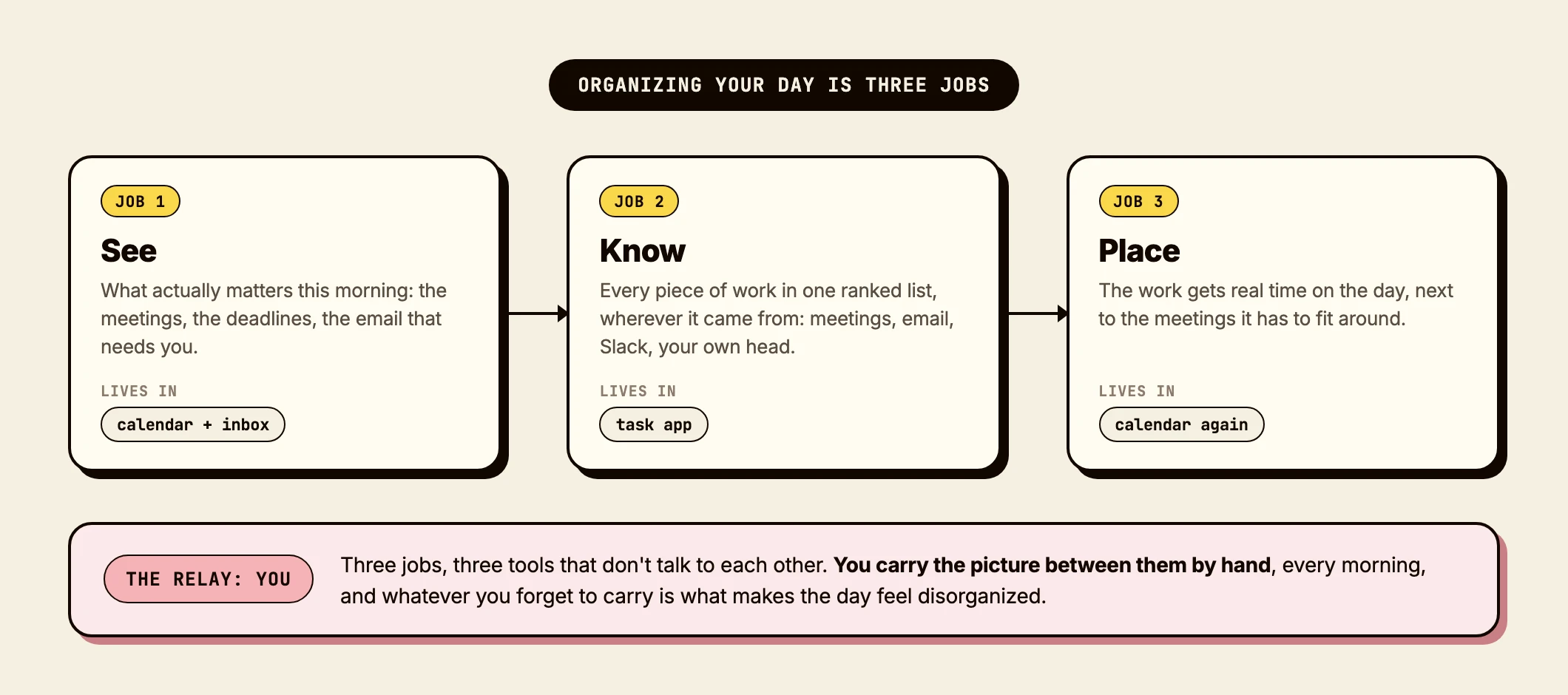
Job 1: see what matters. Before you touch any work, you need the picture: today's meetings, the deadlines moving, the email that needs you. That picture is scattered across your calendar and your inbox, and assembling it is the first tax of every morning. Microsoft's telemetry puts a number on how early that tax gets collected: 40% of people online at 6am are in their email, trying to figure out the day's priorities.
Job 2: know the work. Everything you owe, in one ranked list, wherever it came from: a meeting, an email, a Slack thread, your own head. This is the job that quietly fails first, because work arrives on four doors and the list only has one. Atlassian's 2025 survey of 12,000 knowledge workers found that 56% say the only way to get information they need is to ask a person or book a meeting. Information doesn't flow between systems. People relay it.
Job 3: place it on time. A list is not a plan. The work needs a slot on the actual day, next to the meetings it has to fit around. This is the job with the strongest research behind it, and we'll get to it, because the difference between "on my list" and "on my calendar at 9am at my desk" is measurable and large.
The three jobs are sequential. You can't place work you don't know about, and you can't rank work when you can't see what the day already holds. Which is why the fix for a chaotic day is almost never a new task app. A new app reshuffles Job 2 and leaves the relay between the three jobs untouched.
 Did you know?
Time management as a whole is worth doing, but maybe not for the reason you think. A meta-analysis of 158 studies covering 53,000 people found it moderately related to job performance, and even more strongly related to wellbeing and life satisfaction. Organizing your day buys you back sanity first, output second.
Job 1: see what matters (calendar first, inbox last)
The order you open your tools in the morning decides who runs the day. The most upvoted answer in a recent r/productivity thread on exactly this question gets it right: "Calendar first, task list second, inbox last. The calendar tells me what is already true about the day... If I start with email or messages, the day usually [derails]" (permalink).
The logic: your calendar holds the fixed facts (meetings, deadlines, the shape of the day). Your task list holds your intentions. Your inbox holds everyone else's intentions. Review them in that order and you decide the day from what's true, then adjust for what's yours, then account for what others want. Reverse it and you spend your freshest hour reacting.
The seeing job has one more component that no tool shows you by default: yesterday. What did the meetings you sat through yesterday actually produce? Which commitments did you make? This is the exact information whose loss makes deliverables land out of scope. If your meeting notes turn into tasks automatically, Job 1 gets much cheaper. If they don't, add "scan yesterday's notes" to the morning review, because your memory alone will drop things.
Job 2: know the work (one list, four doors)
The failure mode of Job 2 has a shape, and users describe it precisely. From an r/productivity thread on staying organized: "Things constantly slip through the cracks", from someone running a paper list plus phone reminders, asking whether one app can finally combine calendar, reminders, and notes. The pattern behind it: to-dos scatter across an app, post-its, and memory until the juggling collapses, and the person switches to a new app that fails the same way (permalink).
The app was never the problem. The doors were. Work enters through meetings, email, chat, and your own head, and any list you have to copy things into by hand is a list with a leak. Atlassian's 2026 survey found 87% of knowledge workers saying they lack the time or capacity to coordinate now that AI has everyone producing more. Nobody is staffed to be the relay.
So the practical rule for Job 2: reduce the number of manual hops between a piece of work appearing and it sitting on your list. Every hop is a place where information dies. Concretely, in my own list right now there are 10 to 20 tasks, and they come from four doors: user-feedback emails I turn into backlog tasks, action items from meetings, Slack threads, and things I add myself. Before we wired those doors to feed the list directly, the junction between email plus meetings and the task list was the most annoying part of my mornings, and the part where things got lost.
There's a cognitive reason capture matters beyond hygiene. In a series of six studies, Masicampo and Baumeister found that unfinished tasks intrude on unrelated work, and that writing a specific plan for them (what, when, where) eliminated the interference even though the task stayed undone. Capturing work with a concrete next step isn't bureaucracy. It's how your head lets go.
 Tip
TipDo the capture immediately, not at day's end. A commitment made in a 10am meeting and written down at 6pm is a commitment reconstructed from memory, and the details you lose (the who, the by-when, the actual scope) are the ones that make the output wrong later.
Job 3: place it on time (the strongest evidence in this guide)
Here's the part most list-centric guides never reach: a task on a list and the same task on your calendar are not the same object, and the research gap between them is wide.
The evidence comes from work on implementation intentions, if-then plans that specify when and where you'll act. A meta-analysis of 642 tests (Sheeran, Listrom and Gollwitzer, 2024) found that specifying both a time and a place for a task roughly doubled the effect on follow-through compared to specifying time alone. And in the classic planning fallacy studies, actual completion correlated with deadlines at r = .82, and with people's own predictions at just r = .23. External time structure governs when work happens. Your predictions mostly don't.
Translated into practice: put the top tasks on the calendar with a when and a where, and stop there. The same 2024 meta-analysis found that over-elaborating the plan (adding how, and for how long, and sub-steps) drops the effect back down. A block that says "9:00, draft the pricing page, at my desk" is the sweet spot.
Two honest caveats, because this research gets oversold. The authors themselves detected publication bias in the literature; their bias-adjusted estimate still finds a real effect, but a smaller one. And the planning fallacy will still eat your blocks: in the original studies, students predicted 34 days for their thesis and took 55. The one debiasing that worked was checking your own past track record and explicitly applying it to today's estimate, which raised on-time completion from about 30% to 60%. Plan from your history, not from your optimism.
For the how of blocking itself (which method fits which kind of week, and a free generator that drops the blocks into your calendar), we wrote a full time blocking guide and built a free template generator. My own placement is a maker's schedule: deep work from 8am to 1pm, meetings clustered after, only as needed.
Plan the night before, execute in the morning
The routine that ties the three jobs together, honestly stated: I don't really plan my day in the morning. I plan it the evening before. Knowing tomorrow before it starts is what lets the morning begin clear instead of beginning with archaeology.
The evening pass is short: see the day (calendar first), pick the tasks that deserve blocks, place them. One principle from Sunsama's guide is worth stealing here: plan five or six hours of work for an eight-hour day. The unplanned work is coming whether you budget for it or not. Microsoft's telemetry says 57% of meetings are ad hoc, never on the calendar in advance. A day packed to 100% is a plan that dies on first contact.
Then the morning is execution, not planning. Mine, literally, from yesterday: I open Claude to check the status of the agent work that ran overnight. I ask Kai what's in my inbox that needs me, and whether anyone replied on the outreach I'm running. I check which of today's tasks aren't prepared yet and launch the prep in parallel. I glance at the calendar for the meetings. Ten minutes, and the first deep work block starts with full context: what came out of yesterday's meetings, what's in the inbox, what Slack produced, all already attached to the tasks.
That "full context attached" part is the point of the whole system, and it's what I'd push you to build toward whatever tools you use: the task should carry its history. A task that says "follow up with Sam" is a memory test. A task linked to the meeting where Sam said yes, with the thread where the numbers were discussed, is executable by a tired version of you.
What AI can honestly take over
The "AI plans your day" category makes big promises, so let's be precise about what holds up, because we build in this category and we read the same reviews you do.
The pitch, in Motion's version: the AI "automatically creates, prioritizes, and reschedules tasks across personal and shared calendars... recalculates the optimal plan in seconds" (G2 profile). The reported reality is more modest. Motion holds a 4.1/5 on G2 across 157 reviews as of July 2026, and its most-tagged cons are learning curve, complexity, and price. Even a 5-star reviewer describes the deal precisely: Motion decides what to work on next "Provided I did the inputting of the tasks correctly". Reclaim reviews at 4.8/5, and what users actually praise is narrower than the pitch: auto-rescheduling when new meetings blow up the plan. The criticism inside those positive reviews is churn: when unplanned work lands, the auto-scheduler reshuffles for hours and floods you with change notifications, and even happy users move tasks by hand because the machine's placement doesn't match their judgment.
And the ChatGPT-as-planner route hits a wall you'll recognize by now: the relay. A chat window can't see your calendar, your list, or your inbox, so you hand-feed it everything, every day. One r/productivity user described using ChatGPT as a mid-day coach that genuinely helps, but only if they feed it their project list, a fresh note each day, their goals, and each disruption as it happens (permalink). You're still doing all three jobs. The AI is doing the pep talk.
Across every account we've read (and our own usage), the split is consistent. AI honestly absorbs the collation (assembling the picture across surfaces) and the suggestions (what's next, what's slipping). The seeing judgment (what actually matters to you) and the placement decisions stay human in every workflow that people report actually sticking with.
How we run this with Kai
That split is exactly how we built Kai's daily planning, so this section doubles as a demo of the method and a disclosure of its limits.
The Daily Brief does Job 1. It's a Kai Workflow: every weekday around 7am, Kai reads the day's calendar, your open tasks and the email that needs you, and writes up what it sees: today's schedule with any overlaps noted, the priority tasks, the email highlights, and what to tackle first. It lands on Kai's desk (the list in the app where workflow results wait), in your inbox and as a push. Connect your email when you sign up and Kai sets it up for you; otherwise it's one of the recurring workflows Kai runs in the background, next to a week-ahead plan on Sunday evening and a Friday wrap. Here's what my morning looked like in July 2026, annotations included, mid-retreat with the team, back when Kai wrote its brief at the top of the chat:
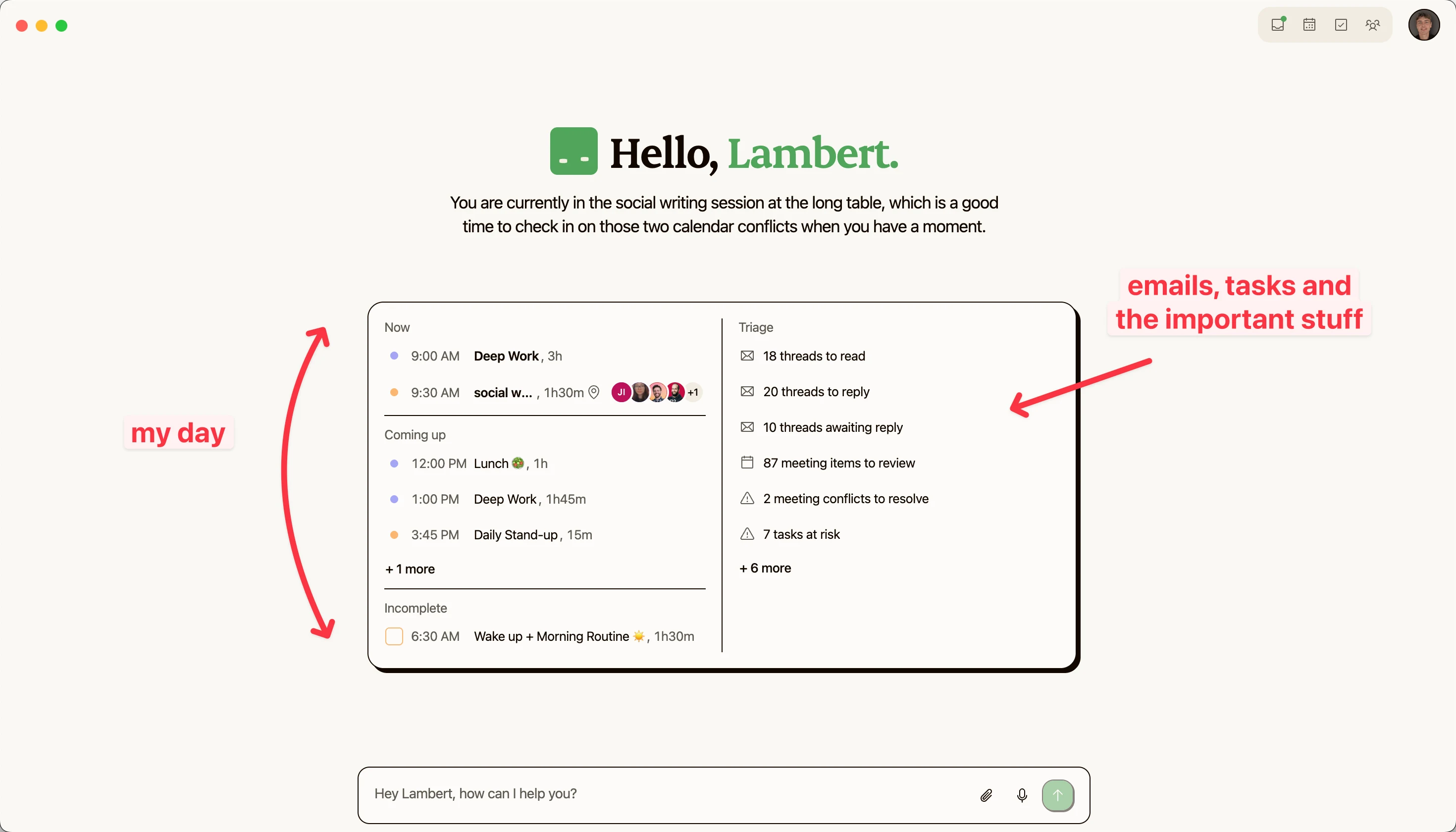
Notice what that greeting did: "You are currently in the social writing session at the long table, which is a good time to check in on those two calendar conflicts when you have a moment." It read the calendar, noticed the conflicts, and suggested a moment to deal with them. It didn't resolve them for me. The greeting is gone from the app now, and the Daily Brief keeps the same stance: it notes the day's overlaps and leaves the call to you. That's the design position: Kai reads and suggests, and the decisions stay yours. Same for email: Kai sorts and drafts, and you send. We built it that way on purpose, because an AI determines the best choice from the information it holds, and the information it holds is not your full context.
Job 2 is where Kai closes the leak I complained about earlier: the four doors feed the list directly. An action item from a meeting arrives as a suggested task carrying the meeting it came from, one tap from the list. An email that needs work becomes a task holding the thread, in one click. The list ranks itself, anything past its deadline collects in an Overdue tab, and the Daily Brief puts your priority tasks next to the day's schedule and email, so the guilt-list you never open stops being a separate place.
For Job 3, blocking stays manual, and that's deliberate too. You drop a task onto the same timeline Kai runs, or ask Kai in chat to schedule a single task, and Kai can place a linked session for it. It will not bulk-schedule your week or reshape your day when things change. Given what the auto-scheduler reviews above say about churn and correction, we think read-and-suggest is the honest version of AI planning right now, and the one that matches how people report actually working.
Where Kai falls short today. Two limits worth knowing before you try it. First, no auto-scheduling, as covered: if you want a machine placing 15 blocks a week for you, Motion or Reclaim attempt exactly that trade, with the caveats above. Second, and this is the one that bites me personally: Kai reads what flows through your connected surfaces (calendar, email, meetings, Slack) plus its own memory, but it has no direct access to a knowledge base. On some projects, the crucial fact lives in a document, not in any email or meeting, and Kai won't see it unless you bridge it yourself through the MCP integration. We're working on native knowledge-base access; today, the bridge is manual.
When the plan breaks by 11am
Every planning guide ends at the beautiful morning plan. Real days break the plan by mid-morning, and what you do next is the actual skill.
The honest baseline first: a broken plan is normal, not a failure of the system. An r/productivity thread asked exactly this, and the top answer, worth adopting wholesale, is to pick one non-negotiable task per day, so that whatever else burns, the day still counts (permalink).
Beyond that, re-triage instead of re-planning. When the 10am fire eats your 11am block, the question is not "how do I rebuild the day", it's "which of the remaining blocks still matters most". That's a 90-second decision with the picture in front of you, and an impossible one without it. Drop blocks honestly (deferred work goes back to the list with its context, not into a guilty limbo), and defend the one non-negotiable.
There's also a hidden cost to every unplanned switch worth knowing about: attention residue. Leroy's research showed that when you switch tasks, part of your attention stays with the unfinished one, and performance on the next task drops. You can't avoid switches, but you can stop treating them as free. A 30-second capture ("where I stopped, what's next") before jumping makes the return far cheaper, and it feeds Job 2 while you're at it.
If the plan breaks the same way every day, treat that as data. Three days straight of email eating the morning block means the morning block moves, or the email triage gets systematized. The plan is a hypothesis about your day. Update it like one. And if you want the upstream fix, fewer meetings producing clearer outputs, start with how to run a meeting and meeting prep.
FAQs
What is the 3-3-3 rule for organizing your day?
Popularized by Oliver Burkeman: spend 3 hours on your most important project, complete 3 shorter tasks, and do 3 maintenance activities. It's a sensible portioning of a day, and a decent starting shape if you have none. Worth knowing: there's no research behind the specific numbers, so treat it as a template, not a law. It maps loosely onto the three jobs: the 3-hour block is Job 3 done well (one big thing, placed), and the shorter tasks come from a list you trust (Job 2).
Should I plan my day in the morning or the night before?
The night before, and we hold this one strongly. Planning in the morning spends your freshest attention on logistics and starts the day reactive. Planning the evening before means the morning starts with execution: you already know the first block, and overnight nothing changed that a 2-minute review can't absorb. The practical evening pass is 10 minutes: see the day, pick the tasks that deserve blocks, place them, and budget only five to six hours of an eight-hour day.
How do I organize my day at work when meetings keep interrupting?
Cluster and protect. Meetings expand into whatever space they find, so give them a defined zone (afternoons, for instance) and protect at least one deep work block like a meeting, on the calendar, with a name. Expect the ambush anyway: Microsoft's data shows a majority of meetings are ad hoc, never scheduled in advance, which is exactly why a day planned to 100% capacity fails. Plan to 70%, defend the one non-negotiable block, and re-triage when the day shifts instead of abandoning it.
What's the best app to organize your day?
Wrong first question, honestly. The failure pattern in every app-churn story is the same: the new app reorganizes your task list (Job 2) while the relay between calendar, tasks, and inbox stays manual, so it fails the way the last one did, in about two weeks. Ask instead: how many manual hops does work take to get from where it appears (a meeting, an email, Slack) to my list, and from my list onto my calendar? The right tool for you is whichever one removes the most hops. That's the entire reason we built Kai as one brain across the surfaces rather than a better silo.
How many tasks should I plan per day?
Fewer than your list wants. The planning fallacy research is blunt: people miss even their own worst-case estimates, and the fix that works is estimating from your past track record instead of your optimism. In practice: one non-negotiable, two or three placed blocks of real work, and slack for what arrives. A 10-to-20-item list is fine to hold, but it's a menu, not the day's plan.

What to read next
The Complete Guide to Time Blocking with a Free Template Generator
Time blocking, the way I actually run it. 5 methods, a 3-step playbook, and a free generator that drops your day straight into your calendar.

The Lab Behind Our Instagram
Issue #018 of How We Grow: the content lab Lambert built behind our Instagram. 800 clips Claude tags second by second, reels Claude edits from them, every idea tested 3 ways on people who don't follow us, and why 570,113 views haven't been turned into customers yet.
Inside Our Product Hunt Launch
Issue #017 of How We Grow: David joins us two days after Kai's Product Hunt launch to talk about what a launch is for when you're already live, why finishing fifth was useful, and the Instagram trick that took our account from 300 to 700 followers.