


Key Takeaways
- Real EAs run a general AI first: ChatGPT (85.5%) and Microsoft Copilot (49.6%) lead ASAP's 2026 survey of 5,000+ admin professionals, with daily AI use at 76.9%, up from 26% in 2024.
- The test that matters is delegated access: whether a tool works in your exec's inbox and calendar. Most AI tools fail it. Microsoft 365 Copilot, Reclaim, Otter, and Fireflies are the main exceptions.
- The EA skill set is splitting into layers: pick tools for the digital execution layer, because the judgment layer is your value now. Pay data shows new-hire EA salaries rising, not falling.
- We build Kai, an AI executive assistant. For an EA it covers own-account triage, botless meeting capture, and action items routed to tasks, and we're plain below about the walls it hits.
Almost every page ranking for "AI tools for executive assistants" is written by a vendor selling a replacement for you. We'd know: we build one of those AI assistants, and this page tests the AI tools for executive assistants on the question every one of those listicles skips. Can an assistant actually run the tool on an executive's accounts, with delegated access, the way you already run their inbox and calendar? Or does it quietly assume you own the mailbox you manage?
That one question disqualifies more of the market than pricing, features, and reviews combined, and it sorts both kinds of reader this page gets: the EA working inside someone else's accounts, and the founder or consultant being their own assistant on their own. The verdict table below answers both, one of them by reading the verdict column backwards.
So here's the stack by job, delegation verdict first, prices from each vendor's own pages, and real EA voices throughout. Kai is in here too, with its walls stated plainly.
What EAs actually run today
Start with what's true before what's for sale. ASAP's 2026 State of the Profession, with 5,536 respondents, 91% of them admin professionals, puts the top tools in order: ChatGPT at 85.5%, Microsoft Copilot at 49.6%, Grammarly at 40%, Gemini at 15.4%. The tally in the r/ExecutiveAssistants thread on daily AI use matches: general AI first, then a notetaker, then everything else. Purpose-built "AI executive assistant" products barely register in either source.
 Did you know?
Daily AI use among admin professionals hit 76.9% in 2026, up from 53.1% in 2025 and 26% in 2024 (ASAP, 2026). The confidence gap is the real story: only 47.2% feel confident building AI into their workflows.
The same threads are just as clear about the limits. The top-voted answer in an inbox-management thread isn't a tool at all, it's "get permission from IT before using AI," at 79 upvotes. Hallucinated meeting minutes come up over and over: "I have to weed out so many hallucinations it's actually more work" (u/NoMove1288). And the sharpest complaint is the one this article is built around:
“I've tried using Claude Cowork and Copilot to build agents for triaging and drafting, but they cannot see into delegated mailboxes so it feels a bit useless. The AI integrations don't seem to recognize anything that isn't my own mailbox.”
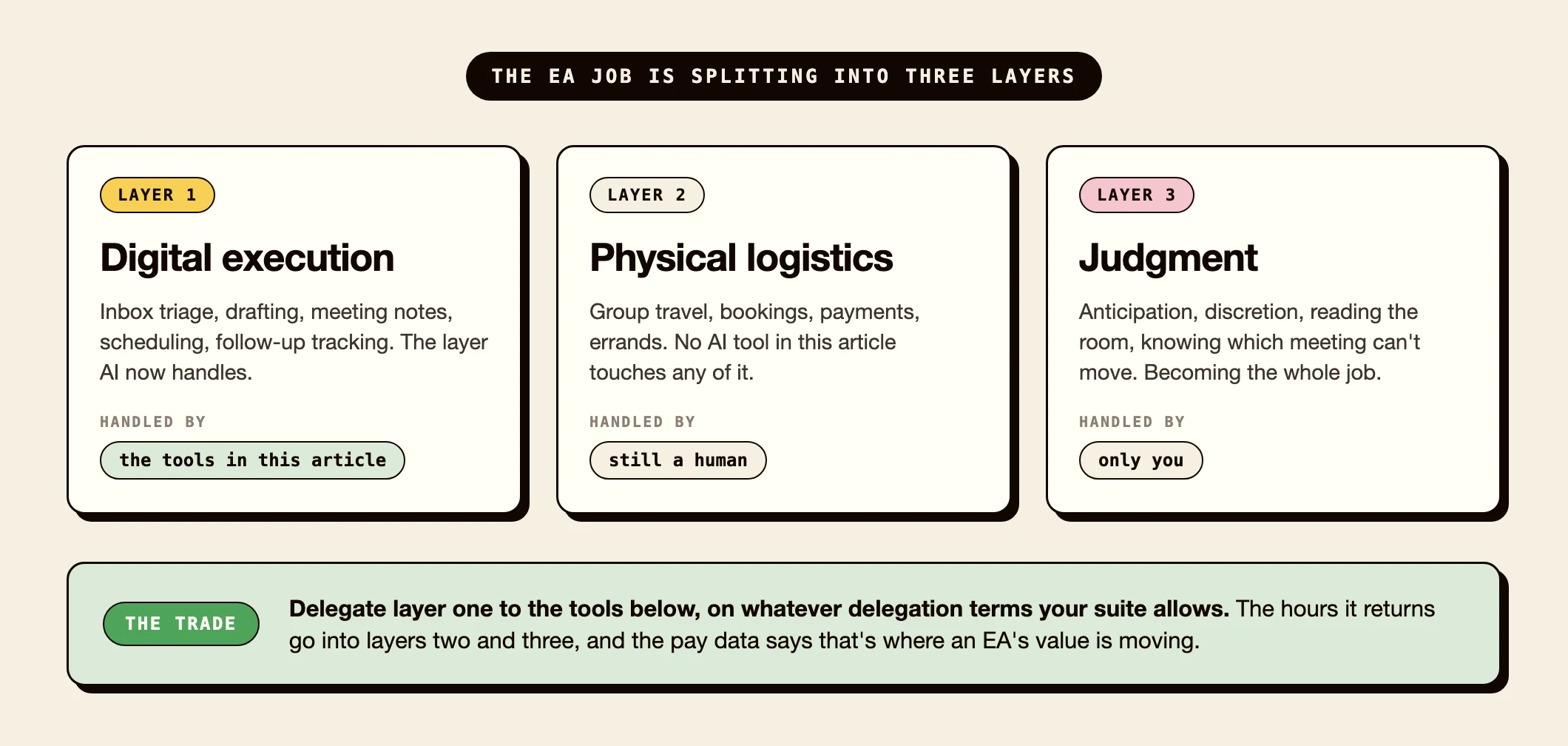
u/mailerd, EA at a VC firm managing 5 inboxes, r/ExecutiveAssistants, March 2026We've written before about which executive assistant skills AI covers and which stay human: the digital execution layer is being absorbed, physical logistics and judgment aren't. Every tool below is a layer-one tool. That's the honest frame for the whole list, and it looks like this:
The delegation test, applied to the whole market
We read the official docs and help centers of every tool an EA is likely to shortlist and asked one thing: can an assistant run this on an executive's account? Three answers exist: a real delegate role, a workaround (usually holding the exec's login or stacking OAuth grants), or nothing.
| Tool | The job | Runs on your exec's account? | From (per user/mo) |
|---|---|---|---|
| Reclaim | Calendar defense, scheduling | Yes: purpose-built delegate role (Business plan) | Free / $10 |
| Calendly | Booking links | Yes: book and manage on the host's behalf | Free / $10 |
| Microsoft 365 Copilot | AI across Outlook and Teams | Yes: works in shared and delegate mailboxes | $18 add-on |
| SaneBox | Email triage (any client) | Yes: dedicated EA access to digest and actions | $5.42 |
| Otter.ai | Meeting notes (bot) | Yes: bot joins meetings you don't attend | Free / $8.33 |
| Fireflies.ai | Meeting notes (bot) | Yes: records even when you're not present | Free / $10 |
| Fyxer | Email triage and drafts | Partial: multiple inboxes on the Professional plan | $22.50 |
| Motion | Task auto-scheduling | Partial: rides calendar sharing, no assistant role | $12.73 |
| Fathom | Meeting notes (bot) | Partial: you must attend, but recaps auto-share | Free |
| Notion AI | Docs, wiki, meeting notes | Partial: sees what's shared with you; capture needs attendance | Bundled (Business) |
| ChatGPT | General AI | No: personal seats, own accounts only | Free / $20 |
| Claude | General AI | No: connectors bind to the account you authenticate | Free / $17 |
| Gemini for Workspace | AI in Gmail, Meet | No for delegates: excluded from Gmail delegation | Bundled |
| Superhuman | Email client | No: delegated mailboxes unsupported, stated outright | $25 |
| Granola | Meeting notes (device) | No: no bot exists, capture is device-bound | Free / $14 |
| Otto | Travel booking | No: books for the solo traveler only | Free (year 1) |
| Kai | AI executive assistant | No: runs the accounts you sign into yourself | $20 |
Verified 2026-08-19: delegation claims and prices were read from each vendor's official docs and pricing pages on that date. Sources are linked in each section below.
Seventeen tools, and roughly a third genuinely work in a delegated setup. Your suite decides half the table. On Microsoft 365, the delegated shortlist is Copilot plus SaneBox, with Otter or Fireflies for meeting coverage. On Google Workspace it's thinner, because Gemini is locked out for delegates: Reclaim for the calendar, a bot notetaker, and the general AI work goes to ChatGPT or Claude on your own seat. And if there's no exec because you're your own assistant, read the verdict column backwards: the "No" rows (Kai, ChatGPT, Claude, Superhuman, Granola) are exactly the tools built to run your own accounts.
Not sure which third of the table is yours? The quiz maps your setup to a stack in 30 seconds:
Find the right AI stack for your EA workflow in 30 seconds
Five questions. Weighted scoring. Honest routing: we recommend Kai when it fits your setup, and a competitor when it doesn't.
Question 1 of 5Whose accounts do you work in most of the day?
This is the question that disqualifies more AI tools than any other.
The general AI layer: where delegation gets decided by your suite
Start with the layer EAs already run, because the delegation answer here is decided entirely by which suite your company pays for.
Microsoft 365 Copilot has the strongest story in this entire article, because it rides Exchange's existing delegate machinery: Microsoft documents Copilot reading, drafting, and summarizing in shared and delegate mailboxes, with full delegate access (Microsoft's own doc). It surfaces anything you already have view permission on, which for a delegated EA is a lot. EAs' actual verdicts are mixed: calendar answers still disappoint ("The day it can provide a complete list of 30 minute time blocks available for a given week, is the day I will cry with joy," u/TryingMom4132), but the workflows EAs share, like agents that summarize five days of an exec's traffic after a vacation, are real.
 Note
NoteGoogle went the other way: Gmail's delegation doc explicitly lists Gemini among the features unavailable to delegates (Google's delegation doc). Meet's "take notes for me" can be pre-set on a calendar event and the notes flow to invitees, which partly routes around it. But in a Google shop, the AI doesn't follow your delegate access the way Copilot does.
ChatGPT and Claude are personal-seat products: OpenAI's Business workspaces are private per member (OpenAI's data-sharing doc), and Claude "can only access the Gmail, Calendar, and Drive data for the Google account you've connected" (Anthropic's connector doc). That doesn't make them useless to EAs. It makes them drafting and research tools rather than account operators, which is exactly how EAs describe using them: exec-voice drafting, transcription cleanup, availability cross-referencing pasted in by hand.
Calendar coordination: one tool takes EAs seriously
Reclaim is the only tool in this list with a real delegate role: your exec grants access once, and you operate their entire Reclaim account from your own login, minus account deletion and API keys (Reclaim's delegated access doc). It sits on Google and Outlook calendars both, and there's a dedicated guide for EAs managing multiple execs. It needs the Business plan, $15 per user per month billed annually, and both of you on the same team.
Calendly gets partway there with event type permissions: edit access on another host's event types lets you book on their behalf, reschedule, and manage their availability (Calendly's permissions doc). The catch is that booking notifications go to the host and the invitee, not to you, so assistants end up building forwarding filters to see their own work confirmed. We compared the wider scheduling field in our Calendly alternatives roundup.
Motion can create events and booking links with your exec's calendar as host, but there's no assistant role: Motion's docs route the EA use case through booking links and concede it "can't override organizer-only permissions in external calendars," so meetings where the exec is only an attendee stay out of reach. When we checked on 2026-08-19, Motion's help center had no live article on the assistant use case at all, which tells you where it sits on the roadmap.
Inbox triage: the clearest split in the market
Superhuman says it outright: "Superhuman Mail doesn't currently support signing into a delegated mailbox" (their EA help article). Their documented pattern inverts the roles: the exec uses Superhuman while you keep working in plain Gmail through Google's native delegation, coordinating over shared labels. If the exec loves it, fine. It does nothing for you.
Fyxer is the interesting one, because its founders ran an EA agency before building it. Its model is multiple individual inboxes rather than a shared-mailbox connection: the Professional plan ($37.50 per user per month billed annually, $50 monthly) runs several inboxes side by side, which is Fyxer's own answer for an EA covering their own plus a principal's mail. Each inbox connects through that account's own sign-in, so plan on an OAuth grant on your exec's account and an IT conversation first.
SaneBox is the quiet veteran here: its Executive Assistant's Access feature sends you the exec's digest and lets you act on it, with SaneBox's own warning that this grants full access to the account. It triages any IMAP mailbox server-side from $5.42 a month, no new client to adopt. If your exec's problem is Outlook specifically, our guide to AI for Outlook email walks the Microsoft-native route instead.
Meeting capture: the bot question decides everything
Whether a notetaker can cover a meeting without you comes down to architecture, not features. Bot-based tools send a participant into the call. Device-based tools record from a laptop that has to be in the meeting.
The two built for coverage are Otter and Fireflies. Otter's bot joins meetings "even if you're unable to" attend, sent by pasting the meeting link, and the calendar it watches doesn't have to match the Otter account's email (Otter Notetaker docs). Fireflies is just as direct: it "will record even if you're not present," as long as its bot was invited (Fireflies FAQ). Both make covering an exec's call from your desk a real workflow, and we ranked that whole category in our Otter alternatives comparison.
The other three in the table can't do that job. Fathom requires you on the call (its FAQ says unattended recording "does not currently exist"), though it auto-shares recaps to everyone on the invite. Granola and Notion AI both capture from your device's own audio, per Granola's docs and Notion's, so they're personal notetakers, not coverage tools. Notion's wider AI at least respects the workspace you already share with an exec: it "only uses information it has permission to see" (Notion's AI FAQ), which is what its "Partial" in the table means.
 Tip
TipBefore any of these touch a recorded call, get IT and legal sign-off. It's the top-voted advice EAs give each other, and the EAs who use these tools daily say so explicitly: "recording and transcription has been approved by legal counsel" (u/AudreyLocke, r/ExecutiveAssistants). Consent basics are in our guide to taking meeting notes, and whatever captures the call, run the output through a real minutes structure instead of shipping raw AI summaries: hallucinated minutes are the single most repeated complaint in every EA thread we read.
Travel: the wall every AI tool hits
Otto is the honest test case. It's a genuinely capable AI travel agent, built by ex-Expedia leadership, free for the first year. It's also, per its own comparison page, for "flights for solo travelers only," with no group booking and no arranger role. The tool marketed with the words "executive assistant" can't book for anyone but its own user.
We hit this wall from the other side, building an AI assistant: users ask us how the AI helps when they need to book flights for a whole team offsite, and the answer is that it doesn't. Payments and physical-world logistics are where every tool in this article stops and a human EA keeps going. No release this year closes that gap. The physical layer of the job stays yours.
Where Kai fits an EA's day
We build Kai, and after sixteen tools tested on delegation, here's its honest row in the same matrix: Kai runs the accounts you sign into yourself. Gmail, Outlook, Google and Outlook calendars, Slack (the full list). There's no delegate role for operating a mailbox you don't hold credentials for, and its meeting capture records from your device, so it can't cover a call you skip.
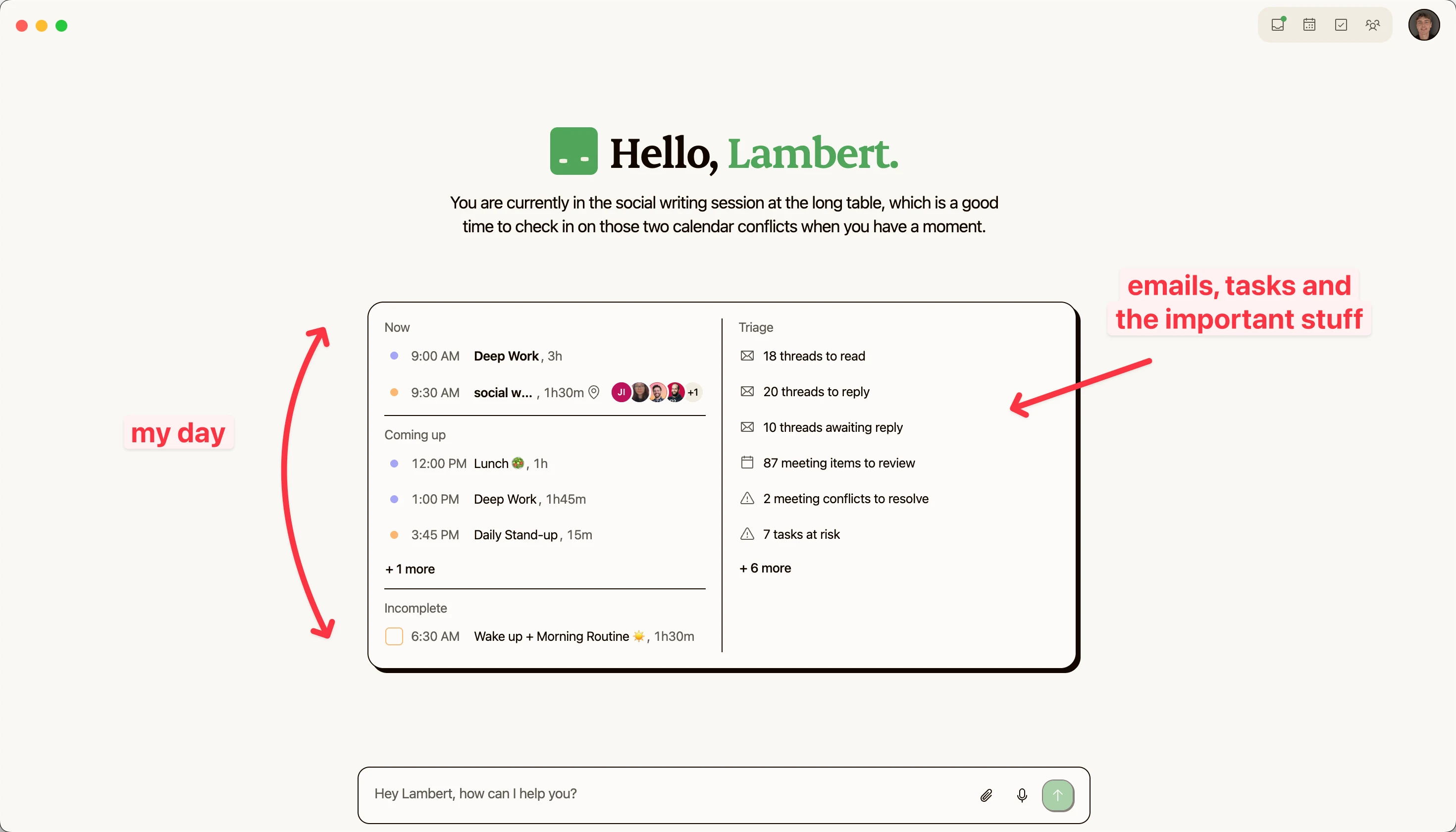
What it does with your own accounts is the point. Kai triages incoming mail into labeled categories with reply drafts waiting in your voice (drafting is opt-in, a setting we changed after users asked), captures meetings without a bot in the participant list, extracts the action items, and routes them into one task list linked back to the source thread or call. The morning brief reads calendar, tasks, email, and meetings together and tells you what to clear first. That screenshot below is our own morning: 3 connected email accounts, roughly 15 captured meetings a week, and the triage-to-task junction is the part we stopped doing by hand. The full routine is in how we organize our day.
Who it's for, in this article's terms: the EA, or the person being their own EA, whose execution layer runs on their own accounts. If your whole day is inside three delegated Outlook mailboxes, Copilot fits your setup better today, and the founders of an AI assistant telling you that is exactly the kind of line this page exists for. Pricing starts with a free trial and no card, then $20 per user per month on Base or $50 on Pro, which has 5x the usage. Every plan includes every feature (pricing).
“Most EAs i know just use Chatgpt or Claude for writing, research and planning. Then stuff like fireflies/Fathom for meeting notes, reclaim or motion for scheduling and zapier/make for connecting tools. Biggest difference isn't tools though, it's just having a small stack that's actually connected”
u/the_mosthated, r/ExecutiveAssistants, July 2026
Will these tools replace you?
The layoff headlines from May 2026 were real, and we covered them in the EA skills split. The newer data points the other way: Payscale's June 2026 report puts EAs among the roles with the biggest new-hire pay premiums, $110,000 for new tech-industry hires against $87,000 for incumbents, and Fortune's read is that AI promoted the role, with top EAs becoming proxies who run meetings and coordinate initiatives. For the exec-side view of these products, our comparison of AI executive assistants scores six of them against the whole job.
EAs themselves put it best:
“AI is really good at producing workplace theater (meeting summaries that nobody reads, work updates nobody reads). They can't tell you that your priorities are out of whack... you can't trust a chatbot to do it correctly because the cost of a screw-up is stupid expensive.”
u/Sufficient-Web-7484, r/ExecutiveAssistants, May 2026The practical conclusion isn't complicated. Delegate the execution layer to the tools above, on whatever delegation terms your suite allows, and put the reclaimed hours into the work no tool in this article touched: anticipation, discretion, and knowing which conflicting meeting is the one that can't move.
FAQ
How do executive assistants use AI day to day?
Mostly for drafting and rewording email, cleaning up transcription, meeting minutes, and research. ASAP's 2026 survey puts ChatGPT at 85.5% and Microsoft Copilot at 49.6% among admin professionals, with 76.9% using AI daily. Purpose-built EA products trail far behind the general tools.
What is the 30% rule for AI?
There's no canonical version: it circulates as "keep AI-generated content under 30%," as "AI handles 70% of routine work, humans keep the judgment 30%," and as its inverse. None cites a primary source. A more useful rule for EAs is the one this article applies: delegate digital execution, keep everything requiring judgment or a signature.
Can AI tools work in delegated mailboxes and shared calendars?
Mostly no, and it's the biggest complaint EAs raise. The exceptions: Microsoft 365 Copilot works in shared and delegate mailboxes, Reclaim has a real delegate role for calendars, Calendly supports booking on a host's behalf, and SaneBox has a dedicated EA access feature. Gemini is explicitly unavailable to Gmail delegates.
I don't support an exec, I'm my own assistant. Which tools apply?
Read the delegation table backwards: the tools marked "No" on exec accounts (Kai, ChatGPT, Claude, Superhuman, Granola) are the ones built to run your own inbox, calendar, and meetings. The delegated-access winners matter to you only if you later hire help.
Can AI replace an executive assistant?
It's absorbing the mechanical layer (triage, notes, scheduling), not the judgment layer (anticipation, discretion, stakeholder handling) or physical logistics like group travel. Payscale's June 2026 data shows new-hire EA salaries rising in tech, which is not what a disappearing role looks like.
Which AI should an executive assistant learn first?
The one your company already licenses: Copilot in a Microsoft shop, Gemini or ChatGPT in a Google one. Only 47.2% of admin professionals feel confident building AI into their workflows, so fluency with the tool you already have clearance to use beats a new subscription.
Do AI notetakers work for meetings you don't attend?
Bot-based ones do: Otter and Fireflies both document sending their bot to meetings without you, by calendar invite or by pasting the meeting link. Device-based tools (Granola, Notion AI meeting notes, Kai) record from a machine that's in the meeting, so they can't cover a call you skip.

What to read next
AI for Customer Success: Which Tools Remember What You Promised
AI tools for customer success, scored on the question listicles skip: when you promise a customer something in March, does anything tell you in September?
The 6 Best AI Executive Assistants in 2026, Compared
Compare the best AI executive assistants of 2026 against a published five-capability rubric, with our own product scored by the same rules.
AI for Outlook Email: What Copilot Does and Where It Stops
Copilot is already in Outlook. We build an AI assistant on Outlook's API, so here is an honest map of what it covers and when you need a layer on top.