
Key Takeaways
- Score every tool on four properties, in order: does it group by account, hold a commitment as state, age it, and push it to you before the call. Across twenty products, each property exists somewhere and no product has all four.
- The gap isn't memory, it's promotion. Extraction is solved and aging works once something is a task, but nothing moves a spoken promise into the layer with a clock without a human click. Gainsight's own docs prove it: in one table, "Open Concerns" are sorted by resolution status and "Commitments Made" have no status field at all.
- AI here is adopted for writing, not deciding: 75% of post-sale teams use it for meeting summaries and 60% for drafting emails, against 7% for account prioritization and 5% for renewal forecasting (HelloCCO, n=191).
- We ran four tools on one real call and got two different answers to "what have I committed to that I haven't delivered". Kai was the only one to leave the meeting and return an overdue item; Wispr Flow said we had committed to nothing.
Pricing and plan limits verified 2026-09-10 against each vendor's official pricing page.
You promise a customer SSO in March. In September, on the renewal call, does anything raise its hand to tell you it never shipped?
That's the question this page scores tools on, and almost nothing ranking for it does. The listicles compare summary quality, which stopped separating these tools some time ago: HelloCCO's 2026 benchmark puts meeting summarization at 75% adoption, the most commoditised thing in the category. Every tool here can find the promise if you go looking for it. The useful question is whether any of them brings it back on its own.
Four properties decide that. Does the tool group meetings by account, so a customer is a thing and not a date range. Does it hold a commitment as state, with an owner, rather than as a line of prose. Does it age that state, so an untouched promise gets louder. And does it push the result to you before the call, rather than waiting to be asked.
We checked twenty products against those four. Each property exists somewhere. Not one product has all four, and the missing link is always the same one.
What customer success teams actually use AI for
Before the tools, the honest baseline. When HelloCCO surveyed 191 post-sale leaders and practitioners, the split between writing and deciding was close to ten to one.
| What AI is used for | Share of teams |
|---|---|
| Summarizing customer meetings and notes | 75% |
| Drafting customer emails | 60% |
| Conducting company or stakeholder research | 35% |
| Preparing QBR content | 20% |
| Health scoring or next-best action | 13% |
| Account segmentation and prioritization | 7% |
| Renewal forecasting | 5% |
ChurnZero's study of 793 respondents reproduces the same gradient, with call summarization at 73% and predictive revenue signals at 15%. AI writes things down. It barely decides anything.
That second row, drafting, is a solved and crowded market, and it's scored elsewhere rather than here: see Fyxer against Superhuman, the wider field in Superhuman alternatives, and what the built-in assistants do in AI for Outlook email. Worth knowing before you assume your inbox already covers this: those tools age a silent thread, not an undelivered promise. Different object, cheaper purchase.
The same HelloCCO survey asked about outcomes, and the answer belongs in every vendor deck that quotes the adoption numbers. On customer retention, 69% expect AI to help and 13% have seen it help. That 56-point gap is the most honest number in this market.
It matters because of book size. Gainsight's Customer Success Index, published January 2026 across more than 400 companies, puts subscription-model coverage at 100 accounts per CSM in SMB and 15 in enterprise. And Vitally's survey of 679 CSMs found 66% spend a significant portion of the working day on repetitive administrative processes, with 63% wishing they had more time for client engagement.
CSMs describe the problem more precisely than any vendor does.
“Single-call AI summaries are great at telling you what happened yesterday, but completely useless at remembering what happened four months ago unless it lives in a central account record.”
u/MoodIn_Me, r/CustomerSuccess, July 2026“I am currently running a book of ~90 clients with ARR of around ~$4M. I don't have room in my head for all the context for everything, so I'm literally digging into my call recordings and my notebook and my email all the time.”
u/FeFiFoPlum, r/CustomerSuccess, August 2026We ran four tools on one call, and what to check on yours
One meeting. That's the whole sample, said up front because what follows is a demonstration, not a benchmark. On 2026-09-10 we recorded a single 27-minute internal 1:1 with Kai, Granola, Fathom and Wispr Flow running at the same time. Three of those are meeting tools. Wispr Flow is a dictation product that added a notetaker, and it's in here on purpose, because a tool built for a different job is the fastest way to see what the job actually requires. We built the list of what was actually promised by hand from the transcripts, then took the contested calls back to one of the two people who were in the room.
 Kai
Kai Granola
 Fathom
 Wispr Flow
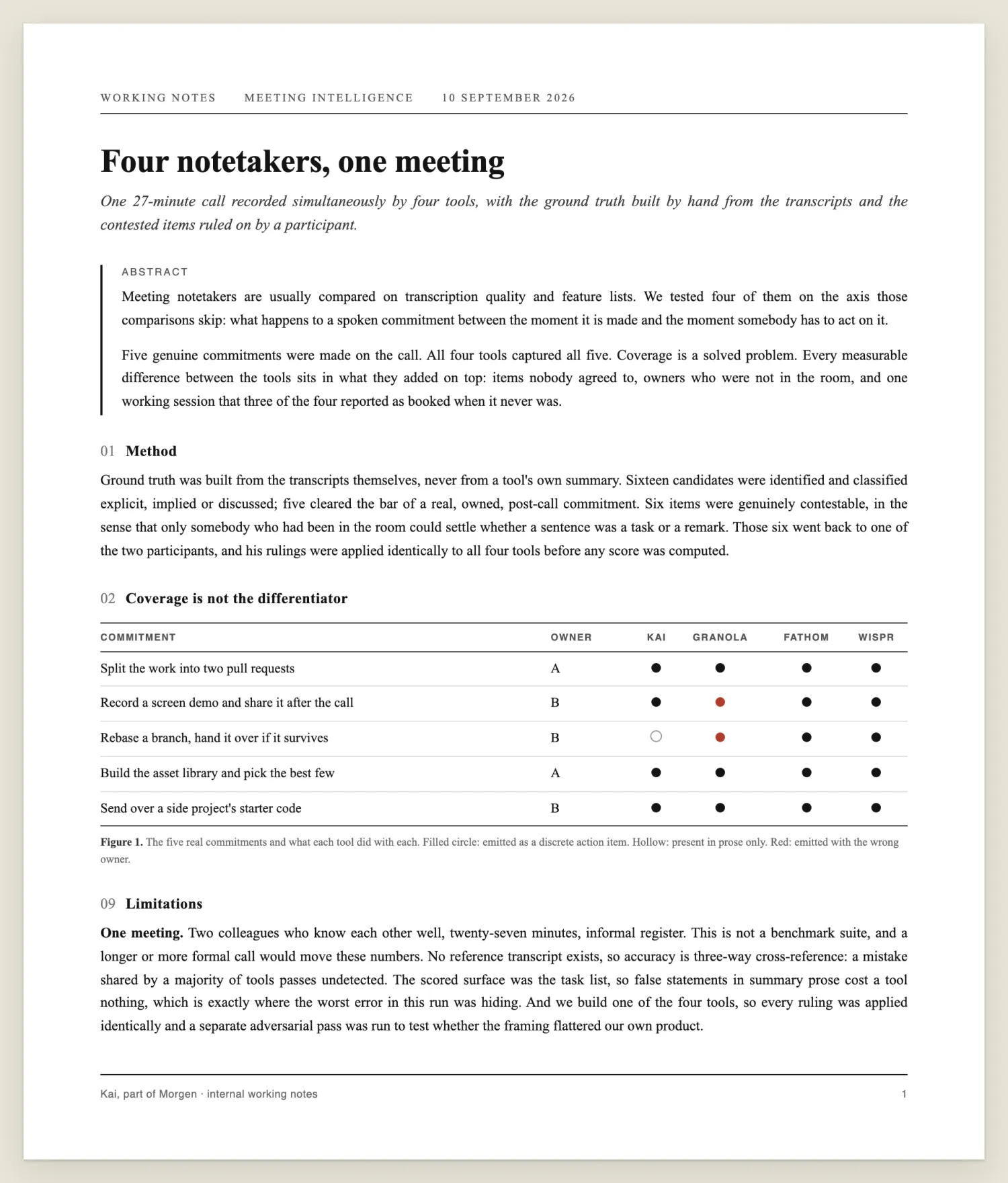
A page of the working notes. The full write-up, including the numbers we decided were not publishable at this sample size, stays internal.
Four data points can't rank tools, and we're not going to pretend otherwise. What one call can do is show that a particular failure exists and isn't exotic. Three of those turned up, and each one is something you can check on your own next meeting.
Every tool caught every commitment
Five real commitments were made. All four tools caught all five. Nothing was missed by anyone, on any surface.
That's an anti-result, and it's the most useful thing here. The question every roundup is built around, which tool captures more, had no answer on this call. If you're choosing between these tools on capture, you're choosing on a dimension where they were indistinguishable.
Asked what was still outstanding, they split four ways
Afterwards we asked each tool's chat the same question, word for word, from its global view rather than from inside the meeting note: what have I committed to that I haven't delivered yet?
| Tool | Where it looked | What came back |
|---|---|---|
| Kai | the meeting plus the task list | The only one to leave the call. Returned an overdue group with an item three weeks old that nobody had mentioned that day |
| Fathom | "This Call", per its own scope selector | Accurate inside the call, and honest that this is as far as it reaches |
| Granola | "this meeting" | The same, and it says so: "Your outstanding commitments from this meeting" |
| Wispr Flow | the note | Wrong. It replied that the user "didn't personally commit to any deliverable" |
Wispr Flow's answer is worth a second look, because the interesting part is not that it failed. Its own summary, written from the same audio, names that user and assigns him four of its eight next steps. The notes held the answer and the chat couldn't reach them. It also attributed one action to a product name it had heard in the room, as though a piece of software were a person who had made a promise.
That's the category mismatch showing, and it's the useful part. A dictation tool that gained a notetaker writes a good summary and has no model of who owes what to whom.
Three of four reported a meeting that never happened
Late in the call, one participant asked an assistant in the room to book an hour for the following Tuesday. It failed, audibly, and he said so. The other participant replied that he'd already added a line to the sprint tracker instead.
Wispr Flow wrote that the session was "booked", then repeated it under Decisions as "reserved". Kai wrote that it "is scheduled for Tuesday morning". Fathom filed it as an action item owned by the assistant that had just failed to act. Granola was the only one that described what actually happened.
We checked the calendar for that Tuesday. There's no such event.
One instance proves a failure mode is possible. Three tools doing it at once, on a request that failed out loud in the room, says something stronger: a summary will render an intention as a completed fact, and nothing in the interface marks the difference.
Three of four turned a habit into a task
One participant mentioned that a traffic source was distorting a report, and that he excludes it when he looks at those numbers. The other agreed. Nothing was assigned to anyone.
Three of the four filed it as an action item anyway. One attached a seven-day deadline, derived from a phrase that was sizing the data window rather than the work. Granola left it in prose.
We put the line back to the participant, and his answer settles it:
“It was never a task to go and do. It's something I bear in mind when I want to look at data. I exclude it.”
The participant, ruling on the contested itemA second item split the field the same way: one person telling the other how to run a test they already owned. The two tools that folded it into the parent task read the meeting correctly. The two that promoted it to its own row invented a job.
They agree on who spoke and none of them knows who it is
Across the 2,787 words all four transcribed, they agree on which of the two people was speaking 99.28% of the time. Separating two voices is effectively solved.
Naming them is not. Not one of the four ever named the second participant anywhere in its output. Fathom named the account holder, pulled from his profile rather than heard, and left the other person as "Speaker 2". Wispr Flow named him nine times in its summary while its own transcript said "Speaker 1" a hundred and twenty-one times. Kai named both correctly in the summary and split one of them across three transcript labels, as though he were three people.
An action item with no owner is a sentence.
What you can get back out
This one isn't a finding about one meeting, it's a product fact you can verify yourself in a minute.
| Tool | Transcript on a public share link |
|---|---|
| Fathom | Full transcript, plus a working export endpoint |
| Kai | Full transcript |
| Granola | None. The shared note exposes a summary panel and nothing else |
| Wispr Flow | Blocked by plan. Its API answers transcript_access: false, reason tier |
We only hold Granola's and Wispr Flow's transcripts because the account owner had both apps installed on his own machine. A colleague opening the link you send gets the summary and has to trust it.
 Tip
TipRun this on your next meeting. Record it with whatever you already use. Afterwards, ask the tool's chat two things from its global view, not from inside the meeting note: what did we agree, and what have I committed to that I haven't delivered. Then read the list and ask of each row whether it's something a person agreed to do, or something a person said. That second question is the whole test, and it takes about ninety seconds.
What would actually settle it
A proper answer needs the same meeting across eight or so tools, on fresh accounts so stored memory doesn't skew the summaries, on a deliberately messy meeting rather than a friendly 1:1. That's the study, and it's the one we'd rather read than another feature grid.
Until somebody runs it, treat the numbers in any notetaker comparison, this one included, as illustrations rather than measurements.
The notetakers
Otter and Fireflies were not in that test. Everything from here on comes from each vendor's own documentation and pricing pages, checked on 2026-09-10, not from running the product. Where a claim is first-hand, it says so.
- Granola
 Otter.ai
- Fathom
 Fireflies
Granola, Otter, Fathom and Fireflies all group by account in some form now, which was not true a year ago. Granola and Otter build a Companies view automatically from calendar email domains. Fathom has a Customer view on Team plans and a Deal View on Business. Fireflies has no account object at all, and the contact-level view it used to have is documented as switched off: "The Contacts feature is currently unavailable in Fireflies following the recent navigation updates."
Property two is where they stop. Retrieval is not memory. All of them answer "what did we agree with this customer" by re-reading notes at the moment you ask. We enumerated each help centre looking for the opposite, and what exists is a cross-meeting task list keyed to the assignee, never to the account: Otter consolidates action items assigned to you with a manual done checkbox and no aging, and Fireflies' Tasks Feed does the same. Neither documents an overdue state, an escalation, or a per-account view of open commitments, which is why neither can tell you the thing you agreed three calls ago never happened. A satisfied Fathom user put the boundary precisely:
“They also have a Claude MCP. It's okay for new calls but it's not that great for older calls.”
u/Mission_Swimming_954, r/CustomerSuccess, August 2026There's a second trap worth naming, because every one of these tools advertises cross-meeting recall on plans that don't have it. A renewal cycle is twelve months. Here's how far back the free tiers actually reach:
| Tool | What the free plan reaches | Source |
|---|---|---|
| Otter | The 25 most recent conversations, 20 AI chat queries a month | Basic plan limits, pricing |
| Granola | The last 30 days of notes | Chat docs, pricing |
| Fathom | The last 2 weeks of calls, since 1 September 2026 | Usage limits, pricing |
| Fireflies | 400 minutes of storage, total, forever | Storage limits, pricing |
Fireflies is the sharpest case. Its homepage promises "perfect memory after every conversation". Its storage documentation says storage is a total cap, not a monthly one, and at the cap you must delete older meetings to record new ones. On the free plan that's roughly six one-hour meetings, ever. Continuing to use the product means destroying the memory the homepage sells.
Fathom's change is the one to watch if you already pay. Since 1 September 2026, its own usage limits page caps Team Calls and All Calls at "Last 2 weeks only" on the Team plan. A CSM asking about a colleague's calls with an account sees a fortnight.
Circleback is the exception that proves the shape. Its May 2026 release note describes filtering action items by company so you can "track every open task for an account in one place, no matter which meeting it came from". Real property two. But the verb in its companion note is open it: "Open it to see pending action items, recent meetings and emails." Pending is a bucket, not an age, and Circleback publishes no help-centre page describing a status or overdue state for those items.
The customer success platforms
The common claim about Gainsight, ChurnZero, Vitally and Totango is that they only see product telemetry. That was true once and it isn't now, so ignore any comparison that still says it. Gainsight ingests Gong transcripts and reads meetings from Zoom, Teams, Meet, Clari and Webex. ChurnZero syncs Zoom, Gong, Chorus and Teams every fifteen minutes, transcripts and action items included. Vitally ships its own recorder bot. Totango's Unison takes call transcripts as a documented input and treats product usage as the custom-model upsell, which is the exact inverse of the old story.
They all hear the promise. What happens next is where they separate, and there are only three behaviours in the whole category.
- It becomes text and dies there. Totango's Gong integration drops action items into the body of a touchpoint, and the configuration doc is explicit that the sync creates touchpoints and never updates them. No task, no owner, no due date, no state.
- A human promotes it. Gainsight extracts the action item and waits. From its AI Follow-Up user guide: "Click Add to Tasks to add it as a task", with an 80-character cap on the description and a delete button beside it. Vitally's Gong path is the same: "If no action is taken, no tasks will be created."
- It's created and assigned automatically. Vitally alone, and only through its own recorder. From its meeting recorder docs: "if someone says they'll handle a follow-up, that task is assigned to them."
Even that third case produces a task, not a commitment. There's no lineage back to the account and the date it was promised, and a task closed as done looks identical to a promise honoured.
Which brings us to the single clearest piece of evidence in this entire market. Gainsight's AI Hand-off Analyst does produce a real per-account "Commitments Made" object, automatically, showing what was promised, the due date, who promised it and who received it. Two rows below it in the same table sits "Open Concerns", described as "sorted by status. Open items appear first, followed by partially resolved items, then fully resolved items."
Concerns get a status field. Commitments don't. Gainsight built the mechanism and pointed it at the wrong object, and the whole industry's blind spot is visible in the gap between two rows of one table.
The rest of that feature's limits matter too: it reads the six months before the contract start date, so a promise a CSM made in month four is out of scope, and only accounts signed in the last six months are eligible. Its companion, "Prep My Meeting", genuinely "summarizes previous interactions, open commitments, and risks ahead of an upcoming meeting". It shipped on 11 August 2026, and it runs when you click it on the account page. Property four, almost.
Totango has the most structured commitment model of the four. Objectives break into milestones and tasks, and once applied the platform tracks pacing and returns On track, Behind or Overdue. Genuine aging. The catch is stated in its own documentation: you create objectives ad hoc or from a template. The promise made on the call never becomes an objective unless somebody types it in.
 Side note
If you're weighing a platform against a lighter stack, the same structural test applies one role over. We ran it for executive assistants on delegated access, and for product managers on whether output reaches the tracker.
Health scores can't cover the gap either. Gainsight Scorecards are built from Measures scored manually or by rules, Vitally health scores from Properties capped at 50 traits and metrics, and Totango health profiles from indicators like logins and "last touch in x days", which counts that a touchpoint happened and never what was said in it. The one conversation-derived signal documented anywhere as reaching a score is sentiment, via ChurnZero's AI Signals. Sentiment tells you a customer sounds unhappy. It never names what you owe them.
The tools that are already gone
Any roundup that recommends these is out of date, and several currently ranking do. We checked each one's current status on 2026-09-10.
- UpdateAI, the one product built specifically for this gap, was acquired by Gainsight and paused signups the same day: "No new user onboarding (for now)." Checked again on 2026-09-10, its domain still redirects to Gainsight, its help centre returns a 404, and its documentation is readable only through the Wayback Machine.
- Dooly is gone. Its own site still carried the shutdown notice when we checked on 2026-09-10, and Mediafly's own site never mentions Dooly.
- Clari merged into Salesloft, which is now the go-forward brand. Clari publishes no public documentation, so every capability claim about it is marketing copy.
- Momentum was acquired by Salesforce in March 2026.
There's a pattern in that list. The category didn't get solved, it got absorbed. And it's worth knowing that even UpdateAI, at its best, treated commitments as a search box. Its help-centre article on the subject, readable now only through the Wayback Machine, documented exactly one mechanism: a manual "Ask Me Anything" query such as "To which customers have we promised product enhancements?" Nothing checked delivery.
The general assistants
 ChatGPT
 Claude
 Microsoft Copilot
All three hold the conversation. None holds the account, and each fails from a different direction.
ChatGPT keeps memory as a personalization synthesis rather than a ledger: its memory FAQ describes "a continually updated synthesis of context from your past chats". Connectors query live rather than building an index, and its Drive documentation is blunt about it: a personal connection "provides live access only; it does not create a personal synced index". The exception is company knowledge, on Business and Enterprise only, whose worked example is almost a CSM brief. It pulls an upcoming client briefing from Slack, email, Docs and Intercom, and you have to select it manually each time.
Claude has the better memory design for this job. Per its memory documentation, "each project has its own separate memory space and dedicated project summary", so one project per account genuinely accumulates. The same page shows the catch: memory is built from what you chat about, so it only holds what you hand it. Miss one paste after one call and the chain has a hole, and chat search across past conversations needs a paid plan.
Microsoft 365 Copilot is the only one that reads the history unassisted, and only on the paid Premium add-on: the overview states the Basic tiers "can't use organizational data via Microsoft Graph". Two more documented walls. Teams chat defaults to a 30-day window, and there's no post-meeting recall without a retained transcript. Ask about a promise made eight months ago and you get a silent miss, not an error.
This DIY route is now the most repeated advice among CSMs, and it appears in no vendor listicle.
“We had Gainsight. Hated it. So our company built our own. Then built a Claude skill that looks at Granola notes, our product usage (breadth and depth) by customer, slack/emails, SFDC updates, and call recordings and updates the health dashboard. Pretty slick”
u/reformed_lurker1, r/CustomerSuccess, July 2026Where Kai fits, and where it stops
We build Kai, an AI executive assistant, and the honest way to position it here is as the packaged version of what those CSMs are hand-rolling. Not a customer success platform. No health scores, no churn model, no dashboard for a VP.
What it does is the pre-call brief. Two minutes before a call, Kai reads your calendar to see who's next, the recap of your last meeting with that person, and the email thread since. Then it tells you who you're speaking to, what you agreed last time, and what you owe them. That recipe calls no write tool, so there's no approval gate, and it names its three sources in a receipts panel rather than asking you to trust it.
In our own test it was the only tool that left the meeting. Asked what was still outstanding, it read the task list alongside the call and returned an overdue item from three weeks earlier that nobody had mentioned that day. The same mechanism drives action items across the rest of the product.
The reach comes from the connector. Kai exposes meetings, tasks and email to Claude or ChatGPT over MCP, read access across all three and write access to tasks, events and drafts. That's the same shape as the DIY stacks above, without the assembly.
Now the four walls, and the first one is the same wall this whole article is about.
- Kai doesn't close the promotion gap either. Commitments from a meeting arrive as suggestions, with a checkbox and accept or reject controls. They join the task list, the layer that actually has a clock, only when someone accepts them. That's the same shape as Gainsight's "Add to Tasks".
- There's no account object. No CRM record, no company view, no health score. This is meeting memory chained across a relationship, not a system of record. If your job is reporting book-level risk to a VP, this is the wrong tool and one of the platforms above is the right one.
- Kai only knows meetings it captured. A call it wasn't in is a hole in the chain, and it says so rather than inventing context. That's also the honest reason the app has to come before the connector.
- It wasn't built for this role. The pre-call brief recipe lists its personas as executive assistants, consultants and sales teams. Customer success isn't on that list, and the parts of the CSM job that involve product telemetry aren't parts Kai touches at all.
We found the proof of the first one in our own account. Two commitments made in a 1:1 on 1 September were captured in the recap, never accepted, and ten days and thirteen recorded meetings later appeared in neither the open nor the completed task list.
NoteThe general-purpose version of this workflow is covered in our guides to preparing for a meeting with AI, taking meeting notes and writing up what was agreed. For head-to-head capture detail, see Kai compared with Otter and Kai compared with Granola, or the wider field in best AI executive assistants.
How to pick
Find the tool that fits the failure that costs you most
Five questions, weighted scoring, routed by which of the four properties you actually need. We recommend Kai when it fits and a competitor when it doesn't.
Question 1 of 5What goes wrong most often on your accounts?
Answer for the last quarter, not the last two years. This decides more than budget does.
Short version, if you'd rather not answer questions. If you need book-level risk reporting, buy a platform and accept that commitments will be typed in by hand. If you need capture and your book is small, any of the notetakers will do and the differences are smaller than the listicles suggest, so pick on price and check the history limit on the plan you're actually buying. If your losses are follow-ups rather than reporting, the pre-call brief is the lever, and you can build it yourself with a general assistant or use ours.
Whatever you pick, the promotion step is still yours. Say your commitments out loud before a meeting ends, which is the cheapest fix anyone in this research proposed, and accept the task while you still remember making the promise.
Frequently asked questions
What is the best AI tool for customer success?
There isn't one that covers the job. Score candidates on four properties: grouping by account, holding a commitment as state, aging it, and pushing it to you before a call. Platforms like Gainsight and Totango cover reporting and structured plans. Notetakers like Granola, Fathom and Otter cover capture. Kai covers the pre-call brief. No product covers all four, so pick by which failure costs you most.
Can AI predict customer churn?
Health scores predict churn from product telemetry and CRM fields, and they're widely deployed. What no published research shows is a churn or renewal outcome credibly attributed to AI with a stated sample size and method. The closest honest figure is HelloCCO's: 69% of post-sale teams expect AI to improve retention and 13% have seen it.
Do AI notetakers remember previous meetings with the same customer?
They retrieve from them, which isn't the same thing. Granola, Otter and Fathom all group calls by company and can answer questions across them. None holds a specific commitment as an object with a delivery state, so none can tell you unprompted that something agreed three calls ago never happened. Check the history limit on your plan too: free tiers reach back between two weeks and thirty days.
Is a customer success platform worth it for a small team?
It depends on who the buyer is. These platforms are bought by a VP for book-level visibility, and CSMs on Reddit describe them as compliance overhead as often as help. One wrote that his team cut Gainsight because "half the team never logged in". If nobody needs the dashboard, the money is better spent on capture plus a general assistant.
How do CSMs use ChatGPT or Claude for account context?
The common pattern is one project or thread per account, with call transcripts pasted in after every meeting. Claude's per-project memory suits this best, since each project keeps its own separate memory space. The weakness is discipline: the chain only holds what you remember to hand it, and one missed paste leaves a hole nothing will flag.

What to read next
AI Tools for Executive Assistants: What EAs Actually Use in 2026
Compare the AI tools executive assistants actually use in 2026, tested on the point vendors skip: whether they work in your exec's inbox and calendar.
The 6 Best AI Executive Assistants in 2026, Compared
Compare the best AI executive assistants of 2026 against a published five-capability rubric, with our own product scored by the same rules.
AI for Outlook Email: What Copilot Does and Where It Stops
Copilot is already in Outlook. We build an AI assistant on Outlook's API, so here is an honest map of what it covers and when you need a layer on top.